6
4. HOW to USE IT
4.1 Taking the body temperature: FOREHEAD
• At the rst use, insert 4 AAA batteries as ex
-
plained at #9.
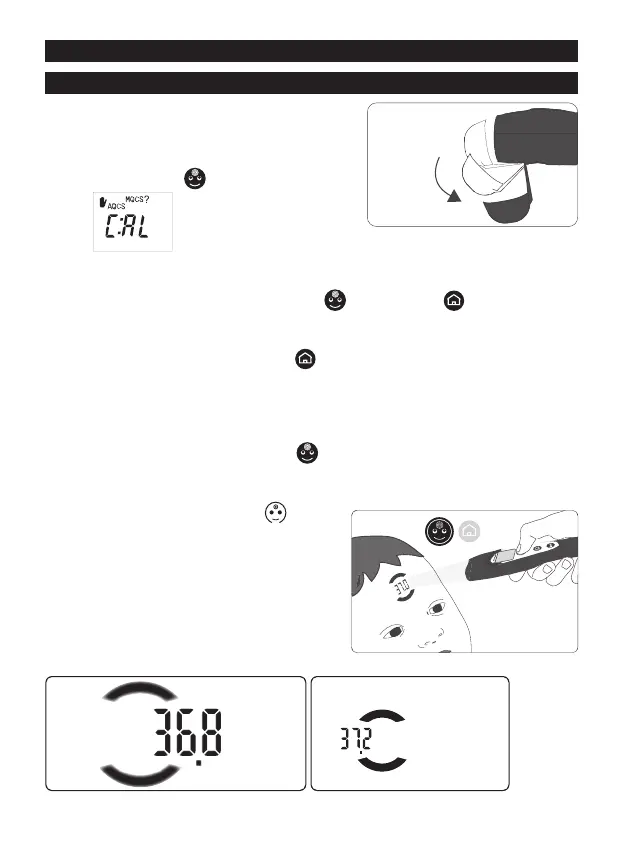
• Open the protective cap by rotating it 90° (g.
2).
• Press the “FACE”
button. If the display
shows
it indicates that it is necessary to stabilize the thermometer
(AQCS or MQCS) before proceeding with the body temperature measurement.
Proceed as follows:
- press and release at the same time “FACE”
and “HOME” buttons: the word
CAL will appear on the display;
- within 10 seconds point the thermometer towards an internal wall (not the inside of
an external wall), pressing the “HOME”
button;
- release the button: lights will ash twice slowly and then the display will show the
acquired temperature.
VisioFocus PRO is now ready to take a measurement.
For more details about MQCS see par. #8.
• To take a reading, press the “FACE”
button and hold it down.
The two aiming lights turn on and you will begin to see the temperature reading,
projected onto the forehead between two arches. The display starts to show the tem-
perature, together with the symbol .
• While keeping the VisioFocus PRO perpen-
dicular to the center of the forehead, move
it in or back away from the forehead until the
temperature reading is set squarely between
the two arches (g. 3).
If the thermometer is too far away, or too close,
the temperature will not fall between the two
arches (g. 4 and 5).
Fig. 3
Fig. 4
NO
too far
NO
too close
Fig. 5
correct distance
and thermometer
perpendicular
Fig. 2
90°


 To Next Page