7
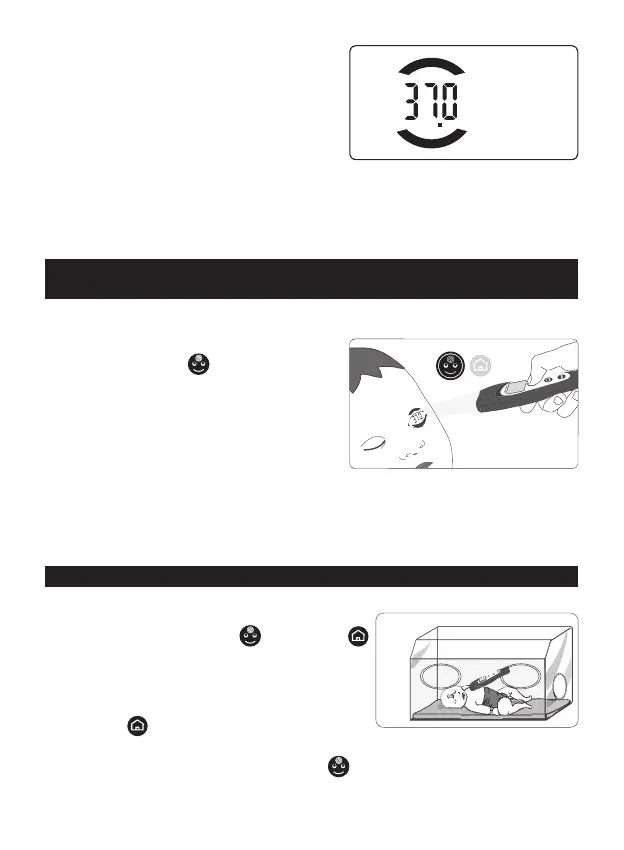
• When you see the temperature at the
midpoint between the two arches (g. 6), the
thermometer is at the right distance: release
the button and keep the device steady while
the lights ash. You can also read the tempera-
ture on the display, lit in light blue. If necessary,
you can immediately take another reading.
• Close the protective cap.
When the thermometer remains idle for 20 seconds, it reverts to stand-by mode
and will display the room temperature for 45 minutes (“DOCT” mode) or 30 minutes
(“NURS” mode) before shutting o.
4.2 In case of sweating, oxygen mask, elderly patients:
take the reading on the eyelid
In case of perspiring forehead, oxygen mask, elderly patients - especially with wrinkled
forehead -, the measurement must be taken on the eyelid.
Proceed as you would do for a forehead rea
-
ding using the “FACE” button (g. 7).
No need to worry that the patient could open its
eyes while you are taking the reading: the lights
are harmless.
Precision is not guaranteed, but such reading
can be considered a valid approximation of
one’s body temperature.
Such reading is also indicated when one has
oil or make-up on the forehead. or when the subject is not perfectly stabilized in the
environment, like for example in the case of readings in airports or when entering in
stations, companies, schools, emergency room.
4.3 Use on newborns in incubators
Before taking the temperature on newborns in incubators, rst you need to do the
MQCS inside the incubator, as follows (see par. #8):
• press simultaneously “FACE”
and “HOME”
buttons. The word CAL appears on the display;
• within 10 sec open the protective cap and, hand
-
ling the device according to the position of the fore-
head of the baby, introduce it in the incubator, press
the “HOME”
button and focus the lights on the
inner wall of the incubator.
• Release the button. Now, using the “FACE”
button, take the temperature on the
forehead of the baby as described in par. 4.1 (g. 8).
Fig. 6
OK
correct
distance
Fig. 7
aternative
reading on eyelid
Fig. 8


 To Next Page