EN-18 EN-19
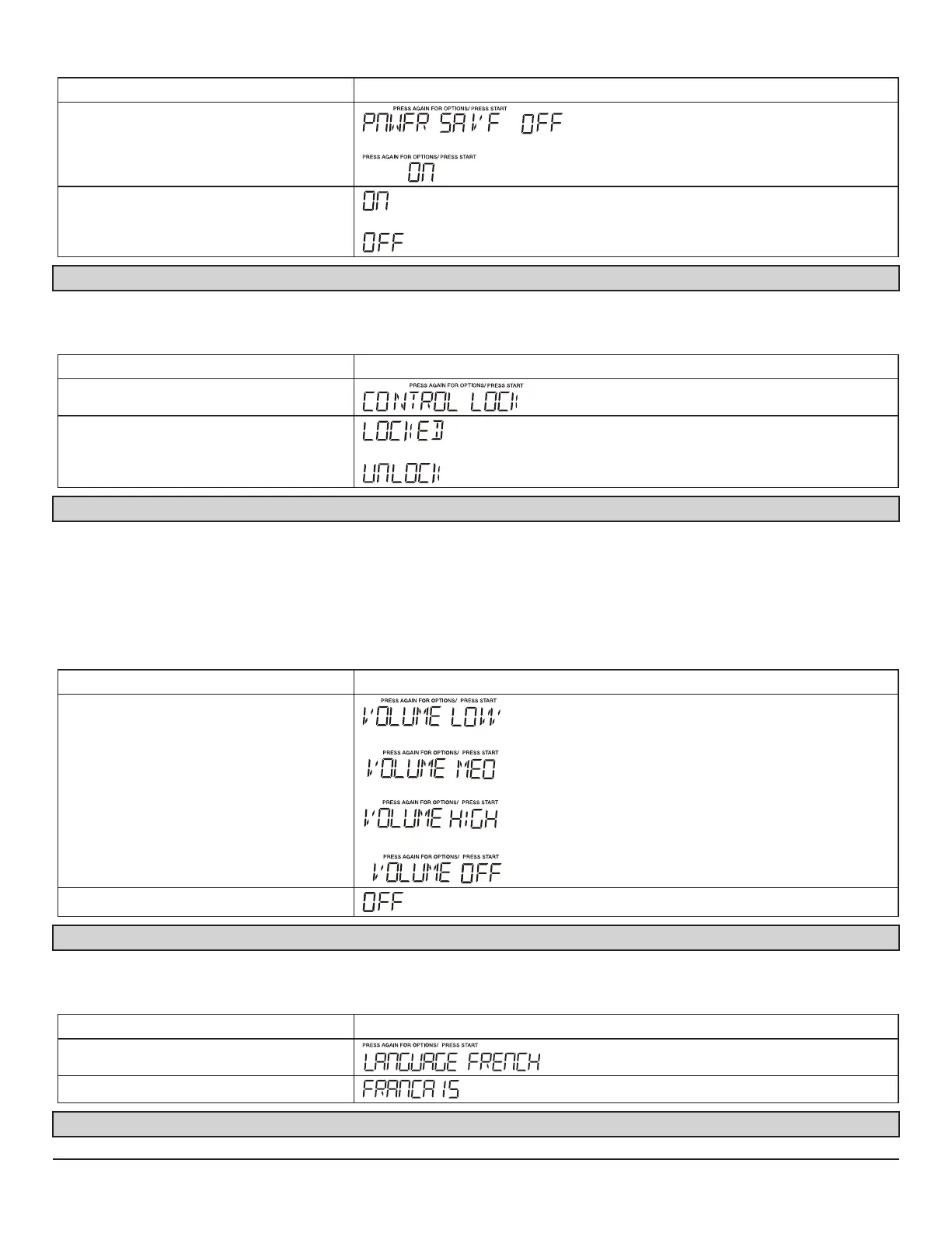
7. SETTING POWER SAVE ON/ OFF
Touch: Display Shows:
1.User pref X3
or
2.START Enter/+30Sec or
Note:“Off” is the defult mode if it is not be set before.
8. SETTING CONTROL LOCK ON/ OFF
To turn ON Control Lock .
Touch: Display Shows:
1.User pref x2
2.START Enter/+30Sec
or
Note:In“Locked”state ,the clock will also display if it is be set.
9. SETTING VOLUME LOW/MED/HIGH/OFF
Audible signals are available to guide you when setting and using your oven.
•
A programming tone
will sound each time you touch a pad.
•
Three tones
signal the end of a Kitchen Timer count down.
•
Three tones
signal the end of a cooking cycle.
• Suppose you want to turn audible signal off.
Touch: Display Shows:
1.User pref X4
2.START Enter/+30Sec
Note:“Volume on” is the def ult mode if it is not be set before.a
10. SETTING LANGUAGE
• Suppose you want to enter “Francais” mode
Touch: Display Shows:
1.User pref X5
2.START Enter/+30Sec
Note:“language French” is the defult mode if it is not


 To Next Page