16
As Follow:
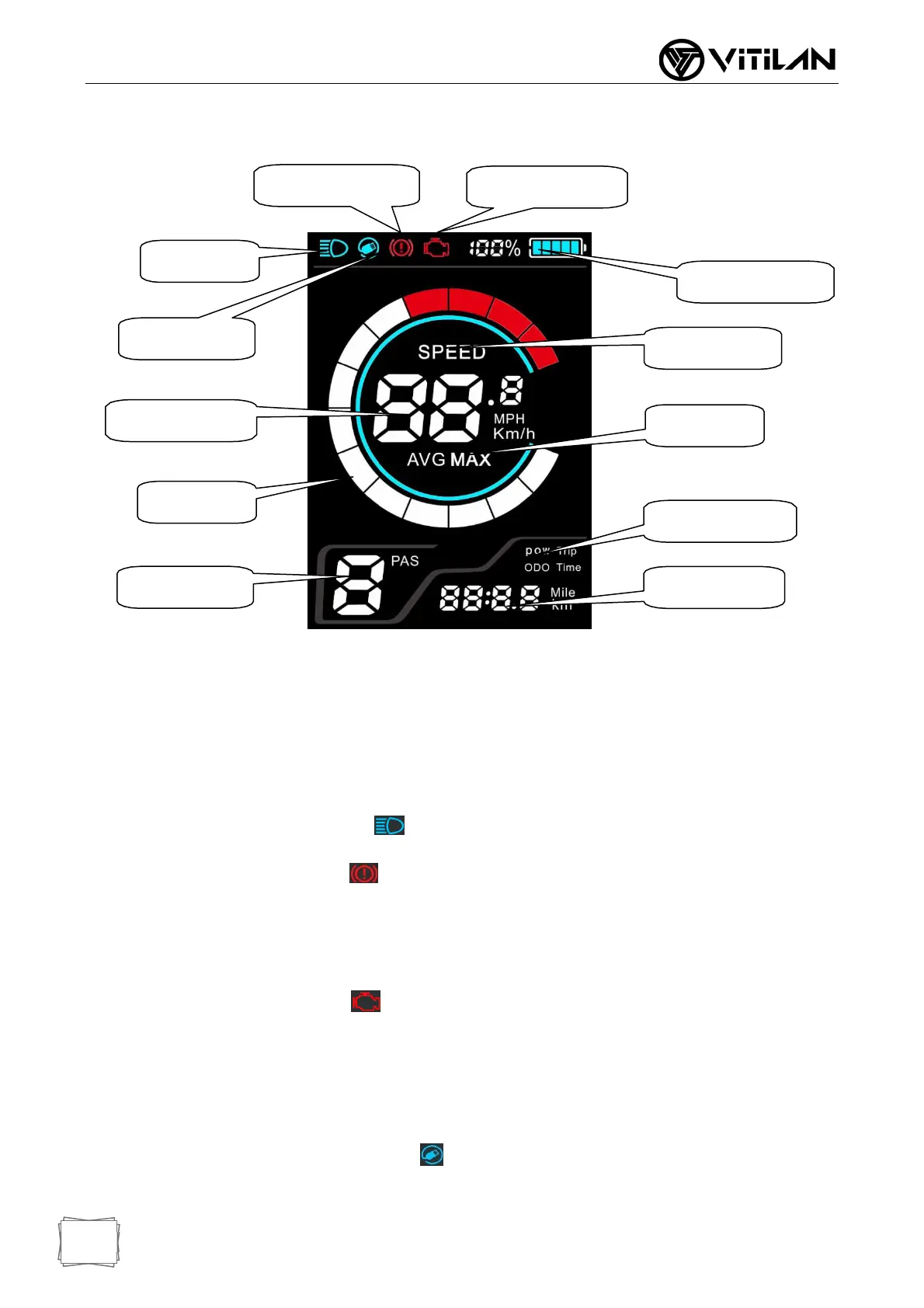
BrakeIndicator
FaultyIndicator
FrontLight
PowerIndicator
USBIndicator
SpeedMode
ValueIndicator
SpeedMode
SpeedCircle
MileageMode
GearIndicator ValueIndicator
6. LCD Display Instructions
LCD Full Display
Speed mode: Average speed (AVG SPEED), maximum speed (MAX SPEED), real-time speed
(RT SPEED)
Speed display: Display speed value, Km / h kilometers per hour, MPH miles per hour
Power Indicator: Provide stable battery reminder through optimization algorithm, power is not
affected by motor start-stop fluctuations, if the system supports battery communication, it can
display accurate percentage power
Headlight indication: Display when the headlights are on
Brake Indicator: Display when brake power off.
Gear indicator: Display the current power-assisted gears 0-9, where 0 is neutral and no
power, and 1-9 corresponds to power-assisted gears. Display P when in walk assist mode.
Faulty Indicator: Display when a fault is detected.
Mileage mode: Divided into single mileage “TRIP”, accumulated mileage “ODO”, riding
time “TIME”.
Mileage display: Display mileage information or time information according to the set mode.
USB display: The interface displays when the USB charging function is turned on.


 To Next Page