23
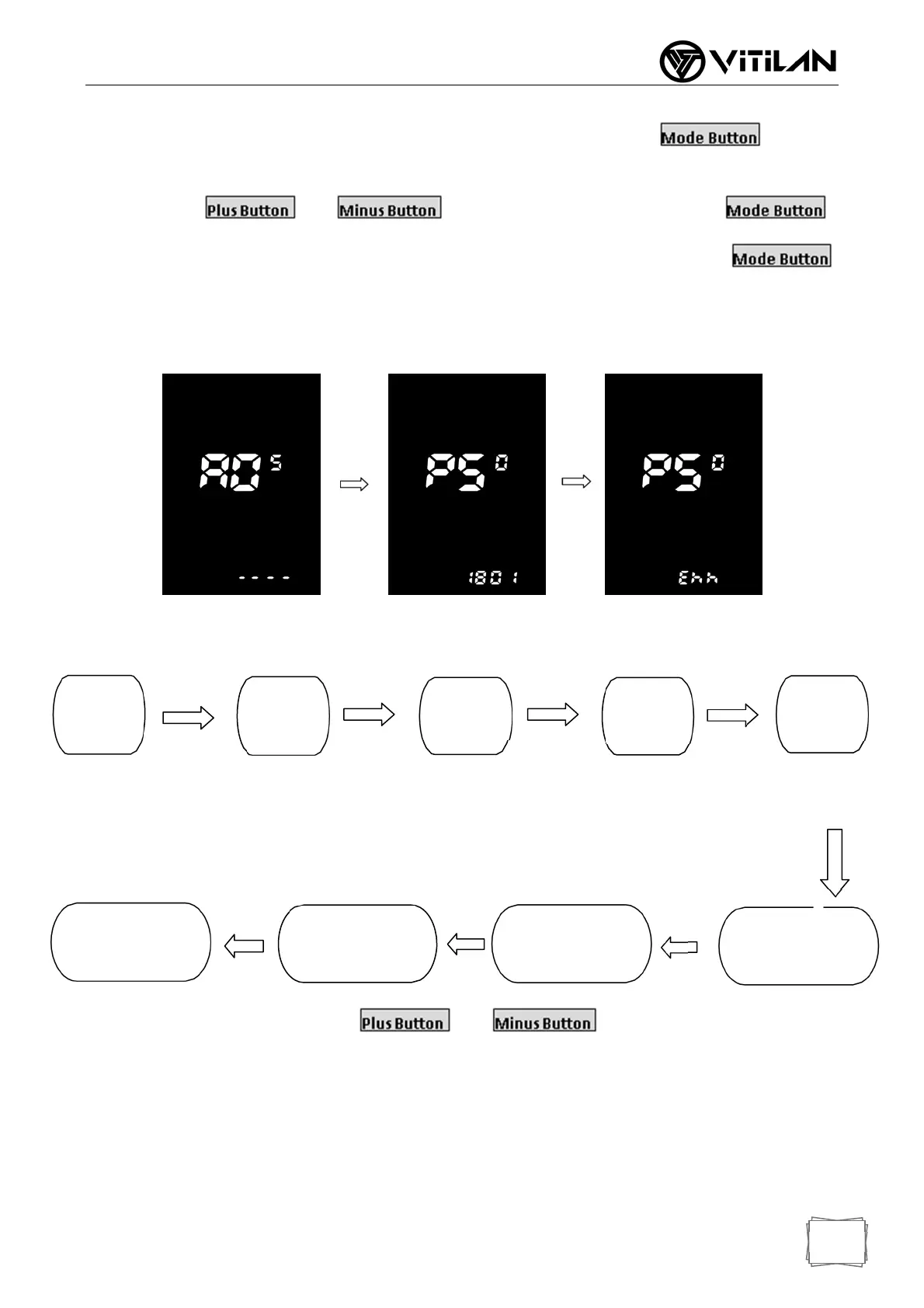
Password input: Enter ADS advanced setting items, the speed position of the display shows “ADS”,
indicating that entering the password can enter advanced setting items. Short press to enter
the password input state, the speed position of the display will show “PSD” at the same time, prompt for the
password, press and to set the password value (0 ~ 9), press
to switch the password item, the password is 4 digits, and the default password "1801", press
to confirm the entry after the password adjustment is completed. If the password is wrong, “Err” will be
displayed, and the display will automatically return to the real-time speed /single mileage display state. If the
password is correct, enter the advanced settings sub-item.
Password Input Surface
8.2 The advanced setting items are as follows:
Voltage Choices:A1item, Press and to switch between 24V / 36V/
48V / 60V / 72V / UBE. UBE stands for user-defined voltage (the voltage value can be set by a
computer program. For details, please refer to the computer parameter setting instruction file).
Voltage
Gear
Speed
Limiting
Currant
Limiting
Wheel
Diamete
PASdirection
Throttle6KM
PASmagnet
number
Speed
measurement


 To Next Page