EasyManua.ls Logo

Vivarium Electronics VE-200 - User Manual

Vivarium Electronics VE-200
2 pages
Print Icon
To Next Page IconTo Next Page
Loading...
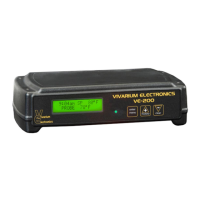
Vivarium Electronics Model VE-200
Thank you for selecting Vivarium Electronics to meet your thermostat control needs. The Model VE-200
has several advanced features including a full featured display, on/off or proportional operation and an
optional night drop feature. Please see the product specifications at the end of this document for full
feature list.
Installation:
Your new VE-200 thermostat includes the VE-200 unit, a 10 foot replaceable temperature probe
and a 6 foot power cord.
Install the temperature probe in the RJ-11 jack on the rear panel of the thermostat. Use the jack
labeled “probe”.
The included power cord will need to be plugged into the rear panel as well. Plug the power cord
into any standard, grounded wall power outlet.
Plug your heater(s) into the AC Out grounded receptacle. You may use an outlet strip/Surge
Protector for convenience. Your total heater wattage cannot exceed 700 Watts.
Indoor Use Only
Once your VE-200 has been installed you will see a short startup screen before moving to the default
display. The display will show the current time (flashing if it has not been set), the current Set Point and
the current probe temperature.
Warning: Fire, electrical shock and unit failure can result from improper installation and misuse.
Menu Options:
You can now program your VE-200 by depressing the “Enter/Menu” button. Be sure to save your new
settings by depressing the “Enter/Menu” button. The VE-200 will confirm the new setting by displaying
“Entry Accepted”. If you do not then your changes will not be saved!
Once you have entered the menu you can navigate through your choices using the +/- keys. You will have
the following options:
Set Daytime Temperature- Use the +/- keys to select your desired temperature setting.
Night Drop Amount- This feature will only be accessible if the optional Night Drop Module is
installed. Use the +/- keys to select the number of degrees you want your temperature to drop at
the start of the night temperature period. Example- If your Daytime Temperature setting is 80°F
and you wish to drop to 70°F at night you would enter a value of “10°F”. If you DO NOT wish to
have a night temperature drop then use a value of “0°F”. Please refer to the Night Drop Module
instruction sheet for further information on use of the module.
Set Time of Day- Set the current time. This will display the correct time on the default display
and also act as the clock for your day and night temperature cycle if being used.
Select Heater Mode-
o ON/OFF operation you will be prompted to enter a Hysterisis value. This is the number
of degrees below the Daytime Temperature setting the thermostat will turn power back
on. Example- If your Daytime Temperature is 80°F and the Hysterisis is 3 the VE-200
will turn OFF upon reaching 80°F and ON when the temperature drops down to 77°F.
This setting will increase or decrease the number of times per hour the VE-200 will
switch on and off. The smaller the Hysterisis value the more tightly the temperature will
be controlled.
Hysterysis- While in on/off mode this setting is the number of degrees below the set
point that power to the heater will be turned back on. For example: A set point of 90°
with a hysterysis of 2 will turn power to the heater back on when the probe temperature
falls to 88°
o Proportional Mode- This mode will use short pulses of power to your heater to control
the heat output. By gradually increasing or decreasing the amount of power to the heater
the VE-200 is able to maintain very accurate temperature settings. In most applications
this is the preferred mode of operation.
History- The VE-200 will also store the Hi and Lo temperatures during operation. You can toggle
the default display to view these recorded temperatures by depressing the “history” button. You
can reset the Lo or Hi history value by depressing the “clear” button while the value is displayed.
These values are lost in the event of power outage.
1
Question and Answer IconNeed help?

Do you have a question about the Vivarium Electronics VE-200 and is the answer not in the manual?

Summary

Thermostat Installation

Menu Options and Configuration

Set Daytime Temperature

Use +/- keys to select desired temperature setting for daytime operation.

Night Drop Amount

Set degrees to drop for night temperature; requires optional module.

Set Time of Day

Set current time for display and cycle timing.

Select Heater Mode

Choose between ON/OFF or Proportional mode for heater control.

History Tracking

View and reset recorded Hi and Lo temperatures; values lost on power outage.

Important Operational Notes

Support and Specifications

Limited Warranty Information

Overview

The Vivarium Electronics Model VE-200 is a sophisticated thermostat designed to precisely control temperature for various applications, particularly in vivariums. It offers advanced features for maintaining optimal environmental conditions, including a full-featured display, options for on/off or proportional operation, and an optional night drop function.

Function Description:

The primary function of the VE-200 is to regulate the temperature of a heating element based on user-defined settings. It achieves this by monitoring the ambient temperature via a remote probe and activating or deactivating the connected heater as needed. The device supports a maximum load of 700 Watts, allowing it to control a wide range of heating elements. Its core functionality revolves around maintaining a stable temperature, preventing fluctuations that could be detrimental to the inhabitants of a vivarium. The VE-200 can operate in two primary modes: ON/OFF and Proportional. In ON/OFF mode, the thermostat turns the heater completely on or off based on a set point and a user-defined hysteresis value. Proportional mode, on the other hand, utilizes short pulses of power to the heater, gradually increasing or decreasing the power output to maintain very accurate temperature settings. This proportional control is generally preferred for its ability to achieve tighter temperature regulation. Additionally, the VE-200 includes an optional night drop feature, which, when used with a Night Drop Module, allows for a programmed temperature reduction during nighttime hours, mimicking natural diurnal temperature cycles. The device also records historical high and low temperatures, providing valuable data for monitoring environmental conditions over time.

Usage Features:

The VE-200 is designed for user-friendly operation with a clear display and intuitive menu navigation. Upon installation, the device displays a startup screen before settling into the default display, which shows the current time (flashing if not set), the set point, and the current probe temperature.

Installation:

Installation is straightforward. The package includes the VE-200 unit, a 10-foot replaceable temperature probe, and a 6-foot power cord. The temperature probe connects to the RJ-11 jack labeled "probe" on the rear panel. The power cord also plugs into the rear panel and then into any standard, grounded wall power outlet. Heaters are connected to the "AC Out" grounded receptacle. Users can utilize an outlet strip/surge protector for convenience, provided the total heater wattage does not exceed 700 Watts. The device is intended for indoor use only.

Programming the VE-200 is done by pressing the "Enter/Menu" button. Users navigate through the menu options using the "+/-" keys. It is crucial to save new settings by pressing "Enter/Menu" again, upon which the device will display "Entry Accepted." If this confirmation is not shown, changes will not be saved.

  • Set Daytime Temperature: Users can select their desired daytime temperature using the "+/-" keys.
  • Night Drop Amount: This feature is accessible only if the optional Night Drop Module is installed. Users use the "+/-" keys to select the number of degrees the temperature should drop at the start of the night temperature period. For example, if the daytime setting is 80°F and a 10°F drop is desired, a value of "10°F" would be entered. A "0°F" setting indicates no night temperature drop.
  • Set Time of Day: This option allows users to set the current time, which is displayed on the default screen and serves as the clock for day and night temperature cycles.
  • Select Heater Mode:
    • ON/OFF Operation: When selected, users are prompted to enter a Hysteresis value. Hysteresis defines the number of degrees below the daytime temperature setting at which the thermostat will turn power back on. For instance, if the daytime temperature is 80°F and the hysteresis is 3°F, the VE-200 will turn off at 80°F and turn on when the temperature drops to 77°F. A smaller hysteresis value results in tighter temperature control but more frequent switching.
    • Proportional Mode: This mode uses short pulses of power to the heater to control heat output. By gradually increasing or decreasing power, the VE-200 maintains very accurate temperature settings, making it the preferred mode for most applications.

Power Output Indication:

A green indicator light on the front panel provides visual feedback on the power output level. A steady off light means no power output. A steady on light indicates full power to the heater. If the light is flashing, the rate of flash indicates the level of power being applied to the heater.

History Feature:

The VE-200 stores historical high (Hi) and low (Lo) temperatures recorded during operation. Users can toggle between the default display and these recorded temperatures by pressing the "history" button. To reset a displayed Hi or Lo history value, the "clear" button can be pressed. These historical values are lost in the event of a power outage.

Maintenance Features:

While the manual does not explicitly detail maintenance procedures for the device itself, it strongly emphasizes the importance of regular inspection of the thermostat sensor probe location and the integrity of the heat source. This is crucial for safe and effective operation.

Important Considerations for Maintenance and Safety:

  • Regular Inspection: Users are advised to regularly inspect the thermostat sensor probe and the heat source. For under-tank/tub heating, it is especially important to check the heating element regularly to ensure its temperature does not exceed 105°F under the enclosure. Unmonitored heat can become trapped, leading to element failure or unsafe conditions.
  • Power Outage: Be aware that historical Hi and Lo temperature values are lost if the device experiences a power outage.
  • Warning: Improper installation and misuse can lead to fire, electrical shock, and unit failure.

The VE-200 is designed to be a reliable and precise temperature controller, but its optimal performance and longevity depend on correct installation, proper programming, and diligent monitoring by the user.

Vivarium Electronics VE-200 Specifications

General IconGeneral
DisplayLCD
Power Supply120VAC, 60Hz
Accuracy±1°F (±0.5°C)
Control TypeDigital
TypeOn/Off
OutputRelay