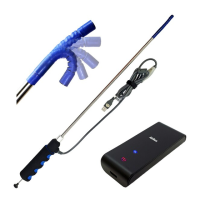
Vividia™ Ablescope VA-400 Rigid Articulating USB
Borescope Inspection Camera
Model: VA-400
Dear Customer, thank you for your business. You can find related software, APP
and user’s guide on the CD. Also you can find the related information on our
website, www.oasisscientific.com and our YouTube channel.
For Windows Users:
Visit our web page: www.oasisscientific.com to download below App and menu:
App software for PC: ehe1.exe
Menu: Quick use guide of App ehe1.exe
Menu: User Guide VA-400 Articulating Borescope
VA-800 is an UVC camera and can be opened by any other App of UVC camera
For Mac Users:
There is no a software on Mac right now from Oasis Scientific.
You can use Photo Booth or other Mac USB webcam software.
APP for Android devices connected with an OTG cable:
App for Android: AbleScope.apk from our website or UsbWebCamera from Play
Store
Menu: Connecting to Android Devices
Vividia™ VA-400 USB Rigid Articulating Borescope Inspection Camera Videoscope
are used for visual inspection work where the area to be inspected is inaccessible
by other means. The borescope uses a miniature video camera at the end of the
soft tube. The end of the insertion tube includes 6 high light white LED which
makes it possible to get a very clear view and take photos or capture videos deep
within equipment, engines and other dark spaces.

 Need help?
 General

 To Next Page