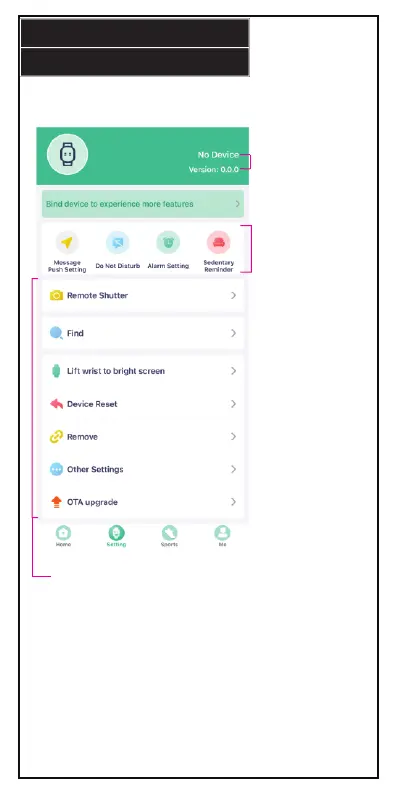
Press the Setting icon to open the settings page. In order to access
setting features, be sure to bind your device to smart watch.
Remote Shutter: Turn on/o
smart watch camera feature.
Find: Locates smart watch.
Lift wrist to bright screen:
Turn on/o this feature.
Device Reset: Resets data on
smart watch.
Remove: Remove smart
watch connection.
Other Settings: Access other
settings.
OTA upgrade: Upgrade app
to latest software.
SETTINGS
11.
Displays device
name and
version number.
Message Push
Setting: Change
notification settings.
Do Not Disturb:
Silence notifications
that appear on smart
watch.
Alarm Setting: Set
alarms.
Sedentary Reminder:
You can set
reminders to be
active when smart
watch registers long
resting periods.


 To Next Page