Press the power button to turn on your smart watch. There are
many features you can access with your smart watch using the
touch-screen display.
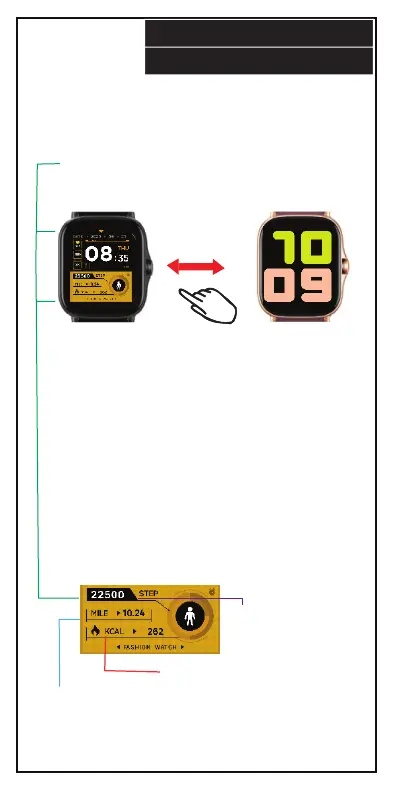
Calories: Displays the
amount of calories
you have burned.
Distance:
Displays the
amount of miles
you have traveled.
Here are a few features you can
access from the main display screen:
Wallpaper: The display screen has
default wallpaper options. To
change wallpaper, swipe right or
left. You can download more
wallpapers from the FitPro app.
Messages: Swipe down to view text
messages from connected
smartphone.
Quick Menu: Swipe up to access the
quick menu.
Main Menu: Tap screen to access
the main menu.
SMART WATCH
Main Display Screen: Can display the current time and
date as well as distance traveled, heart rate measurements,
calories burned, steps taken and battery power depending
on wallpaper setting.
Steps: Displays a
count of how many
steps you have taken.
12.


 To Next Page