POWERING THE CAMERA ON
BATTERIES
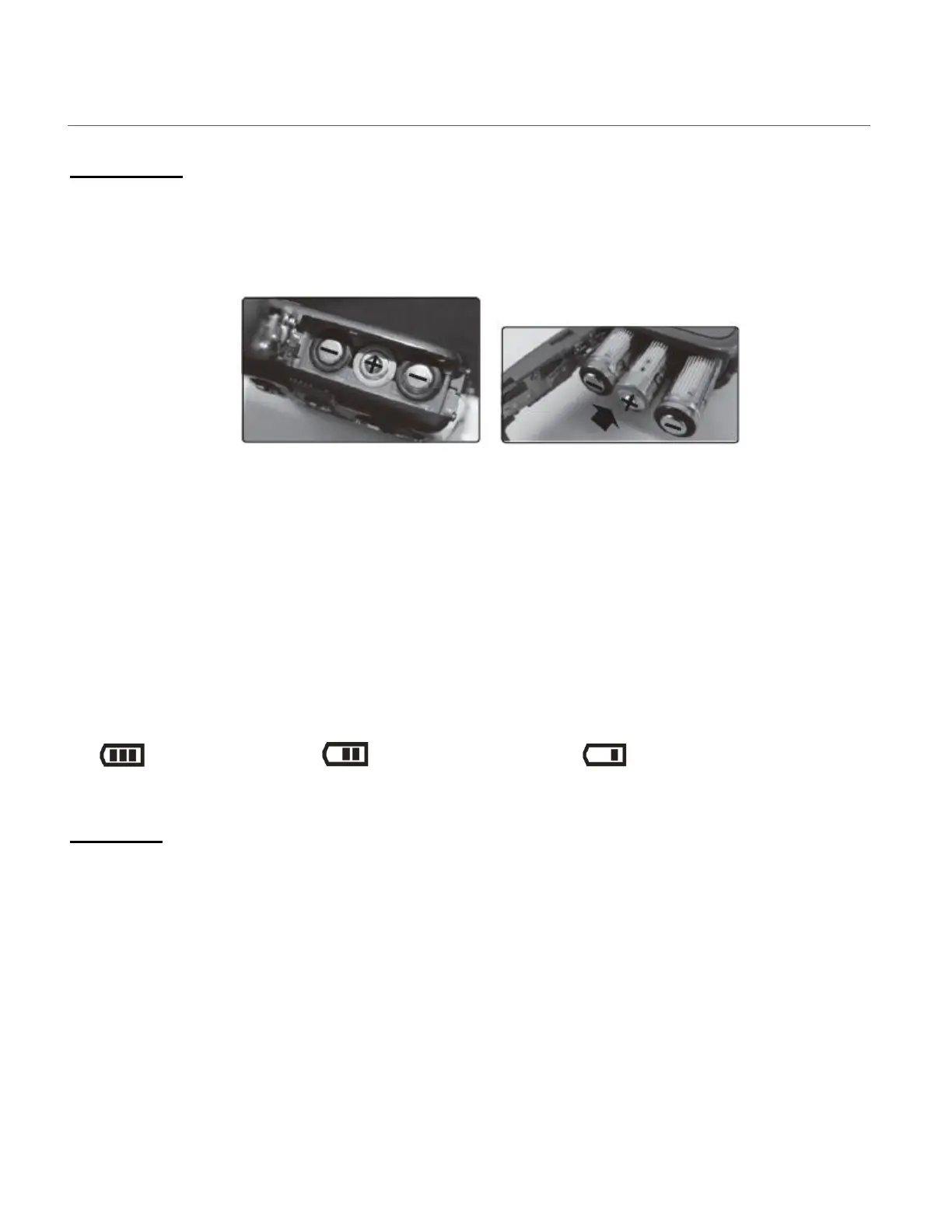
Make sure the batteries have been inserted properly into your digital camera, according to the
polarity shown inside the battery compartment.
Use 3 x AAA (1.5V) batteries. Alkaline batteries are recommended. (Batteries not included.)
Note:
Remove the batteries from the camera when not in use for an extended period.
Do not mix alkaline and non-alkaline batteries.
Some features, such as Flash, will not work if the battery power level is low.
When the battery power is low the battery icon turns red and the camera will automatically
turn off a few seconds later.
Rechargeable batteries not recommended.
The energy status of the power is displayed on LCD as shown below:
Full battery power Medium battery power Low battery power
SD CARD
Make sure an SD card has been properly inserted into your camera. (SD card not included.)
To properly insert the SD Card:
1) Locate the SD Memory Card slot on the side of the camera. Note that the SD icon next to
the SD Memory Card slot indicates the direction in which to place the SD Card. See images
below: 1 and 2.
2) Push the SD card into the slot in the direction as shown by the SD icon on the camera.
Push the SD card until you hear a slight clicking sound. This indicates the SD card has been
inserted correctly. See images below: 3 and 4.








 To Next Page