EasyManua.ls Logo

Vivo DESK-V100EBY - User Manual

Vivo DESK-V100EBY
20 pages
Print Icon
To Next Page IconTo Next Page
Loading...
Black Electric Single Motor Desk Frame
Follow along step-by-step with our video walk through by scanning
the QR code with your mobile device or by following the product
link: vivo-us.com/products/desk-v100eby
Instruction Manual
SKU: DESK-V100EBY
ASSEMBLY VIDEO AVAILABLE:
help@vivo-us.com
www.vivo-us.com
309-278-5303
Question and Answer IconNeed help?

Do you have a question about the Vivo DESK-V100EBY and is the answer not in the manual?

Summary

Contact Information and Support

Personable Customer Support

Details on customer support hours and availability, Monday-Friday.

Missing a Part?

Procedure for reporting missing or defective parts within 30 days of delivery.

Pre-Assembly and Safety

Safety Warnings and Precautions

Covers choking hazard, electrical safety, and weight capacity limits for safe operation.

Product Policies

Details on product warranty, return policy, and contact information for issues.

Tools and Package Contents

Required Tools

List of tools needed for assembly, including Phillips screwdriver and Allen wrench.

Package Contents List

Inventory of all included parts for the desk frame assembly.

Assembly Steps

Step 1: Mount Crossbar

Attaching the crossbar to the desk legs using M8x50mm screws.

Step 2: Install Feet

Securing the feet to the desk legs using M6x35mm screws.

Step 3: Attach Side Brackets

Mounting the side brackets onto the legs with M8x16mm screws.

Step 4: Adjust Desk Frame Width

Adjusting the crossbar to set the desired width for the desktop.

Step 5: Attach Frame to Desktop

Securing the assembled desk frame to the desktop using ST4.2x15mm screws.

Step 6: Install Sync Rod

Connecting the sync rod between the legs for synchronized movement.

Step 7: Attach Controller

Mounting the main controller unit to the desktop.

Step 8: Connect Cords

Connecting the motorized leg cable and power cord to the controller.

Step 9: Secure Cables

Using cable clips and hooks to organize and attach wires to the desktop.

Step 10: Power Desk and Reset

Plugging in the power cord and performing the initial desk reset process.

Controller Functions and Settings

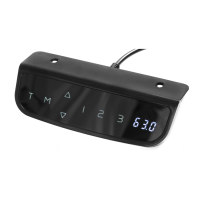
Controller Display and Buttons

Overview of the controller's display panel, memory settings, and arrow buttons.

Desk Height Adjustment

Instructions for raising and lowering the desk using the controller's up and down arrows.

Saving and Recalling Heights

How to store and retrieve preferred desk heights using the memory function.

Unit Display Conversion

Procedure to switch the height display between Centimeters (cm) and Inches (in).

System Reset and Error Handling

Steps to reset the desk and resolve error messages like ER1.

Collision Avoidance Configuration

Adjusting the sensitivity levels for the collision avoidance feature.

Setting Height Limits

Configuring the minimum and maximum adjustable height limits for the desk.

Troubleshooting Desk Issues

Solutions for common desk problems, including overheating and error codes.

Customer Support Information

Need Assistance?

Contact information and support hours for getting help with the product.

Overview

This document outlines the assembly and operation of the VIVO Black Electric Single Motor Desk Frame, SKU: DESK-V100EBY. This desk frame is designed to provide an ergonomic workspace, allowing users to easily adjust the desk height for sitting or standing positions. The manual emphasizes safety precautions, assembly steps, and controller functions to ensure proper and safe usage.

Function Description

The VIVO Black Electric Single Motor Desk Frame is a height-adjustable desk base that supports a desktop (not included) to create a dynamic workstation. Its primary function is to allow users to seamlessly transition between sitting and standing throughout their workday, promoting better posture, reducing sedentary behavior, and potentially improving overall well-being. The desk frame utilizes a single motor system to power the height adjustment, controlled by an intuitive display panel.

The core components of the desk frame include two legs (one motorized, one non-motorized), two feet for stability, a crossbar to connect the legs and provide width adjustment, and side brackets for attaching the desktop. A sync rod ensures synchronized movement of both legs during height adjustments. The system is powered by electricity and includes a controller for user interaction and a power cord for connection to an outlet.

The desk frame is designed for indoor use and is not intended for outdoor environments or contact with liquids. It has a specified weight capacity that must not be exceeded to prevent damage or injury. The electrical components are integrated for safe operation, provided the assembly instructions are followed carefully and no unauthorized alterations are made.

Usage Features

The VIVO Black Electric Single Motor Desk Frame offers several user-friendly features for convenient and personalized operation:

  • Height Adjustment: The desk height can be easily adjusted using the up and down arrow buttons on the controller. Pressing the up arrow will raise the desk to its highest position, while pressing the down arrow will lower it to the lowest position.
  • Memory Presets: The controller allows users to save up to four preferred height settings. To store a height, the user simply adjusts the desk to the desired level and then presses and holds one of the numbered memory buttons (1, 2, 3, or 4) for more than three seconds. The display will confirm the save (e.g., "S-1"). This feature enables quick and precise recall of favorite sitting or standing heights.
  • Display Unit Switching: The desk's display can show height measurements in either centimeters (cm) or inches. Users can switch between these units by pressing and holding buttons 1 and 4 simultaneously for three seconds. The selected unit will be stored in the controller's memory.
  • Reset Mode: In case of incorrect height readings or system errors (e.g., "Er1" display), a reset function is available. To perform a reset, the user presses the down arrow until the desk reaches its lowest position, then presses and holds the down arrow again for at least three seconds. The display will show "rSt" to indicate the reset process. This helps resolve minor operational glitches.
  • Collision Avoidance Settings: The desk frame incorporates a collision avoidance system to prevent damage to the desk or objects in its path during height adjustments. Users can adjust the sensitivity level of this system from 0 to 9. To access these settings, press and hold both the up and down arrow buttons together for more than three seconds. The arrow buttons can then be used to select the desired sensitivity (0 for off, 1-9 for increasing sensitivity). Pressing both arrows again for three seconds saves the setting.
  • Minimum/Maximum Height Setting: Users can define custom minimum and maximum height limits for the desk. To set the maximum height, adjust the desk to the desired upper limit, then press and hold buttons 1 and 2 simultaneously for three seconds. "Hon" will be displayed. To cancel, repeat the process ("HoF" will be displayed). Similarly, for the minimum height, adjust to the desired lower limit, then press and hold buttons 3 and 4 simultaneously for three seconds. "Lon" will be displayed. To cancel, repeat the process ("LoF" will be displayed). When the desk reaches these limits during operation, "HI" or "Lo" will be displayed.
  • Cable Management: The manual includes instructions for using cable clips to secure cords to the desktop, helping to maintain a tidy and organized workspace. Hooks are also provided to attach to the side brackets for additional cable or accessory management.

Maintenance Features

The VIVO Black Electric Single Motor Desk Frame is designed for straightforward maintenance, primarily focusing on safe operation and troubleshooting:

  • General Care: The manual advises against cleaning the product while it is connected to power. This is a crucial safety measure to prevent electrical shock.
  • Component Integrity: Users are explicitly warned not to disassemble or replace components while the power is connected. This ensures safety and prevents damage to the electrical system.
  • Cord and Plug Inspection: It is essential to never operate the system with a damaged cord or plug. If damage occurs, users are instructed to contact the seller for replacement parts, emphasizing the importance of using intact electrical components.
  • Environmental Precautions: The desk should not be operated in damp environments or if any electrical components have come into contact with liquids. This prevents electrical hazards and damage to the internal mechanisms.
  • Overheating Protection: The desk system includes a safety feature to prevent overheating. If the display shows "Hot," it indicates that the desk is overheated. In such cases, the user must allow the desk to rest for more than 18 minutes before attempting further operation. This protects the motor and electronic components from damage due to excessive heat.
  • Troubleshooting Guide: The manual provides a basic troubleshooting section for common error codes. For example, if "ER1" is displayed, the resolution is to press and hold the down arrow to perform a reset. This empowers users to address minor issues without needing immediate technical support.
  • Product Warranty: The product comes with a warranty, and users are encouraged to visit the VIVO website or contact customer support for the most up-to-date details. This provides assurance and support for potential manufacturing defects or issues.
  • Returns Policy: VIVO offers a hassle-free 30-day return policy for products that do not work out. If parts are damaged, defective, or missing upon receipt, users are advised to contact customer support within 30 days for a free replacement. This ensures that customers receive a fully functioning product.

Overall, the VIVO Black Electric Single Motor Desk Frame is a robust and user-friendly solution for creating an adjustable ergonomic workspace, with clear instructions for assembly, operation, and basic maintenance to ensure a safe and satisfying user experience.

Vivo DESK-V100EBY Specifications

General IconGeneral
ModelDESK-V100EBY
CategoryController
ManufacturerVivo
MaterialSteel
ColorBlack
TypeDesk Controller

Related product manuals