After plugging in, touch the power button. The LCD display will light
up and the machine will start working. Touch the power button
again, and the humidifier will stop working and enter standby mode.
OPERATING INSTRUCTIONSOPERATING PANEL
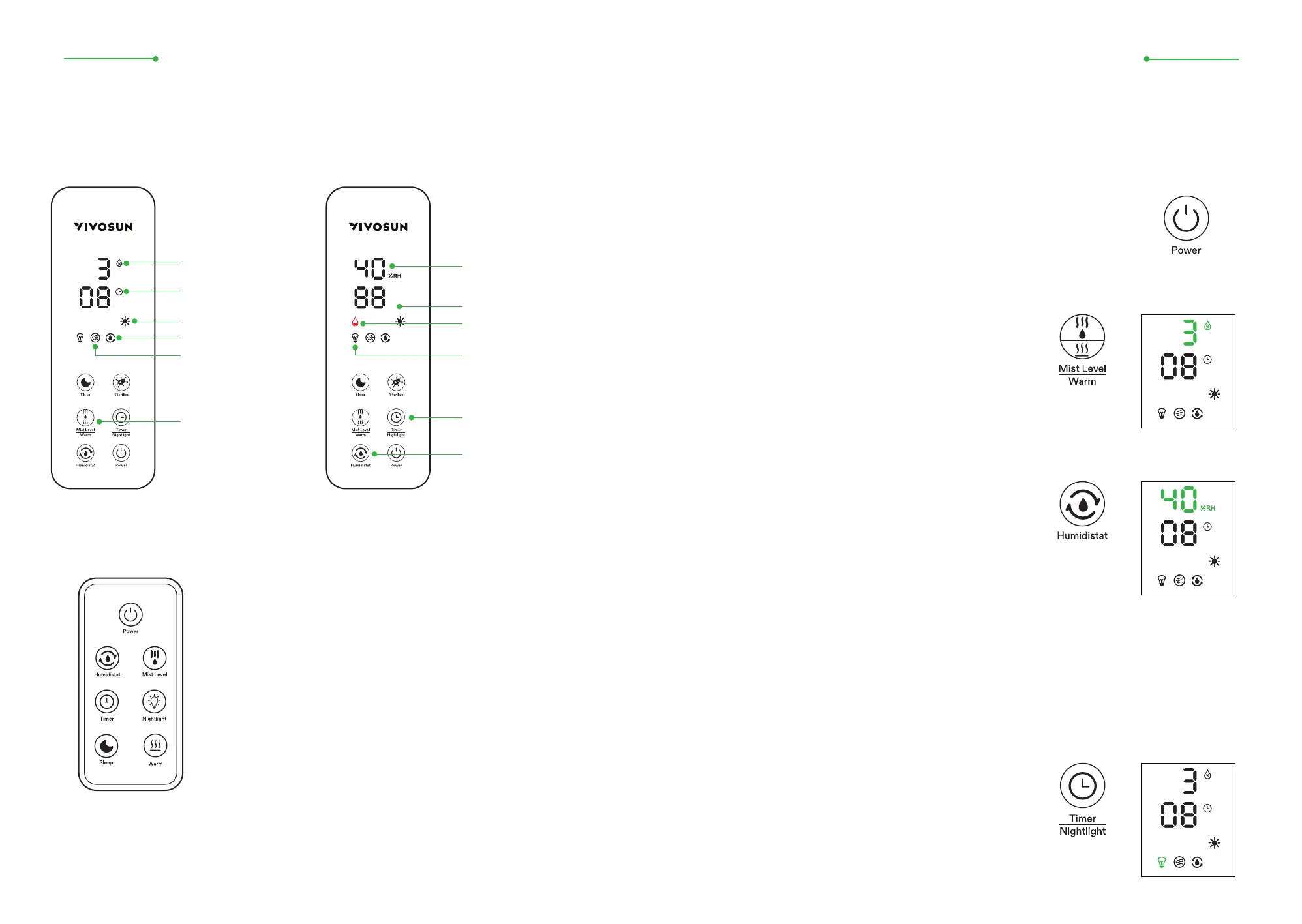
Mist Level
Temperature (°F)
Preset Humidity / Current
Ambient Humidity
Tap to adjust the timer (112h)
Long press for 3s to turn
the nightlight on/o
*Warm Tip.
There is no UV Sterilize key on the remote control; this function
must be operated via the machine's control panel.
Humidity 40%-90%
Nightlight
Anti-dry-burn disconnection
with a dripping sound
Timer
Humidistat
Warm
Tap to adjust the mist
volume (0/1/2/3)
Long press 3s to turn
warm mist on/o
Sterilize
Power Key:
Four mist levels can be chosen from: zero mist (0), low
mist (1), medium mist (2), and high mist (3). After
setting, the corresponding level number will be
displayed (as shown in the Figure to the right). By
default, the product is set to the maximum fog level.
Mist Level Key:
Start the machine and the default mode is continuous
humidification. To change the constant humidity,
press the Humidistat key and the LCD "Ambient
Humidity" will light up. The initial humidity is set at
40%. Every time you press the button, the value rises
by 5% until it reaches 90%. After setting the humidity,
the LCD will also display the current ambient humidity.
After reaching the preset humidity, the machine will stop humidifying. When the
ambient humidity falls below the preset humidity, it will resume working again. After
reaching 90%, press the Humidistat button again to exit constant humidity mode, and
press it yet again to return to the initial humidity setting of 40%.
Constant Humidity Key:
6L ULTRASONIC HUMIDIFIER
ASSEMBLY INSTRUCTONS
4
-Main Product Panel
-Remote Control Panel
Press and hold the timer button for 3 seconds to turn
the night light function on or o. When on, a nightlight
icon will appear on the display (as shown in the Figure
at the right).
Night Light Function:
6L ULTRASONIC HUMIDIFIER
ASSEMBLY INSTRUCTONS
3


 To Next Page
 Loading...