VIVOTEK
10 - User's Manual
9. Remove the protection membrane from the dome cover.
LED Denitions
Item LED status Description
LED De`nitions
1 Steady Red Powered and system booting, or network failed
Red LED off Power off
Green LED off Network is disconnected
2 Steady Red and Green LED blinks every 1
sec.
Connected to network
3 Green LED blinks every 1 sec. and RED
LED blinks consecutively every 0.15 sec.
Upgrading rmware
4 Green and RED blink every 0.15 sec, Green
and RED light on, then blink again.
Restoring defaults
5 RED LED is on, Green LED blinks and RED
LED is constantly on.
Status after a reset (network connected)
Green and RED LEDs are constantly on. Status after a reset (network disconnected)
8
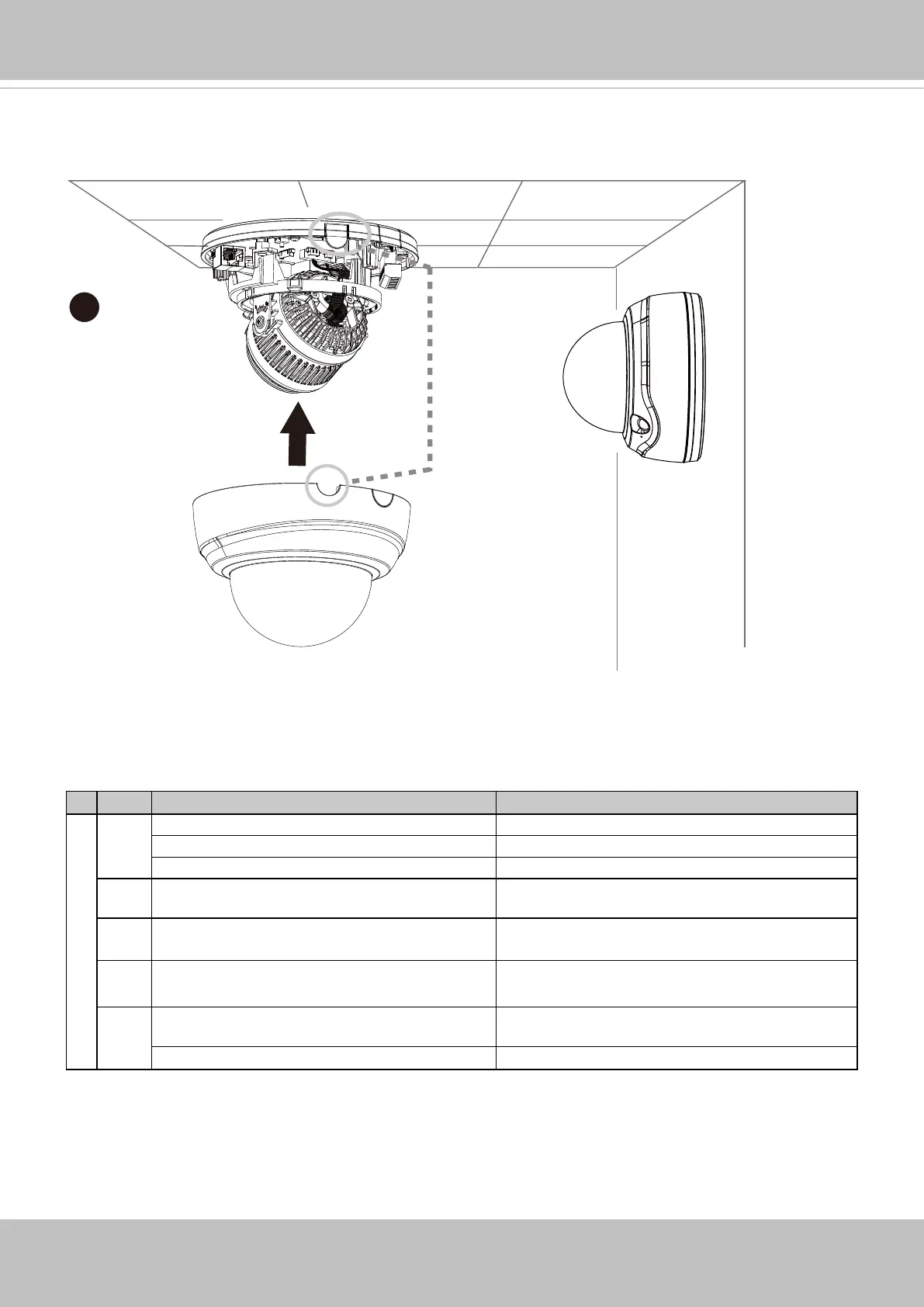
8. Install the dome cover by aligning the crescent cutout with the protruding tab on the base
plate.


 To Next Page
 Loading...