VIVOTEK
User's Manual - 9
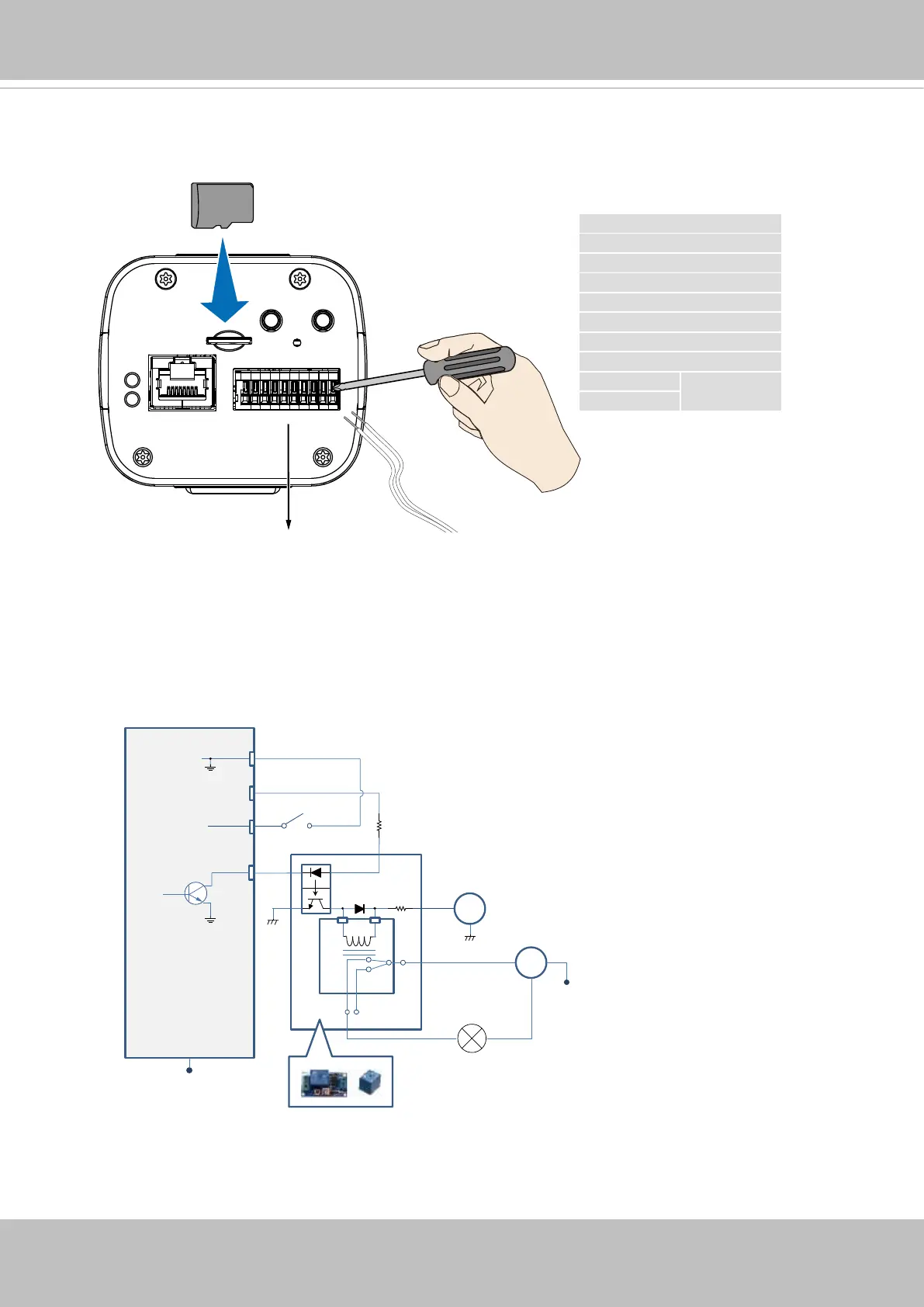
7. Install a MicroSD card, and, if preferred, connect DI/DO wires to the terminal block The
AC/DC pins can accept either 12V or 24V power input with no polarity.
The DO pin can provide a 5V output, and the max. load is 50mA.
M
icro
SD
DO+ (+5V)
DO-
DI1+
DI2+
DI3+
DI- (common GND)
RS485-
RS485+
AC/DC+ pw
12V or 24V
AC/DC- pw
DI/DO Diagram
DI-
DO+
DI+
DO-
Switch
External Device
External DC power
Dry contact with external DC power source to supply a relay. Dry contact is the safest connecon
to protect devices.
NC
NO
Relay
Photo
Coupler
DC
DC 0V
DC 0V
External AC power
with Protected Earth
AC
PE
PE


 To Next Page