VIVOTEK
182 - User's Manual
8.28 Remote Camera Control (capability.remotecamctrl.master
> 0)
Note: This request requires Viewer access privileges.
Method: GET/POST
Syntax:
http://<servername>/cgi-bin/camctrl/rCamCtrl.cgi?[channel=<value>]
[&x=<value>&y=<value>&r=<value>&videosize=<value>&resolution=<value>&stretch=<value>]
– Click on image
[&camid=<value>]
[&return=<return page>]
Example:
http://myserver/cgi-bin/camctrl/rcamctrl.cgi?channel=0&x=300&y=200&r=100&resolution=1920x
1920&videosize=1920x1920&strech=1&camid=0
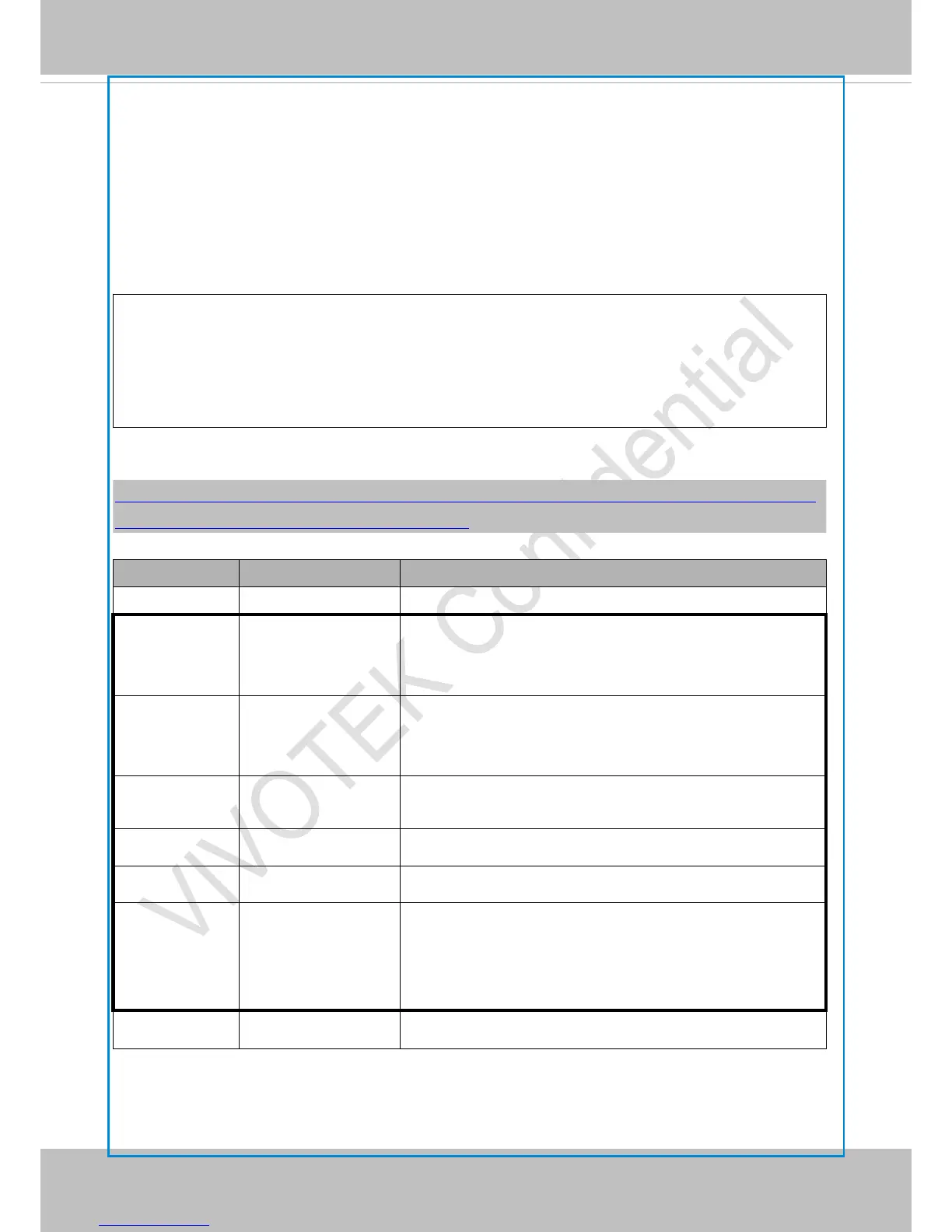
PARAMETER VALUE DESCRIPTION
channel <0~(n-1)> Channel of video source.
x <integer> x-coordinate clicked by user.
It will be the x-coordinate of client side camera after
movement.
y <integer> y-coordinate clicked by user.
It will be the y-coordinate of client side camera after
movement.
r <integer> radius select by user. It will be the roi view area radius of
client side camera after movement and zooming.
videosize <window size> The size of plug-in (ActiveX) window in web page
resolution <window size> The resolution of streaming.
stretch <boolean>
0 indicates that it uses resolution (streaming size) as the
range of the coordinate system.
1 indicates that it uses videosize (plug-in size) as the range
of the coordinate system.
camid 0,<positive integer> slave camera ID



 To Next Page