EasyManua.ls Logo

Vivtone SMART - User Manual

Default Icon
12 pages
Print Icon
To Next Page IconTo Next Page
Loading...
support@vivtone.com
Version: A1
Smart
APP-CONTROLLED HEARING AID
User Manual
Question and Answer IconNeed help?

Do you have a question about the Vivtone SMART and is the answer not in the manual?

Summary

Preface

Intended use

Explains the purpose of the BTE hearing instrument.

Precautions

Provides advice for users with ear infections or concerns.

Hazard warnings and product safety

Hazard Warnings - relevant warning notices

Lists crucial safety warnings for using the hearing instrument.

Features

Product Safety - relevant product handling and care

Details how to handle and care for the device safely.

Proper disposal of electronic products

Explains the correct method for disposing of the hearing aid.

Preparation

Kit packaging included

Lists the items included in the hearing aid package.

Battery helpful tips

Provides guidance on battery usage and insertion.

Operation

Complete hearing instrument assembly

Step-by-step guide for assembling the hearing instrument, tube, and dome.

How to wear the instrument

Instructions on how to correctly place and wear the hearing aid.

On and off function

Explains how to turn the hearing aid on and off.

Volume control

Describes how to adjust the volume using the switch or Bluetooth.

Program switch

Maintenance

Troubleshooting

Provides solutions for common issues like low sound or whistling.

Whistling noise helpful tips

Offers advice to reduce or eliminate whistling sounds.

Sound tube cleaning and care

Instructions for cleaning and maintaining the sound tube.

Cleaning care and precautions

Replacing the battery

Step-by-step guide for replacing the hearing aid battery.

Appendix

Environment condition

Specifies operating and storage conditions for the device.

Technical data

Lists key technical specifications of the hearing aid.

FDA information

The purpose of medical evaluation

Explains the importance of medical evaluation before purchasing a hearing aid.

Notice to hearing healthcare providers

Stop using hearing aids and consult a physician if:

Lists conditions under which users should stop using the aid and see a doctor.

Children with hearing loss

Overview

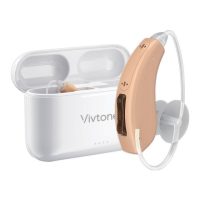
The Vivtone Smart App-Controlled Hearing Aid is a behind-the-ear (BTE) electronic device designed to amplify sounds from the surrounding environment, helping individuals with mild to moderate hearing loss or those who wish to enhance their ability to hear conversations in noisy environments. It offers a blend of traditional control and modern app-based adjustments for a personalized listening experience.

Function Description:

The hearing aid functions by receiving sound through its front microphone, processing it, and then delivering amplified sound through the sound tube and dome into the ear canal. It features multiple listening programs that can be selected via a program switch on the device or through a Bluetooth-connected mobile phone app (refer to the SOUNDWEAR user guide for app details). These programs are designed for various environments:

  • Program 1 (Conversation environments): Suitable for home and office use, offering high fidelity and low noise reduction.
  • Program 2 (Noisy environments): Optimized for places like restaurants, with higher noise reduction.
  • Program 3 (Traffic environments): Strengthens the sound of surroundings.
  • Program 4 (Outdoors): Focuses on noise reduction for wind. The device includes a built-in power-on delay to ensure full functionality activation after battery insertion. Volume control is available through both the memory switch on the device and the Bluetooth app.

Important Technical Specifications:

  • Model: Smart
  • Battery Type: 13A battery
  • Peak OSPL 90 (dB SPL): 122
  • HAF OSPL 90 (dB SPL): 111
  • Peak Gain (dB): 38
  • HAF full on Gain (dB): 29
  • Total Harmonic Distortion:
    • 500Hz (%): ≤3.0
    • 800Hz (%): ≤2.0
    • 1600Hz (%): ≤2.0
  • EQ Input Noise (dB): ≤32
  • Frequency Range (Hz): 300-3900
  • Environmental Conditions:
    • Working Temperature: 10 °C to +40 °C
    • Working Air Humidity: 0% to 80%
    • Working Air Pressure: 500 to 1200 hPa
    • Transportation/Storage Temperature: -20 °C to +60 °C
    • Transportation/Storage Air Humidity: 0% to 90% (Transportation), 0% to 80% (Storage)
    • Transportation/Storage Air Pressure: 500 to 1200 hPa

Usage Features:

  • Assembly: The hearing instrument consists of the housing, sound tube, and dome. The dome is pressed over the grooves of the sound tube, and the sound tube is tightened clockwise onto the instrument's threaded connector. Red lettering on the sound tube indicates the right ear, and blue lettering indicates the left ear.
  • Wearing: The instrument is placed over the top of the ear. The dome is gently inserted into the ear canal until the tube sits flush against the face, fitting snugly but not tightly. The retention lock is then tucked into the edge of the ear bowl. It is recommended to turn on the instrument and set the volume to a low or comfortable level before insertion to avoid feedback.
  • ON/OFF Function: To turn on, gently insert the battery and close the door. To turn off, simply open the battery door, which also helps extend battery life.
  • Program Switching: The device supports up to 4 listening programs, which can be cycled through by pressing the program switch. A 'beeping' signal indicates the current program (e.g., 1 beep for program 1, 2 beeps for program 2). The device reverts to the last program setting when turned on.
  • Volume Control: Adjustable via the memory switch on the device or through the Bluetooth app.

Maintenance Features:

  • Battery Replacement: Open the battery door, remove the old battery, remove the protective foil from the new 13A battery, insert the new battery with the positive (+) side (flat side) facing up, and close the battery door gently. Forcing the door shut if the battery is incorrectly inserted can cause damage.
  • Cleaning:
    • General: Keep the instrument clean and dry. Use a soft cloth to remove dirt and moisture after each use.
    • Sound Tube and Dome: Use the provided cleaning tool and brush to remove debris/wax built-up.
    • Deep Cleaning (Sound Tube): To clean, rotate the sound tube counter-clockwise from the hearing instrument case to remove it. Insert the cleaning tool through the threaded end of the tube and push it all the way through until it emerges from the dome's end. To reassemble, reverse the removal process by tightening the tubing and connector clockwise until the flat surfaces are flushed.
    • Perspiration: If the instrument is exposed to a lot of perspiration, it is recommended to turn it off and place it in a dry box at least once a week.
  • Precautions:
    • Do not drop the device on hard surfaces.
    • Always use new, high-quality batteries.
    • Keep batteries away from children and pets; seek immediate medical attention if swallowed.
    • Do not use water, harsh chemicals, strong cleaners, or other fluids to clean the hearing instrument.
    • Do not leave the hearing instrument in direct sun or areas where the temperature can exceed 60°C / 140°F.
    • Handle the instrument with care to prevent dropping.
    • Proper disposal of electronic products is important; the device should not be thrown away as normal daily waste but disposed of at electronic waste/recycle sites or through a hearing care professional.

Troubleshooting:

The manual provides a troubleshooting guide for common issues:

  • No/Low Sound Amplification: Possible causes include low battery (solution: replace), built-up wax in the dome (solution: clean or replace dome), excessive ear wax (solution: consult physician), volume set too low (solution: turn up volume), improper dome insertion (solution: re-insert dome), damaged hearing instrument (solution: contact provider), or hearing change (solution: contact hearing care professional).
  • Whistling or Feedback: Possible causes include wrong size or damaged dome (solution: replace with new or better fitting dome) or improper dome insertion (solution: re-insert dome flush with ear canal walls). Additional tips to reduce whistling include lowering the volume, ensuring secure instrument fit with the best dome size, clearing ear canal wax/debris, and replacing the dome or tubing if broken or torn.

FDA Information and Healthcare Notices:

The manual includes important FDA information, emphasizing the recommendation for a medical evaluation by a licensed physician (ear specialist) before purchasing a hearing aid. This ensures treatable conditions are identified. It also notes that an audiologist or hearing aid dispenser will conduct an evaluation to fit the device to individual needs. Federal law restricts sales to individuals who have had a medical evaluation, though a waiver can be signed for religious/personal beliefs, which is strongly discouraged. The manual also lists conditions that warrant consulting a physician before using a hearing aid, such as visible ear deformity, sudden hearing loss, active ear drainage, significant air-bone gap, rapidly progressive hearing loss, cerumen accumulation, dizziness, or ear pain/discomfort. It advises stopping use and consulting a physician if hearing worsens, ears become occluded with wax, hearing doesn't improve, or an ear infection/skin irritation develops. Special care is advised for devices exceeding 132 decibels to prevent further hearing impairment. The hearing aid is not a cure for hearing loss but a part of rehabilitation, potentially supplemented by auditory training and lip reading. For children with hearing loss, a medical evaluation and direction to an audiologist for evaluation and rehabilitation are crucial due to potential impacts on language, educational, and social development.

Vivtone SMART Specifications

General IconGeneral
BrandVivtone
ModelSMART
CategoryHearing Aid
LanguageEnglish