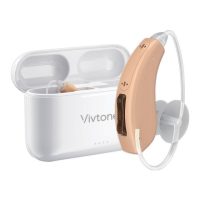
Program switch
Maintenance
9 10
Troubleshooting
Your hearing instrument can be programmed up to 4 different listening programs.
When the hearing instrument is turn on, it will revert to last program setting.
Other preset programs are for your specific needs that can be accessed by
using the program switch. Pressing of the program switch will change
the program according to the preset sequence: 1, 2, 3 and 4.
Your hearing instrument ‘beeping’ signal will help identity preset programs.
Example: program 1 will emit 1 beep, program 2 will emit 2 beeps, etc.
Your Smart is preset with 4 different listening programs.
Program 1 Program 2 Program 3 Program 4
Conversation
environments,
such as home and
office use.
High fidelity and
low noise reduction.
Noisy environments,
such as restaurants.
Higher noise
reduction.
Traffic environments,
strengthen
the sound of
your surroundings
Outdoors. Noise
reduction focused
for wind.
No/Low Sound Amplification
Whistling or Feedback
Low battery
POSSIBLE CAUSE SOLUTION
Built-up wax in the dome
Excessive ear wax
Volume set too low
Improper dome insertion
Hearing instrument damaged
Hearing change
Dome is wrong size or damaged Replace with new or better fitting dome
Improper dome insertion
Re-insert the dome
Contact your provider
Contact your hearing care professional
Turn up the volume
Clean the dome or replace the old dome
Consult your physician
Replace with a new battery
Re-insert the dome into your earso that it is flush with the
walls of the ear canal


 To Next Page
 Loading...