3
12
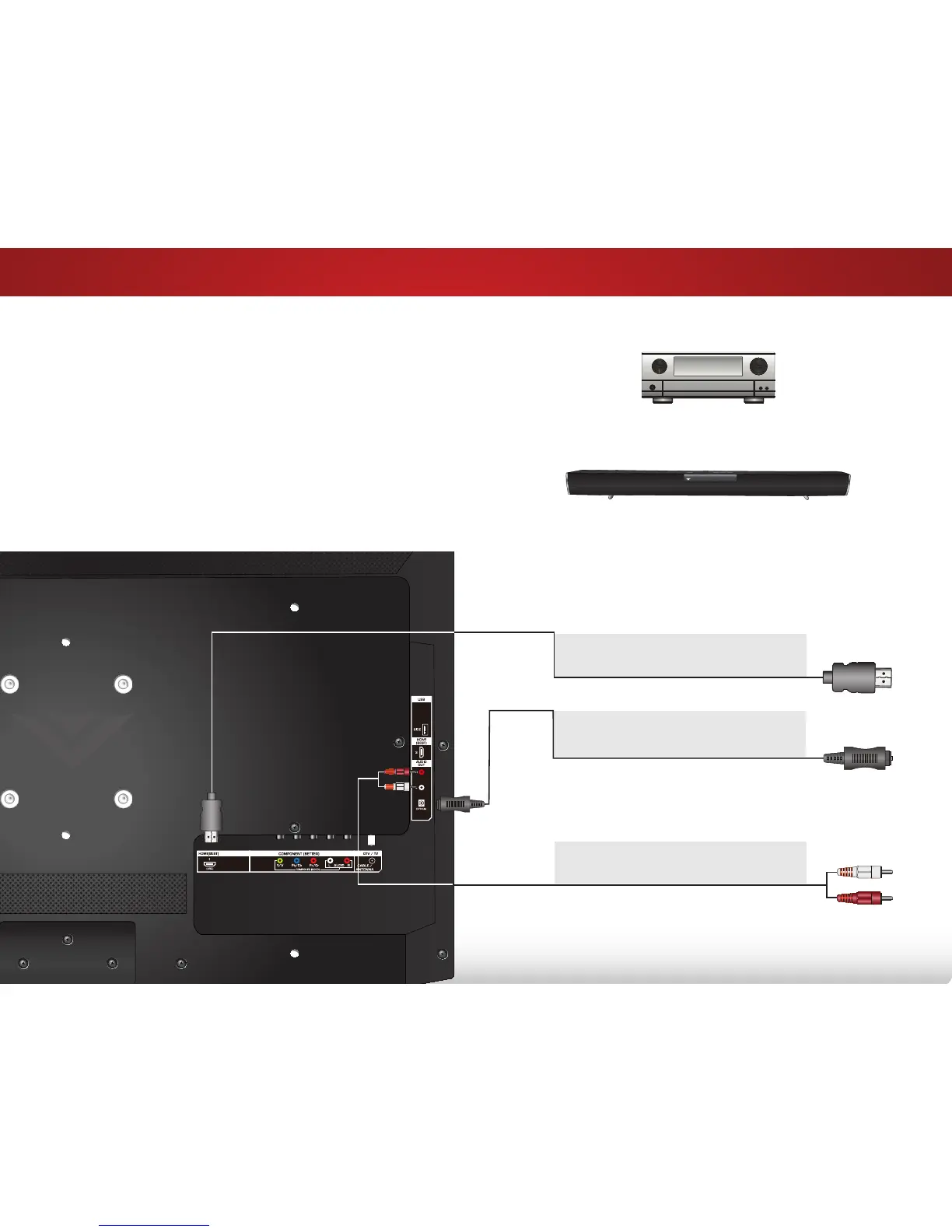
ConneCting An AuDio DeviCe
Home Audio Receiver
VIZIO Sound Bar
Your TV can output sound to an audio device, such as a receiver
or sound bar.
1. Verify that your device has a video port that matches an
available port on the TV (HDMI, RCA, etc).
2. Turn the TV and your audio device off.
3. Connect the appropriate cable (not included) to the TV and
the device.
4. Turn the TV and your device on.
BETTER
OPTICAL/SPDIF CABLE
• PCM STREAM
• DOLBY DIGITAL 5.1 CHANNEL
• DTS 5.1 CHANNEL
BEST
HDMI CABLE
• CFC 2-WAY COMMUNICATION
• 2.0-5.1 DIGITAL AUDIO
• PCM, DTS, DOLY DIGITAL
Note: The image shown here is for illustrative purposes only and may be subject to change.
The actual number of ports and their locations may vary, depending on the model.
GOOD
RCA CABLE
• ANALOG STEREO CONNECTION
• 2.0 CHANNEL


 To Next Page