5
39
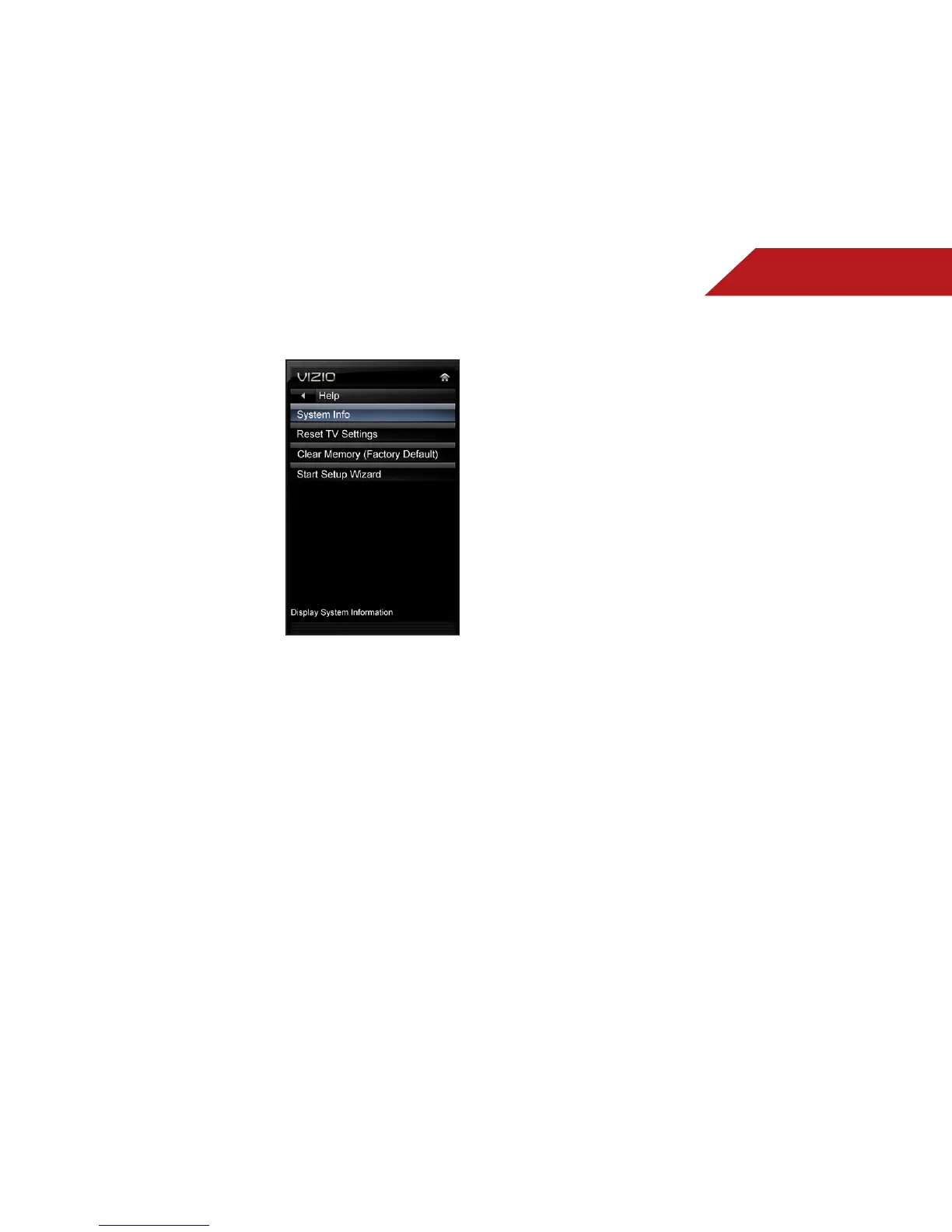
USING THE HELP MENU
You can use the TV’s Help menu to:
• Display system information
• Reset the TV settings
• Restore the TV to its factory
default settings
• Start setup wizard
Displaying System Information
To display a summary of the TV settings:
1. Press the MENU button on the remote. The on-screen menu is
displayed.
2. Use the Arrow buttons on the remote to highlight the Help
icon and press OK. The Help menu is displayed.
3. Highlight System Info and press OK.
4. Use the Up/Down Arrow buttons to scroll through the system
information.
5. When you are finished reviewing the system information,
press the EXIT button on the remote.
Resetting the TV Settings
To reset the TV’s picture and audio settings:
1. Press the MENU button on the remote. The on-screen menu is
displayed.
2. Use the Arrow buttons on the remote to highlight the Help
icon and press OK. The Help menu is displayed.
3. Highlight Reset TV Settings and press OK. The TV displays,
“Are you sure you would like to Restore Defaults? This will
erase any custom settings.”
4. Highlight Yes and press OK.
5. Press the EXIT button on the remote.


 To Next Page