English - 14
Function LED Behavior Description
DTS
TruSurround
On/O
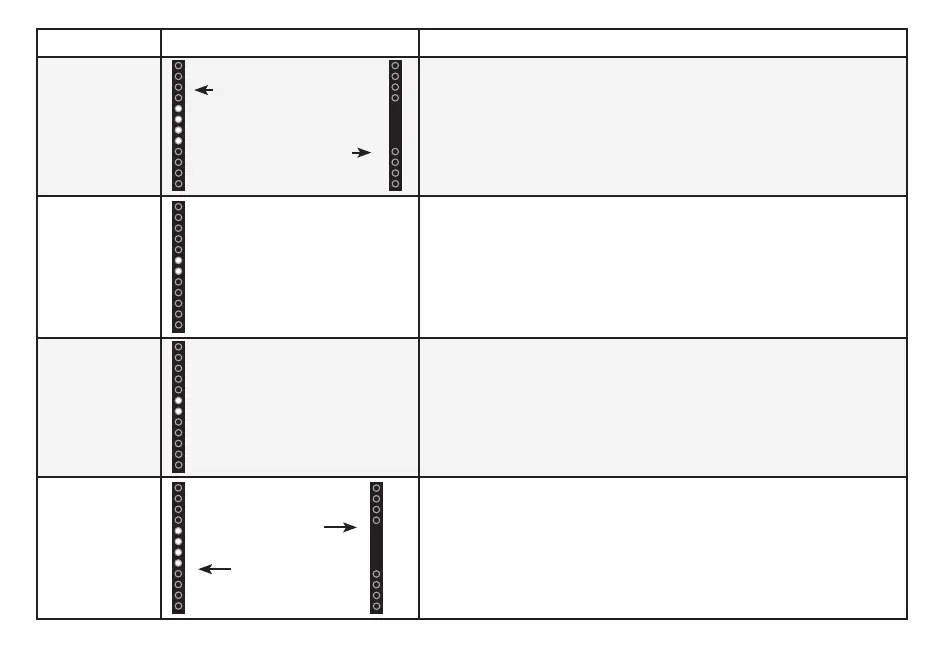
Press the TSHD button to enable/disable DTS TruSurround.
When enabled (On), all inputs will produce virtual surround
sound. When disabled (O), all sources will playback in stereo.
Treble
Levels
Press the TREBLE button then press the Next/Previous button
to increase/decrease the treble level. The LED indicators will
move up with increasing levels and down with decreasing
levels.
Bass
Levels
Press the BASS button then press the Next/Previous button
to increase/decrease the bass level. The LED indicators will
move up with increasing levels and down with decreasing
levels.
Equalizer
Mode
Press the Next/Previous button to toggle between two preset
equalizer settings, Music and Movie.
Note: Movie mode is on by default.
Two center LEDs indicate
Treble level 0.
Two center LEDs indicate
Bass level 0.
TruSurround On
TruSurround O
Music
Movie


 To Next Page