Need help?
Do you have a question about the Vizio SB4020M-B0 and is the answer not in the manual?
Covers safe operation, cleaning, ventilation, and avoiding foreign objects in openings.
Advises on electrical safety, unplugging during storms, and handling connectors with dry hands.
Warns against exposure to moisture, heat, dust, and using damaged units.
Highlights the severe internal burn hazard from swallowing coin cell batteries.
Guides selection between Digital Optical, Digital Coaxial, and 3.5mm analog cables for TV connection.
Illustrates connecting the power adapter to the sound bar and plugging it into an electrical outlet.
Guides on removing sound bar stands and using the wall mounting template to mark drill holes.
Details attaching wall brackets and using cable management hooks for a tidy setup.
Offers solutions for common issues such as the unit not powering on or producing sound.
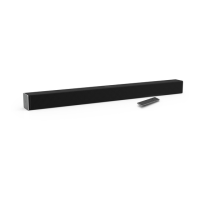
This document is a Quick Start Guide for the VIZIO Model SB4020M-B0 Sound Bar, providing essential information for setup, operation, and troubleshooting.
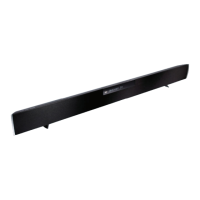
The VIZIO Sound Bar is a high-definition audio device designed to enhance the sound experience of your television. It processes audio signals from various sources and outputs them through its integrated speakers, aiming to deliver a more immersive and enveloping sound. The sound bar supports multiple audio input types, allowing connectivity with a wide range of devices such as TVs, game consoles, network media players, tablets, and MP3 players. It also features USB connectivity for MP3 playback from thumb drives. The device is equipped with SRS TruVolume and SRS TruSurround HD technologies to optimize the audio output for a consistent and immersive listening experience.
The sound bar offers straightforward controls and connections for ease of use. On the front panel, an Info Display shows volume, input, and other relevant information. Physical buttons include Power (to turn the unit on/off), Input (to change the audio source), and Volume Up/Down (to adjust the overall volume). A Power Light indicates when the sound bar is active.
Connectivity options on the rear panel include Digital Optical In, Digital Coaxial In, and Analog 3.5mm In for connecting to your TV or other audio sources. A Power Port is provided for the AC/DC adapter, and a USB Port allows for MP3 playback from a USB thumb drive. Wall Mount Posts are also present for optional wall installation.
The included remote control provides comprehensive control over the sound bar's functions. It features buttons for Power, Volume Up/Down, Play/Pause, Rewind/Previous, Fast Forward/Next, Input, Mute, and Menu. The remote control also allows for toggling SRS TruVolume and SRS TruSurround HD, and adjusting bass, treble, and brightness levels through the Menu options.
For initial setup, users are guided to choose one cable type (Digital Optical, Digital Coaxial, 3.5mm, or 3.5mm to RCA) to connect the sound bar to their TV, ensuring the TV port is an audio output. After connecting the power adapter and plugging it into a wall outlet, the sound bar should be positioned centrally below the TV, close to ear level, for optimal sound. The remote control's plastic tab must be removed to activate it. Once the TV is on, the sound bar can be powered on, and the input source selected to match the TV connection.
Additional devices can be connected to the sound bar using the available input ports. To listen to a specific device, the input source on the sound bar must be changed accordingly. Optical, Coaxial, and 3.5mm cables transmit audio only, so separate video connections to the TV may be required for video devices.
The guide emphasizes several safety instructions for proper maintenance and longevity of the sound bar. Users are advised to switch off power before connecting components, unplug the power cord before cleaning, and use a damp cloth for cleaning, avoiding liquid or spray cleaners. It is important to keep the sound bar away from moisture, heat sources, and heavy dust. Proper ventilation is crucial, and slots/openings should not be blocked.
The remote control battery replacement is detailed, requiring a flat-head screwdriver to open the battery cover. When replacing the CR2032 battery, it's crucial to ensure the '+' sign faces up.
Troubleshooting tips are provided for common issues such as no power, no sound, or buzzing/humming. These include checking power connections, volume levels, mute status, input source selection, and TV audio output settings (PCM for SPDIF/Optical, FIXED/STANDARD for variable audio output). For Bluetooth issues, ensuring the source device's volume is up and that it's paired correctly is recommended. If buzzing persists, checking cable connections and trying different source devices or inputs is suggested.
The guide also explains how to activate SRS TSHD (TruSurround HD) and listen to Dolby Digital content (which requires Dolby Digital format content and Digital Coaxial or Optical connection). It clarifies when to use Night Mode (reduces bass for quieter listening) and SRS TruVolume (normalizes volume fluctuations). Adjusting bass and treble levels is done via the remote's menu.
For factory reset, a specific button combination (Power + Volume Up + Volume Down held for 10 seconds) is provided, which returns the sound bar to its default settings. This can be useful for resolving persistent issues. The Info Display automatically shuts off after a few seconds to conserve energy.
For wall mounting, users are instructed to remove the stands using a phillips-head screwdriver and save the screws. A wall mounting template is provided to mark bracket holes. Screws and anchors (not included) must be appropriate for the wall material and capable of supporting the sound bar's weight. Cable management hooks are available to route audio cables neatly to the TV.
The document also includes information on programming universal remote controls, advising users to refer to their remote's manual. VIZIO offers free lifetime technical support for product setup, technical problems, and warranty questions.
 General
| Type | Sound Bar |
|---|---|
| Channels | 2.0 |
| Total Power | 40W |
| Total System Power | 40W |
| Subwoofer | No |
| Bluetooth | Yes |
| Weight | 5.5 lbs |
| Connectivity | Bluetooth, Optical, AUX |
| Inputs | Optical, 3.5mm Aux |
| Dimensions (W x H x D) | 40" x 2.4" x 3.5" |

 To Next Page