VIZIO VBR110 User Manual
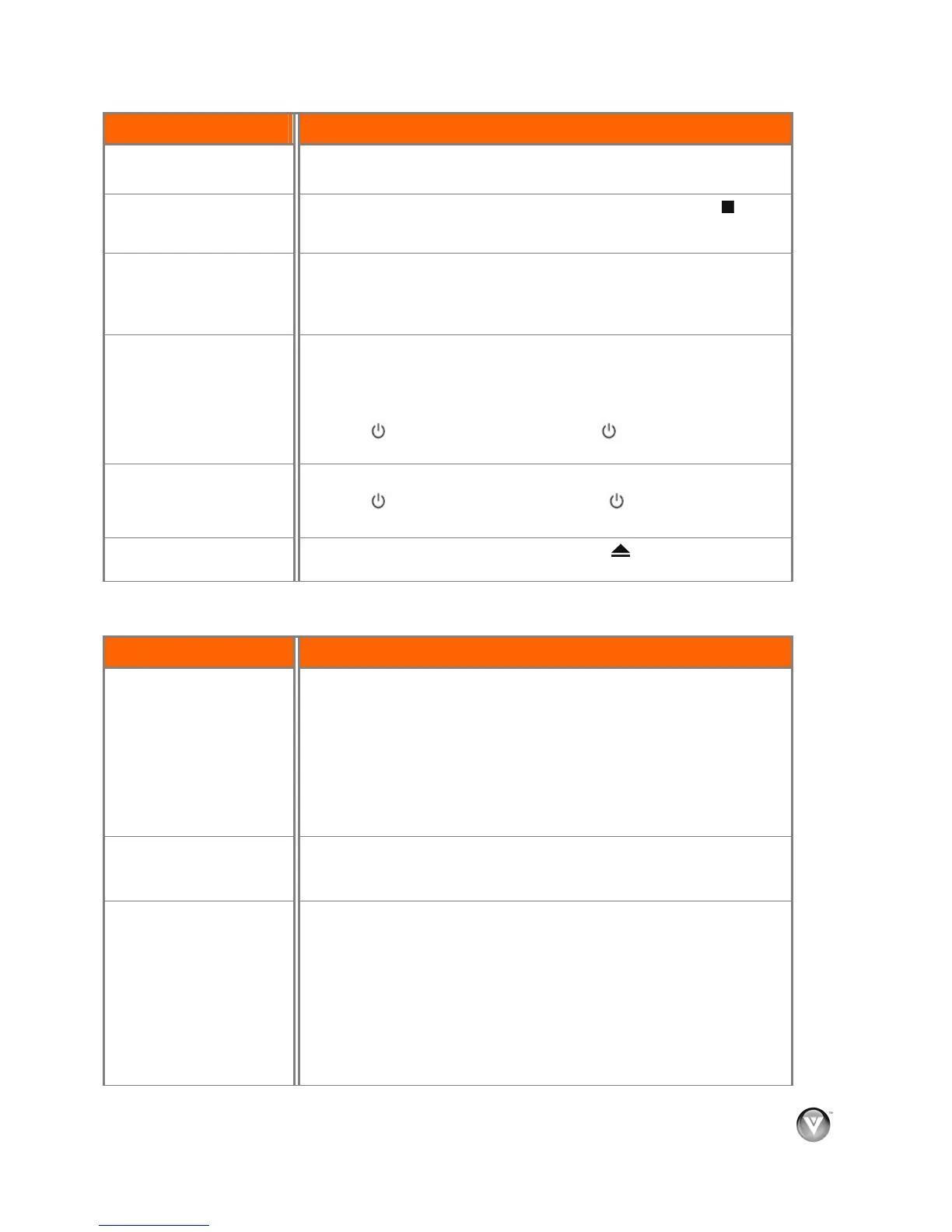
Issue Solution
Subtitles do not display.
! Subtitles are not recorded on the disc.
! Turn the subtitles on.
Resume feature does not
work.
! On some discs, the resume information is lost when you press
or
when you open the disc tray. Some discs do not support the resume
feature.
Startup is slow.
! Startup may be slow if your player is connected to the TV with an HDMI
cable.
! Startup may be slow the first time you plug in the power cord or after a
power failure.
Disc tray opens
automatically while playing
a disc.
! Make sure that the disc is not dirty or defective.
! Make sure there are no obstacles blocking the tray.
! The disc may be blank or not compatible with your player. For a list of
compatible discs, see “Playable discs”.
! Press , wait five seconds and then press again to reset your
player.
The player is on and
displays the start logo and
menu, but there is no image
from the disc.
! Clean the disc if it is dirty.
! Press
, wait five seconds, and then press again to reset your
player.
The player freezes when
reading a CD-R or DVD-R.
! When you see “loading” on the screen, press
, remove the disc and
clean it and then try again.
Audio Troubleshooting
Issue Solution
No sound.
! Press Volume + (Up) on the TV remote control.
! Press MUTE on the TV remote control to make sure that MUTE is not
ON.
! Make sure headphones are not connected to the TV or home theater
system.
! Check the audio connections of external devices that may be connected.
! Try another cable (HDMI, Component, AV/Composite, Coax etc.)
! Change audio settings of your player.
Audio pauses momentarily.
! This occurs normally between play list chapters or scenes.
! Audio momentarily pauses when your player switches between layers on
a dual-layer disc.
You can see a picture but
you cannot hear sound.
! Press Volume + (Up) on the TV remote control.
! Press MUTE on the TV remote control to make sure that MUTE is not
ON.
! Press AUDIO to select the audio.
! Make sure headphones are not connected to the TV or home theater
system.
! Check the audio connections of external devices that may be connected.
! Audio may not be heard when more than four devices are connected
with HDMI cables. Reduce the number of connected devices.
Version 12/10/2009 33
www.VIZIO.com



 To Next Page