VIZIO
®
VW37L HDTV40A User Manual
Version 10/17/2008 23
www.VIZIO.com
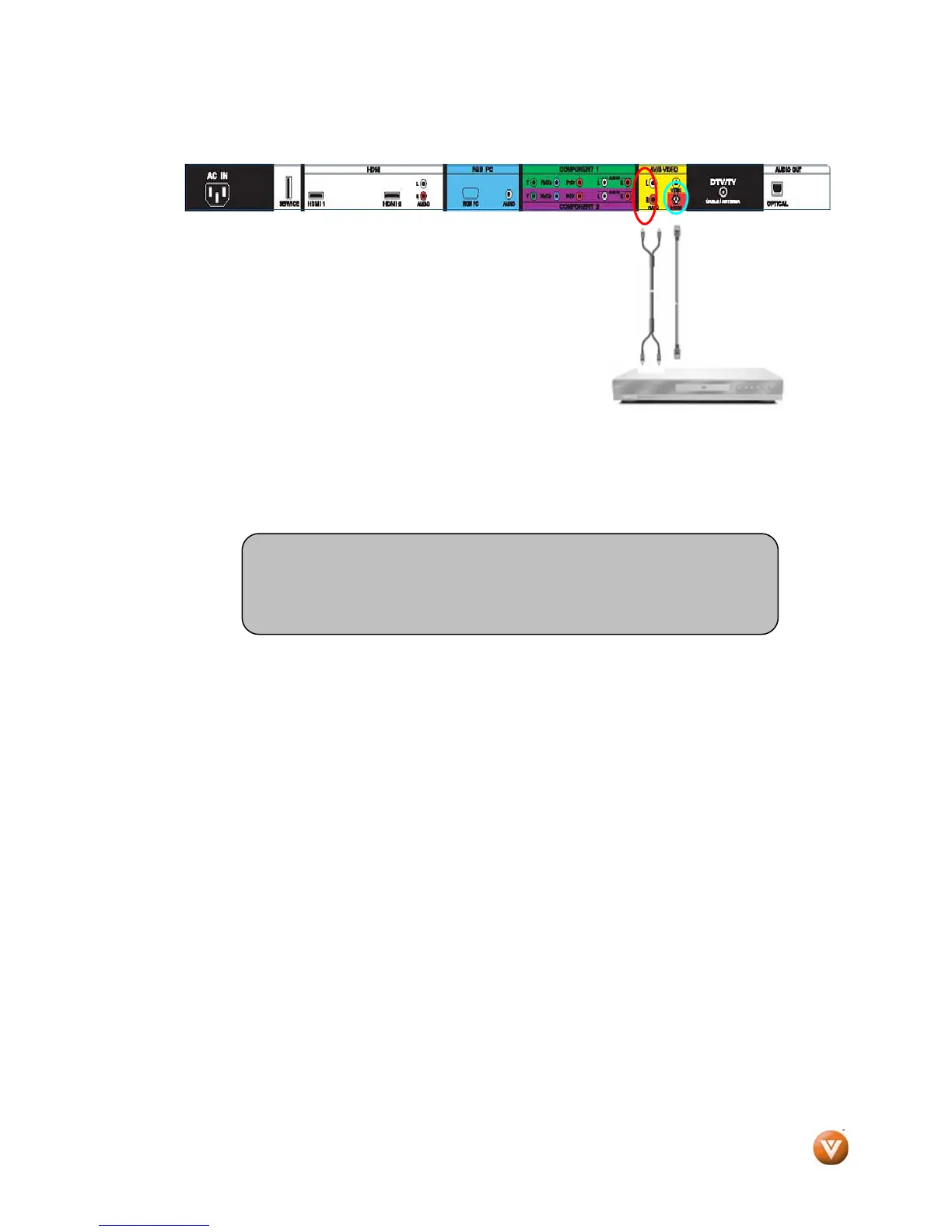
2.6 Connecting Your VCR or Video Camera
1. Turn off the HDTV and VCR or Video Camera.
2. Connect the S-Video jack on the rear of your VCR or
Video Camera to the S-Video jack in the AV group on the
rear side of the High Definition TV.
3. Connect an audio (white and red connector cables) cable
to the audio output connectors associated with the S-
Video output on your VCR or Video Camera and connect
the other end to the audio connectors associated with
the AV input on the back side of the High Definition
TV.
4. Turn on the power to the HDTV and VCR or Video Camera.
5. Select AV using the INPUT button on the remote or side of the High Definition TV.
Note:
Refer to your VCR or Video Camera user manual for more
information about the video output requirements of the product.



 To Next Page
 Loading...