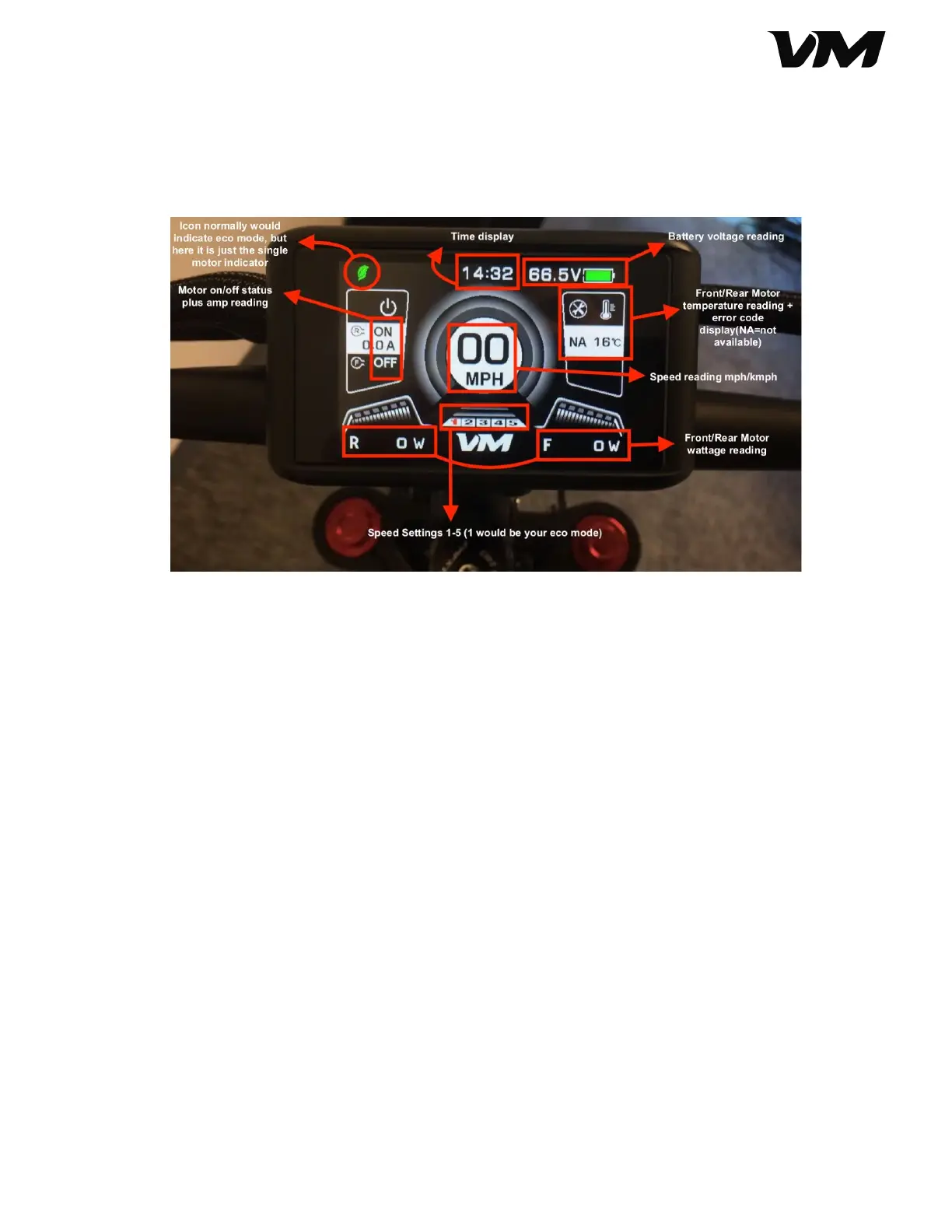
3. When you press the mode button, the readout will shift to the secondary display,
which provides cumulative details, like trip mileage, total mileage, trip duration,
average speed, and max speed.
4. To access the main menu settings, double-click the mode button.
5. The screen will display the following options:
a. Brightness (1: dimmest, 5: highest)
b. Clock (date, time (24-hr military time only))
c. System
■ Unit system (Metric / Imperial)
■ Power system (60V)
■ Temperature protection (Celsius only (℃))
■ Zero Start (Yes: zero start / No: kick start)
■ Power indicate (Voltage: battery voltage / Percent: battery bar)
d. Auto off (1-60 mins)
e. Wheel (14.0 inch, do not change)
f. Advance settings (password protected, see next section)
g. Battery (displays current information for battery)
■ Voltage
■ Capacity
■ Cycle Time
■ Temperature
■ Last Uncharge Time
■ Remain Capacity
■ Full Capacity
h. Factory setting (returns scooter to factory settings)
Distributed by and property of VoroMotors 8


 To Next Page
 Loading...