7
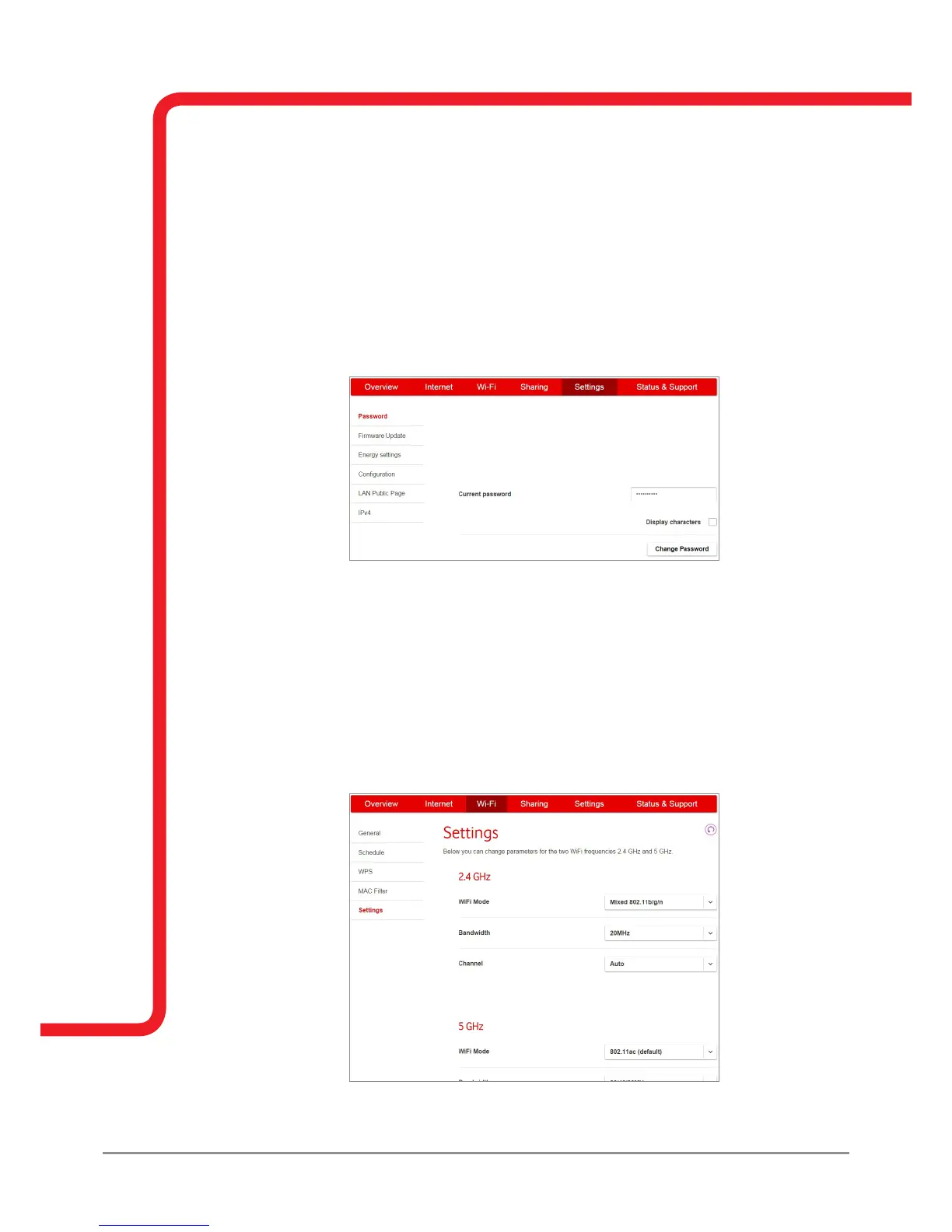
Set a new password for your Vodafone Broadband router to enable you to change your router settings
securely.
How do I stop unauthorised access to my Vodafone Broadband router’s settings?
To improve security and prevent unauthorised access to your Vodafone Broadband router’s
settings, follow these steps to change your Vodafone Broadband router’s password.
(Please note your Vodafone Broadband router’s password is different from your Wi-Fi password).
1. Go to the ‘Settings’ tab.
2. Select ‘Password’.
3. Click on the ‘Change password’ dialogue box.
4. Follow the on screen instructions.
5. Click ‘Apply’.
How do I change the Wi-Fi channel on my Vodafone Broadband router?
If another wireless device (even next door) is using the same channel as your Vodafone Broadband
router, the two devices could compete for the airwaves. Here’s how to change the channel:
1. Ensure ‘Expert mode’ is enabled.
2. Go to the ‘Wi-Fi’ tab.
3. Select ‘Settings’.
4. Find the ‘Channel’ setting and select ‘Preferred channel’ from the drop-down menu.
5. Click ‘Apply’.
Vodafone Broadband router password
Change Vodafone Broadband router password



 To Next Page