7 8
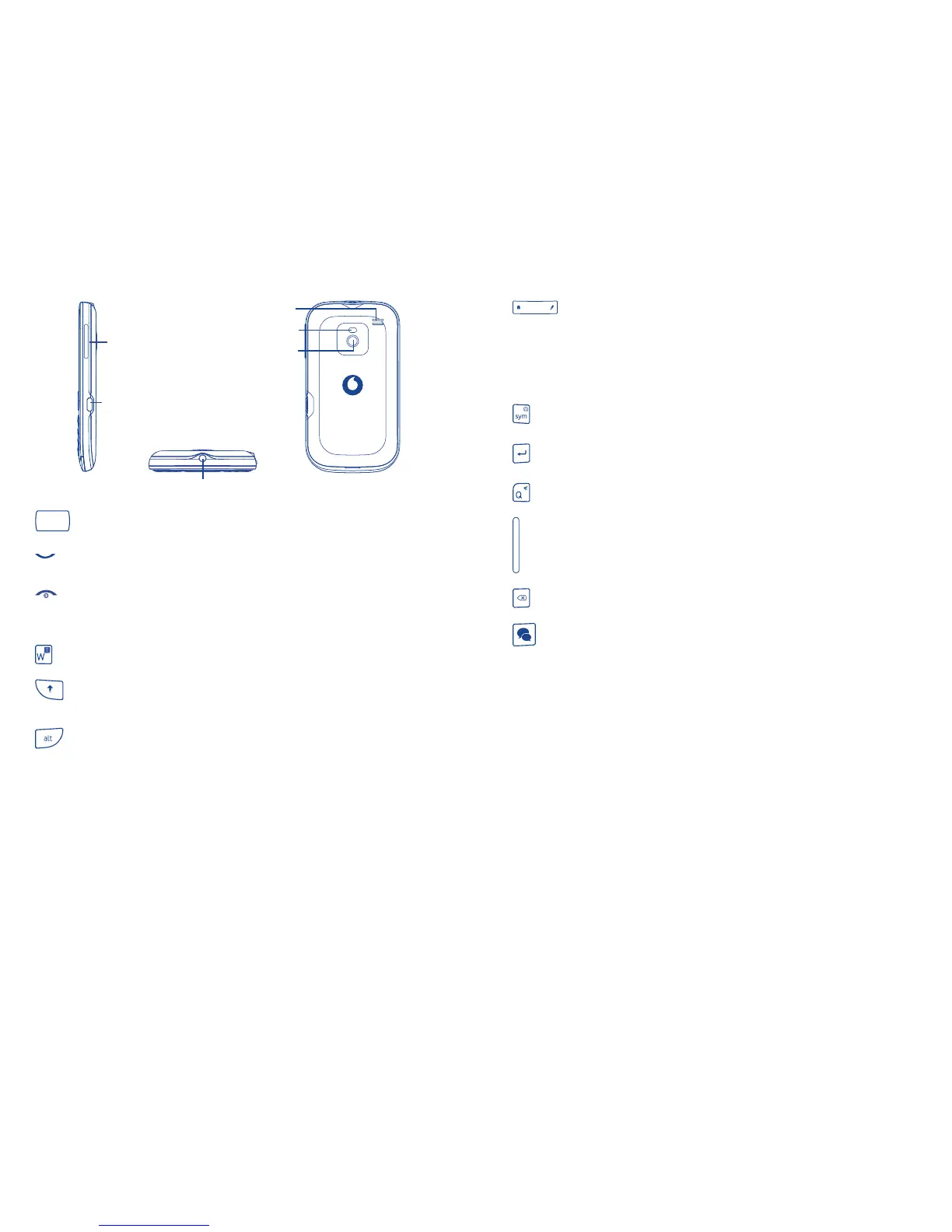
Headset connector
micro-USB
connector
Volume key
Camera
Flash
Loudspeaker
Flick to go left/right/up/down•
Press to confirm an option (press the middle of the key)•
Pick up/Send a call•
Enter Call log•
Press: End a call •
Return to the Home screen
Press and hold: Power on/off•
Press and hold: Access your voicemail•
Press once: Input a capital letter•
Press twice: Lock the keyboard in capital letter input mode•
Press once: Input a top-half key character•
Press twice: Lock the keyboard in top-half key input mode •
Alt + B: Access Bluetooth
Alt + J: Access Apps
Alt + M: Access Music
Alt + P: Access Device sound profiles
Press: Enter a space (in Edit mode)•
Press OK key, then Space key to unlock the keypad (on the
Lock screen)
Press and hold: Access text input language list (in Edit mode)•
Lock the keypad (on the Home screen)
Hold down • Space key, then press Alt key to select input method
Enter symbol table•
Hold down • Alt key, then press Sym key to enter emoticon table
Confirm an option•
Enter the next line•
Press and hold: Switch between General and Silent profile•
Volume up/down•
Scroll up/down•
Press to delete a word or character•
Press to access applications: Google Talk, Messenger, Facebook, •
Facebook Chat, Twitter



 To Next Page