9 10
Home screen1.2
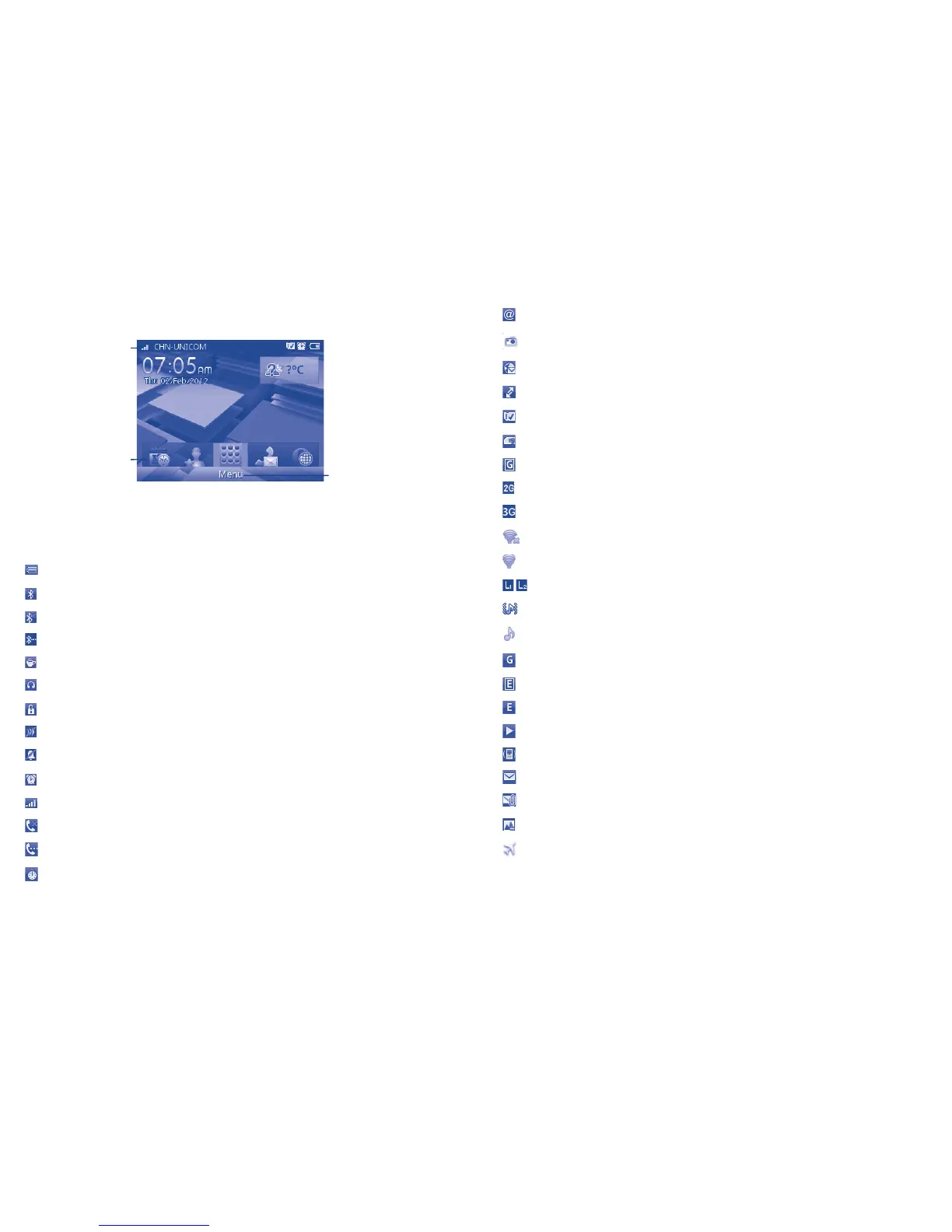
The Home screen is divided into several parts, as shown below:
Status bar
Widget bar
Select to enter main
menu screen
Status bar 1.2.1
(1)
From the status bar, you can view both phone status and notifications.
Battery charge level.
Bluetooth activated and visible.
Bluetooth activated but invisible.
Bluetooth connecting.
Java application activated.
Headset connected.
Keypad locked.
Mute is on during a call.
Silent profile is activated.
Alarm or appointment programmed
Level of network reception.
Missed calls.
Call in progress.
Stopwatch activated.
(1)
The icons and illustrations in this guide are provided for informational purposes only.
Email unread.
Radio is on.
WAP message
(1)
.
Roaming.
SD card inserted.
SIM card unavailable.
GPRS in use.
2G network available.
3G network available.
Wi-Fi disconnected.
Wi-Fi connected.
Line switching
(1)
: indicates the selected line.
Vibrate and ring mode: your phone vibrates and rings.
Music active.
GPRS connected.
Edge in use.
Edge connected.
Music player active.
Vibration mode.
SMS
unread.
MMS unread.
Sending MMS.
Flight mode.
(1)
Depending on your network operator.



 To Next Page