2.5 Using Vodafone mobile
broadband with your
Vodafone Station
2.4 Factory resetting the
Vodafone Station
To factory reset your Vodafone Station to the default factory settings,
please use the following:
1. Log into the Vodafone station by entering the following URL
into your internet browser: http://vodafone.station OR 192.168.1.1
2. Click on Advanced on the top menu
3. Click on Additional Settings in the sub-menu
4. To factory reset the Vodafone Station, click on the Reset button to
perform a factory reset
5. The Vodafone Station will now lose connectivity and the device will restart
6. Once the Vodafone Station has powered back on and gained a DSL
connection, you will be asked if you want to keep your personal confi guration
or cancel. You need to select one of these options to complete the reset.
7. The Vodafone Station will then run the automatic process to gain
authentication details and connect to the internet.
8. Internet connectivity can be checked via the icons on the
front of the router on the LCD screen. Please refer to LCD icons.
Note: Your Vodafone Station will re-start while Vodafone remotely
confi gures it.
A Vodafone Vodem can be used with your Vodafone Station as a backup
internet connection if there is an outage on your fi xed broadband or while
you’re waiting for your fi xed line broadband connection to get set up.
List of Supported Vodems:
The following Vodafone Vodems are compatible with the Vodafone Station:
• K3772
• K3806
• K4201
®
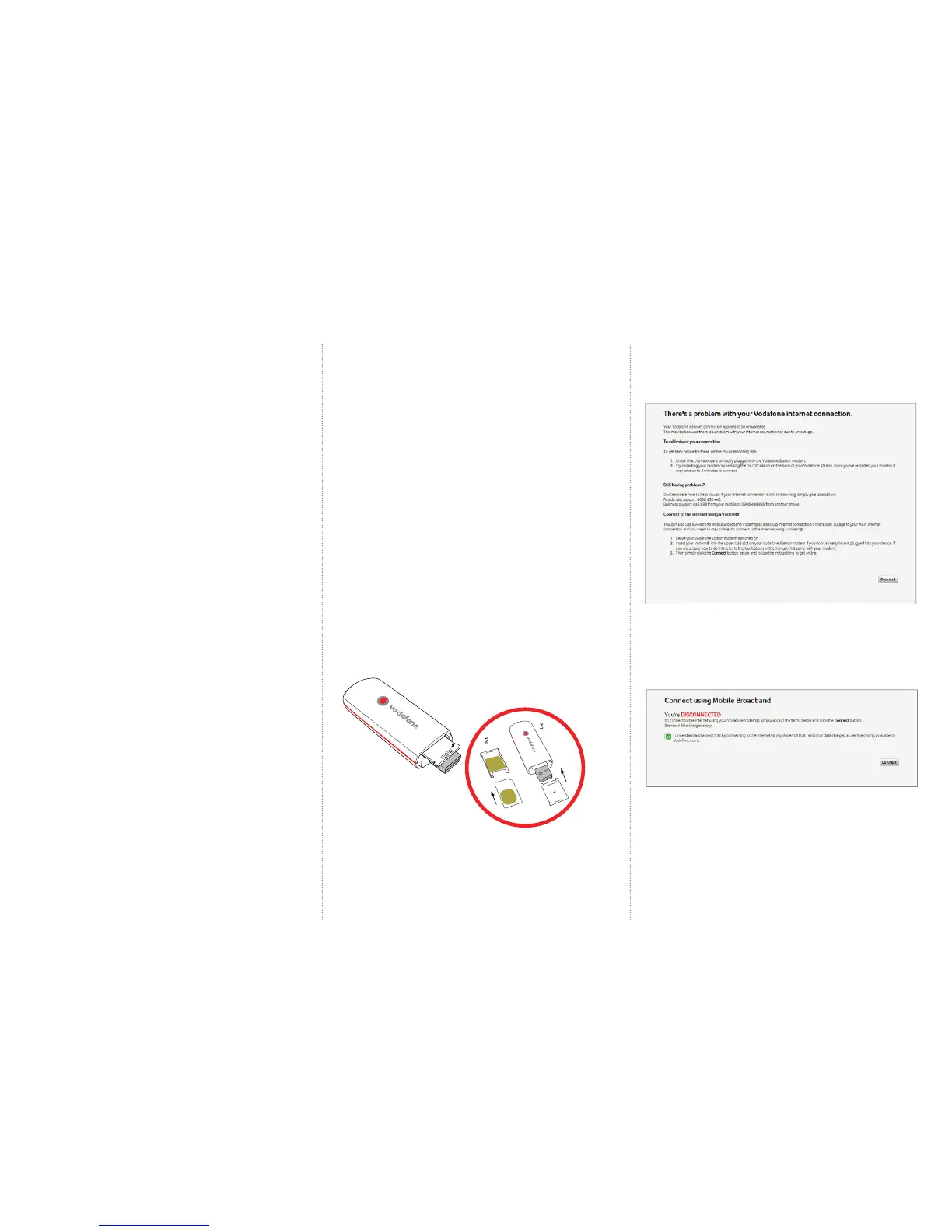
Inserting the Vodafone mobile broadband vodem stick:
1. Remove the SIM card holder from the Vodafone mobile broadband vodem.
2. Insert the SIM card into the card holder.
3. Re-insert the SIM card holder into the Vodafone mobile broadband vodem.
4. Connect your vodem to the Vodafone Station
5. Now whenever your broadband or fi bre connection disconnects and you try
to access a webpage you will receive the below message asking if you would
like to connect using your vodem.
6. Click connect to begin
Please make sure that you understand that the vodem account holder will
incur data charges for data used by the vodem before proceeding.
Tick the box to indicate that you understand that using the Vodem will incur
data charges and click connect.
After a few moments the Vodem will connect to the Vodafone mobile network
and you will receive the following screen. Once this screen appears you will be
able to browse the internet as you normally would.



 To Next Page
 Loading...