You must be in “Bootloader Mode” so that the
EDGE™ RF is recognized by the software.
To do this, once the USB/μUSB cable is connected to
the computer, press and hold the ON/OFF button for
3 seconds.
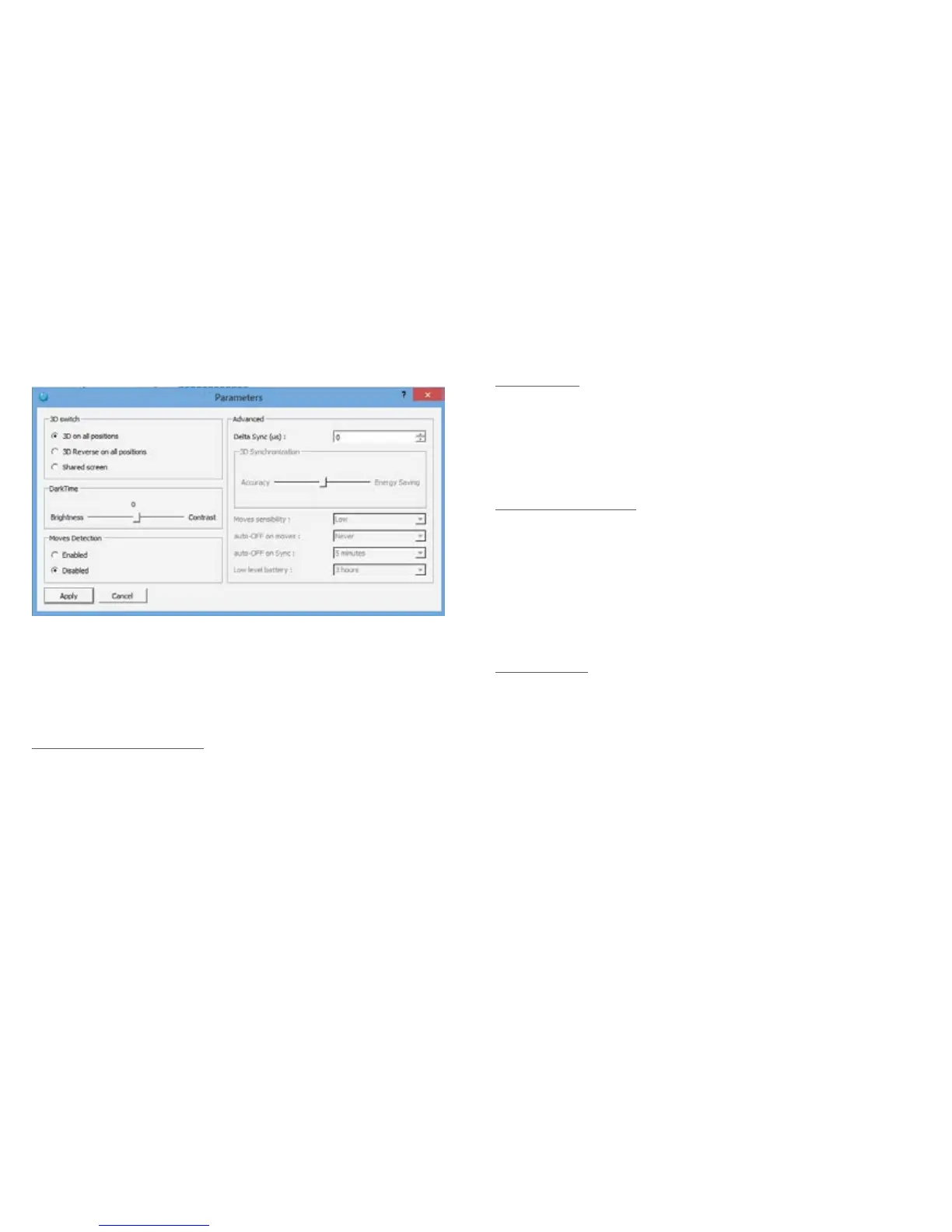
Switch Pos (A, B or C) :
- 3D on all positions : In this conguration the glasses
will receive a normal 3D sync whatever the switch
position
- 3D Reverse : In this conguration the glasses will
receive a reverse 3D sync whatever the switch
position
- Shared screen : In this conguration
Switch in A position : 3D
Switch in B position : 2D left
Switch in C position : 2D right
Dark Time :
Allows you to change the value of DarkTime
The slider allows you to adjust the value between -4000
microseconds (better luminosity) and 4000 microseconds
(better contrast). The value applied is inscribed above
the slider (0 in this example)
Moves Detection :
Enables or disables the Auto OFF feature when glasses
are not moving
Enabled: The glasses turn OFF automatically if no
movement is detected after 5 minutes (AUTO OFF
enabled).
Disabled: The glasses will stay on even if no motion is
detected. (AUTO OFF function disabled).
Advanced :
Delta Sync (μs) : Modify the sync offset (between -2000
and 2000 microseconds). Default = 0
6. VOLFONI LOADER - PARAMETERS
You can access to this part by clicking on “parameter”
in the menu “edit”


 To Next Page