INSTALLING THE TESTER VOLTECH AT3600 USER MANUAL
PC COM PORT CONFIGURATION
When the installation of the Editor has been completed, you will see the Editor icon
in the program group ‘Voltech Software’. Double-click with the left mouse button on
the Editor icon to start the program.
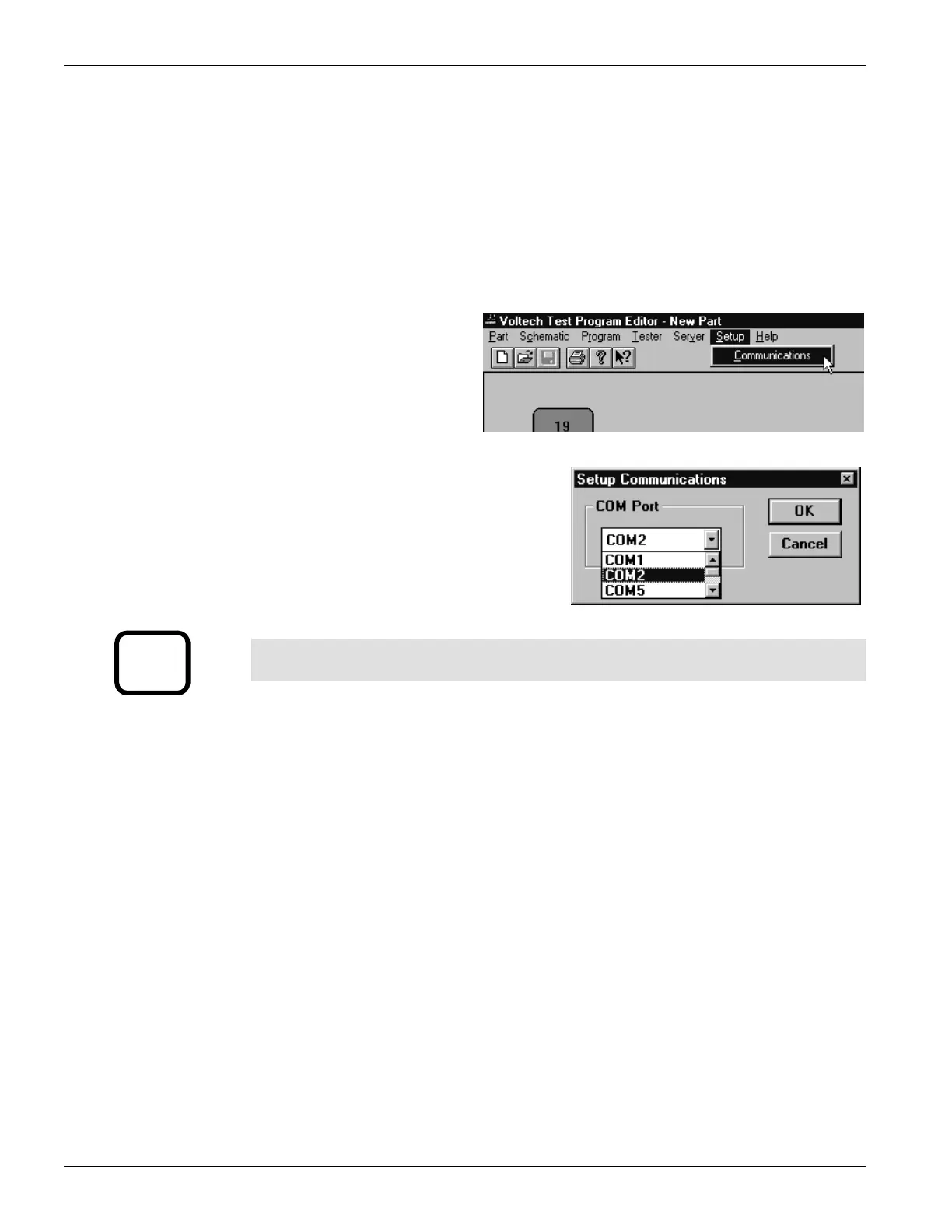
Initially configure the Editor to use the chosen COM Port:
1. From the Top Level
‘Setup’ menu, select
‘Communications’.
2. In the dialogue box shown here;
select the PC communications port
which is connected to the tester.
WARNING: If the chosen ‘COM’ port is reserved by another Windows
application, an error message will appear. You should select another port.
i
2.4. INSTALLING THE SERVER SOFTWARE
Check that your PC satisfies the following hardware requirements:
PC Processor 486 or better
Memory 4MB minimum
Hard Disk Space 3MB minimum
(Note: 3MB does not include disk space required for storing programs or test results)
Operating system Windows 95 or later
To install the Server software, follow the same basic instructions as for the Editor.
The Server is often installed on a different PC to that which will be used for the
Editor, depending on your production needs. A Server PC needs to be permanently
connected to the AT600 only if you wish to store test results or use a central program
store rather than the AT3600’s own memory.
PAGE 2.2.4. VPN 98 - 024 GETTING STARTED


 To Next Page
 Loading...