INSTALLING THE TESTER VOLTECH AT3600 USER MANUAL
2.6. SERVER SOFTWARE SET UP
When the installation of the Server has been completed, you will see the Server icon
in the program group ‘Voltech Software’. Double-click with the left mouse button on
the Server icon to start the program.
Before you can use the Server, the PC communication channels must be assigned for
each tester connected.
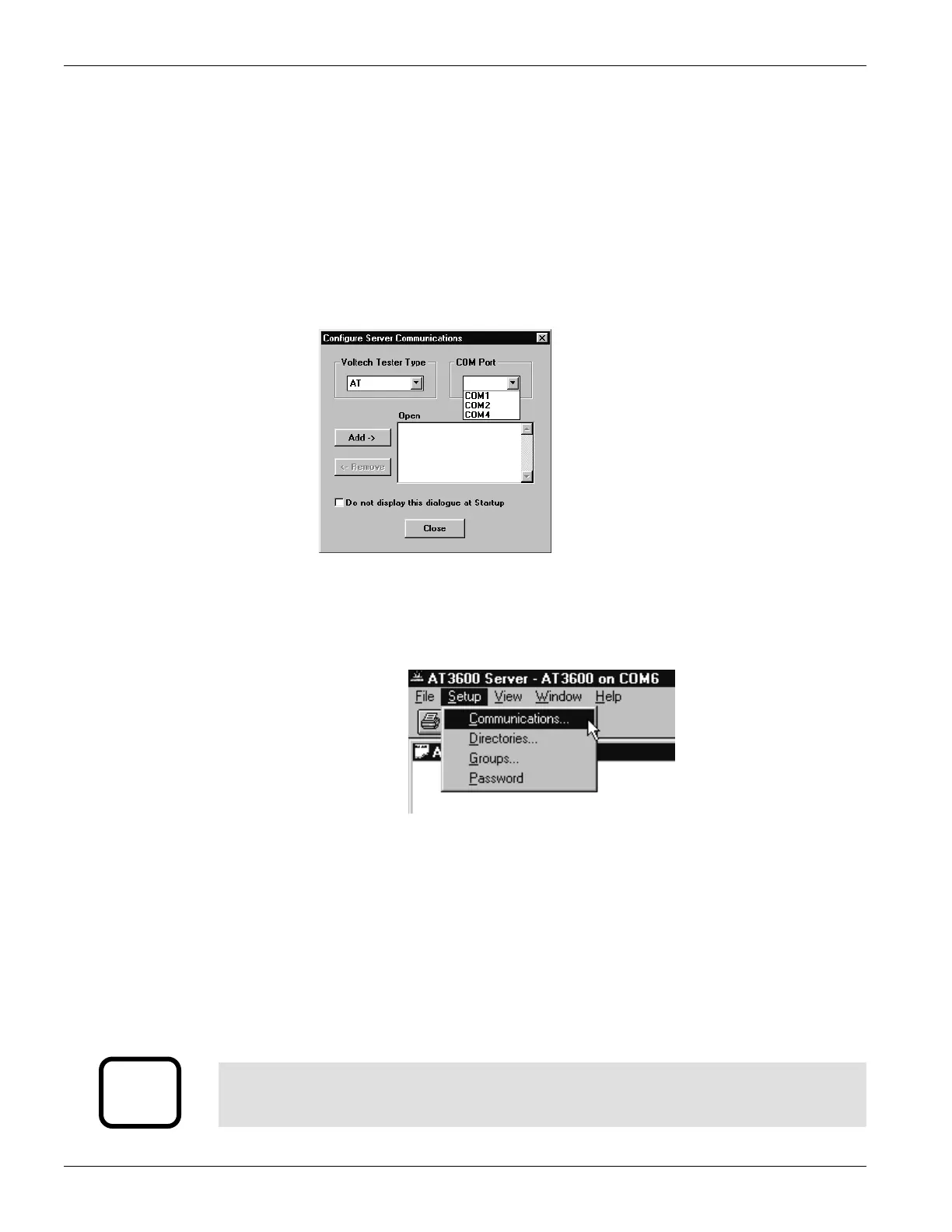
When the Server is executed for the first time, the following dialogue will be
displayed:
A check box 'Do not display this dialogue at Startup' exists to prevent it from being
displayed each time the Server application is launched. When this option is activated,
this dialogue box can be accessed via the ‘Setup’, ‘Communications...’ menu.
To assign a particular AT Series Tester to a COM Port:
1. Select the communication port to which your tester is connected from the COM
PORT selection box.
2. Click on the ADD button to append your connection to the current connection
list.
3. To remove a current connection select it from the list and then click on the
REMOVE button.
i
IMPORTANT:
You must have at least one AT Series Tester connection to use the program
transfer or real time results functions of the Server application.
PAGE 2.2.6. VPN 98 - 024 GETTING STARTED


 To Next Page
 Loading...