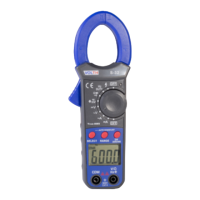
(1)Turn the Rotary switch to the range of Ω / / . At this time, the meter is reserved
at resistance range.
(2)Plug red lead in “V/Ω” socket, and plug black lead in “COM” socket
(3)Connect the leads with the two ends of the circuit or component, and then read the
value of resistance.
(4)Press SELECT key to change the range of . When the resistance measured is
less than about 90Ω ±20Ω, the buzzer sounds. This is continuity testing.
(5)When the test lead is under open-circuit or input-overload status, the display will
display “OL”.
(6)When measuring diode, press the SELECT key to the function of .
(7)Connect the test lead with the two ends of the diode, and then read the value of
forward voltage drop value.
(8)When the test lead is under reverse connection or open-circuit status, the display
will display “OL”.
Note:
a,When the resistance measured is above 1MΩ, it needs several seconds for the
reading to be stable, it is normal when measuring high resistance.
b, When measuring high resistance, insert the resistance pin directly into the V Ω and
COM jack, so as to avoid interference
c, When measuring resistance in a circuit make sure the power to the circuit is turned
off and all capcitors are discharged.
4.5 Measurement of capacitance
Warning! When measurement of capacity,
the measured capacitor should be completely discharged.
(1)Turn the Rotary switch to “ ” function. Plug red lead in “V/Ω” socket, and plug
black lead in “COM” socket.
Warning: The range for capacitor can’t be set manually. When the capacity value is
large, the time for measurement may be a little longer.
a, Do not take an external voltage or charged capacitor (especially a large
capacitor) connected to the test terminal
b, When a large capacitor is serious leakage or breakdown, the measurement value
may be instability
4.6 Measurement of frequency / DUTY Ratio
(1)Turn the Rotary switch to “Hz” function.if you want to measure DUTY Ratio,Press
SELECT key to switch
(2)Plug red test lead in “V/Ω” terminal and plug black lead in “COM” terminal.
(3)Connect the leads with measured circuit and then read the reading.
(4 )when the voltage exceeding 30V, please enter the Voltage frequency measure-
ment mode by pressing the SELECT key in the “ACV” measurement function.
6.


 To Next Page
 Loading...