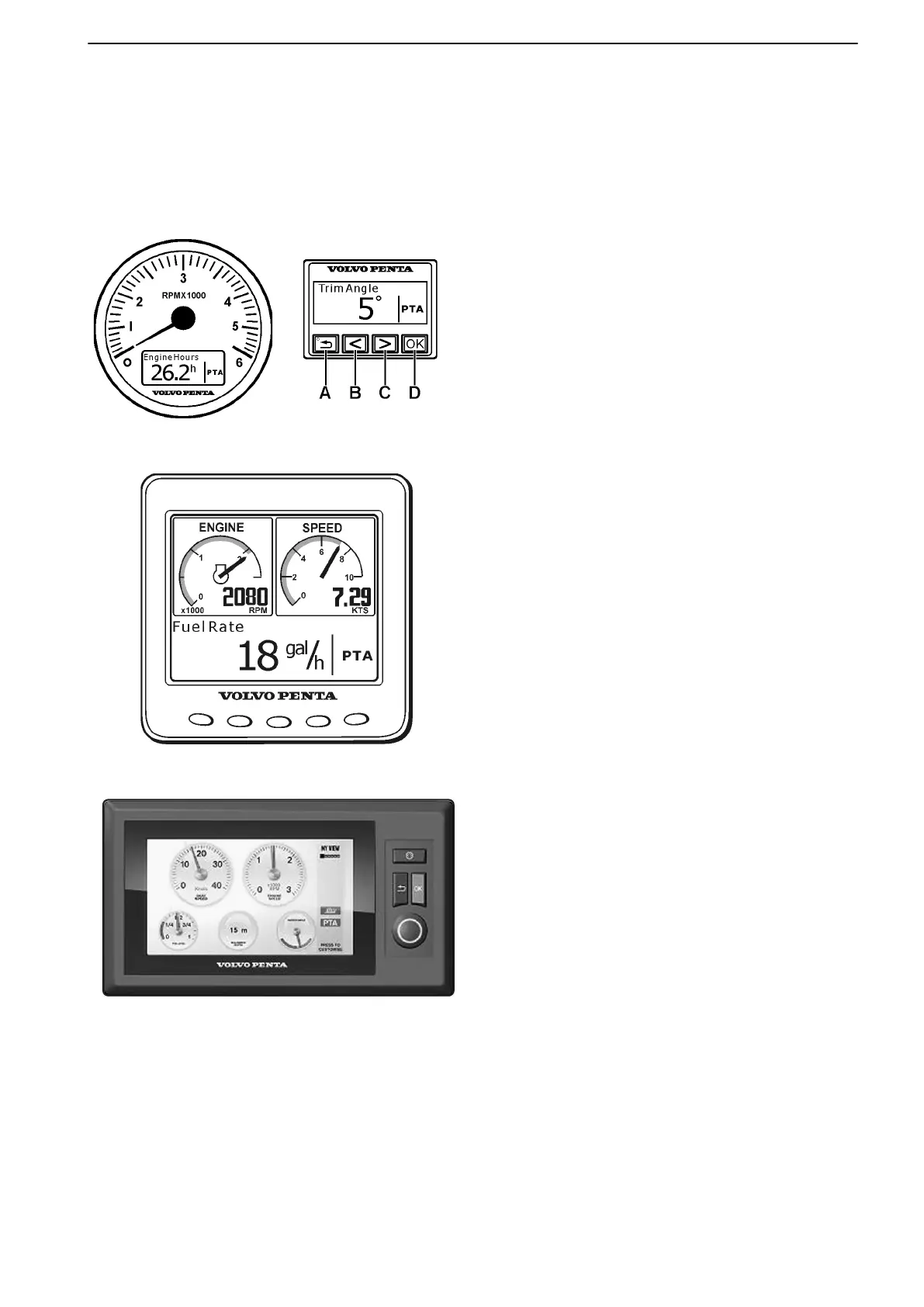
EVC System Display
There are four types of displays. When using a top mount remote control, you must have either the Info Display
Panel or the Color Display installed. For a single side mount remote control, you are not required to have a display
installed.
51274h
51751
● EVC System Tachometer Display – An LCD
display integrated into the EVC System Tach-
ometer. It displays engine hours only.
● Info Display Panel – A smaller LCD display. It
provides a variety of information. The buttons
allow you to: Navigate up a level in the menu
structure A, navigate backward through the
menu selections B, navigate forward through
the menu selections C, activate the highlighted
menu selection D.
51275
● EVC System Display – A multiple window dis-
play–meaning that several windows can be
monitored simultaneously. This display pro-
vides information only; it may not be used to
make EVC-related settings.
● 7” Color Display – A larger, color LCD display.
It provides a variety of information in a larger,
easier to read format. Additional information
about the color display may be found in the sec-
tion entitled Screens in this chapter.
When the EVC system has detected a fault or something else that requires the operator’s attention, a pop-up
appears in the display(s). For additional instructions on how to handle such alarms and informational messages,
please refer to Acknowledging Alarms and Messages and to the Fault Code Register.
Instruments and Controls
47701898 12-2010 21



 To Next Page