RANDOM is displayed for as long as the function is activated.
CAUTION: Never put tape or a label on the disc itself _ it might come off inside the CD player and cause damage.
pg. 139 CD changer
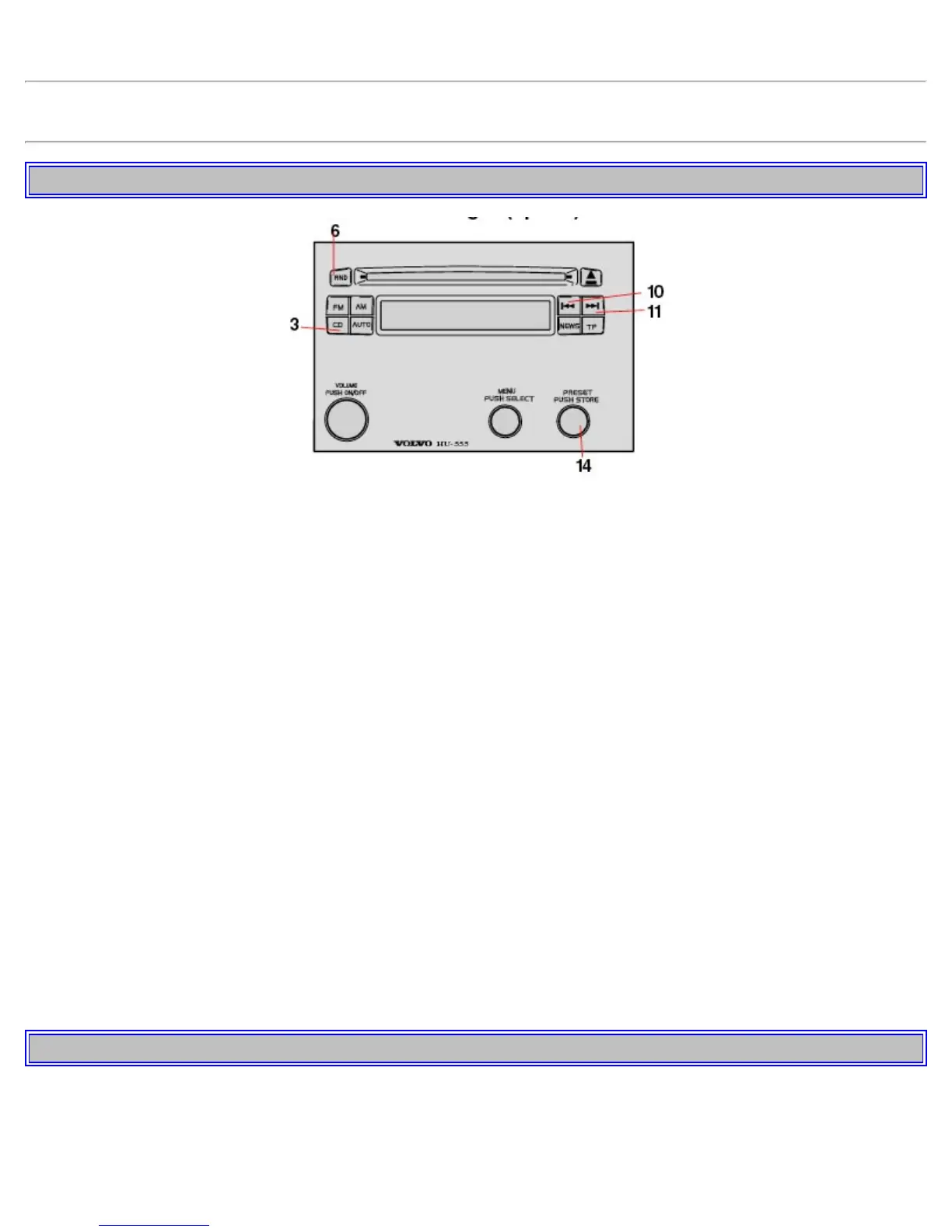
CD changer _ On (3)
Press button (3) to activate CD changer mode. The CD changer will resume playing the disc and track that were most
recently played.
If the CD changer magazine is empty
LOAD& CARTRIDGE will be displayed.
Internal/external CD (3)
To toggle between external CD changer and the radio's internal CD player; press button (3).
Selecting a disc (14)
Turn the PRESET knob. The disc number and track is displayed.
Fast forward/backward (10, 11)
Press and hold down buttons (10) or (11) to seek within a track. The seek function will stop when the button is
released.
Skipping or selecting a track (10, 11)
Press button (10) to restart the current track.
If the elapsed time for the current track is less than 1 second, previous track will be chosen.
Press button (11) to skip the current track and go to the next one.
The track number will be shown in the display.
Random track (6)
Press RND to activate the random function. The unit plays tracks from the magazine in random order.
RANDOM is displayed for as long as the function is activated.
pg. 140 Menu structure


 To Next Page