10 Audio
CD player/CD changer
10
``
* Option/accessory, for more information, see Introduction.
251
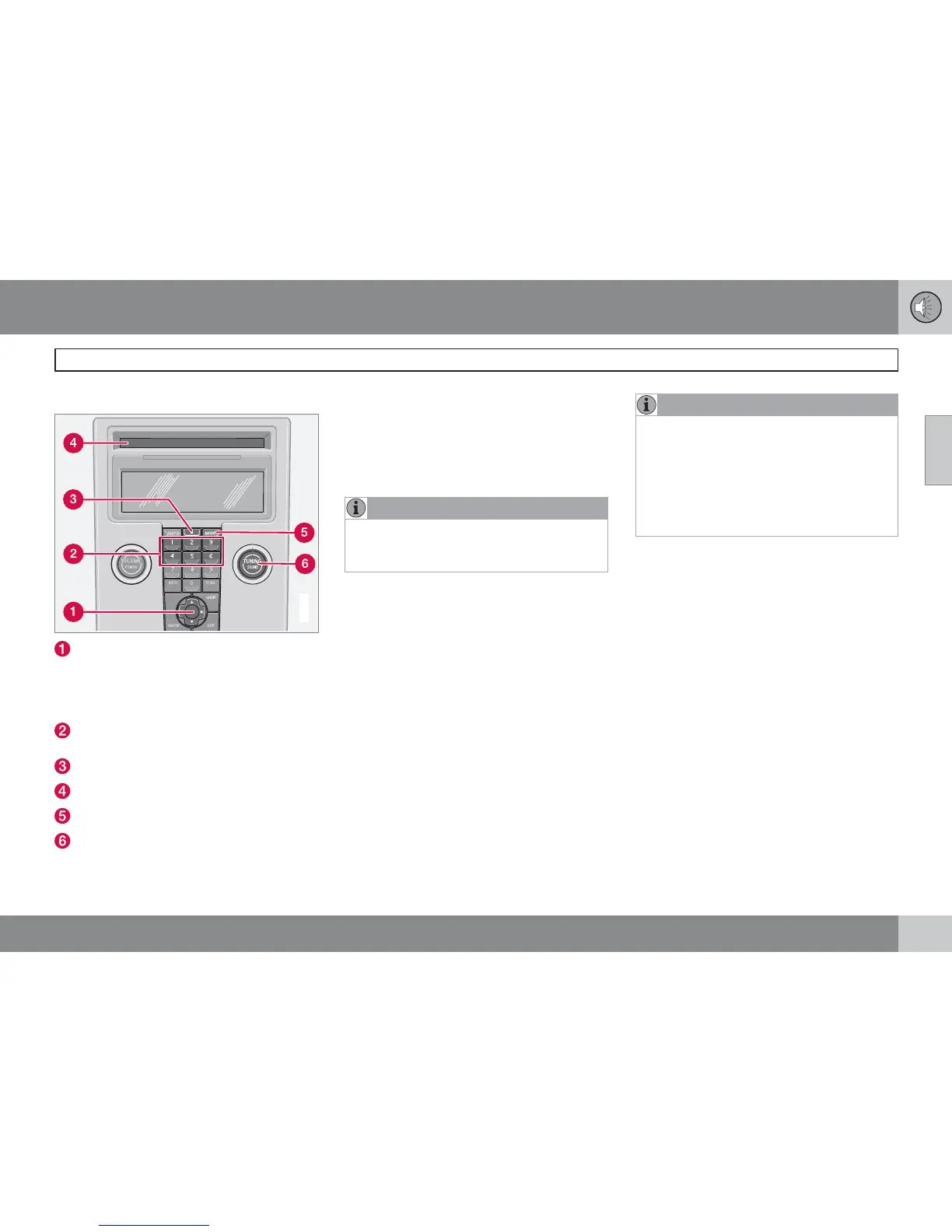
CD function controls
G026367
MENU NAVIGATION CONTROL–press
the up or down arrow keys to scroll in a
menu, or the keys on the left/right sides of
the control to change CD tracks/fast for-
ward/back
Buttons for selecting a disc in the
optional CD changer
CD eject button
CD slot
MODE button
TUNING dial for selecting tracks
Playing a CD
Single CD player
Start the CD player by pressing the MODE but-
ton (5) and inserting a disc in the slot (4). If there
is already a disc inserted, it will begin to play.
NOTE
If a CD is in the slot when the audio system
is in CD mode, the CD will be played auto-
matically.
CD changer*
The CD changer can hold up to six discs.
1. Start the CD changer by pressing the
MODE button (5).
2. Select an empty position using the 1 – 6
buttons or the up/down keys on the MENU
NAVIGATION CONTROL. The display
shows which positions are empty.
3. Insert a disc into the slot (4).
NOTE
•
Ensure that Insert disc is displayed
before inserting a disc.
•
If a CD position in the changer contain-
ing a disc is selected, and the audio
system is in CD mode when it is
switched on, the CD will play automati-
cally.
CD eject
Eject from Single CD player
Press the eject button (3) to eject the disc.
Eject from CD changer
This function makes it possible to eject a single
disc, or to eject all of the discs in the changer.
Press the eject button (3) briefly to eject the
disc that is currently playing.
A longer press (more than two seconds)
starts the process of ejecting all of the
discs in the changer.



 To Next Page