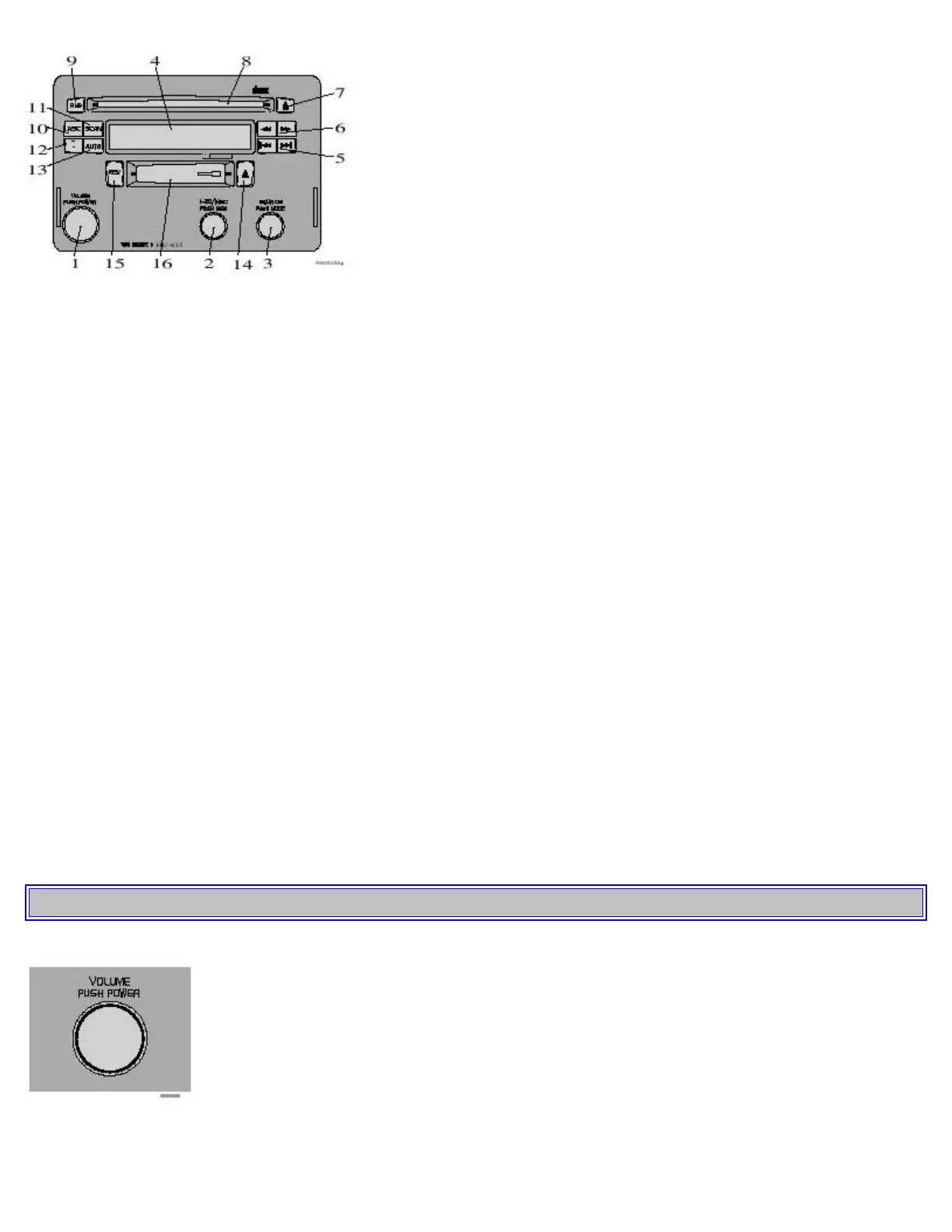
1. Switch On/off (push)
Volume (turn)
2. Selector knob:
Select the channel (turn)
CD changer - Selecting disc (turn)
Program radio frequency in a channel (push)
3. Selector knob for choosing (turn) :
Radio
Cassette
CD changer
Mode knob (push) for setting: Bass, Treble, Fader and Balance
4. Display
5. Radio - Station seek up/down
Cassette position - Selecting next/ previous track
CD position - Selecting next/previous track
6. Radio - Manual station selection
Cassette position - Fast winding forward/reverse
CD-position - Fast winding forwards/ backwards
7. Random for CD (Description for CD is applicable when a CD Changer is connected)
8. CD opening
9. Random for CD
10. ASC - Active sound control
11. SCAN
12. Traffic information
13. Dolby B NR noise reduction
14 Tape eject
15 Tape direction selector/
16. Cassette opening
pg. 133 Audio system
Switch on/off
Press button to switch on or turn off the radio.



 To Next Page