1
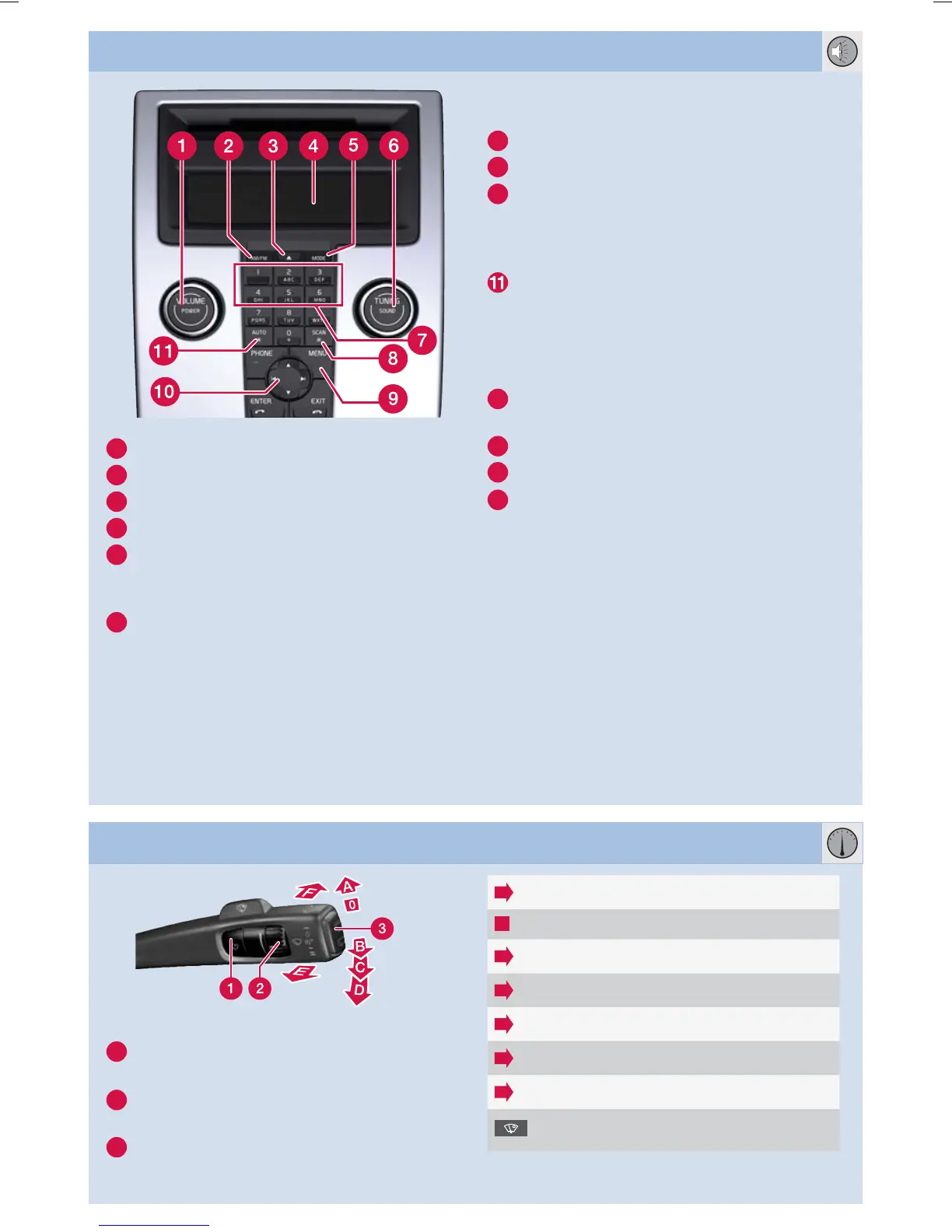
Press for On/Off. Turn to adjust the volume.
2
Radio FM1, FM2 or AM.
4
Display.
5
MODE – CD, AUX
A
or USB.
6
Press to select sound pattern, e.g. BASS,
Dolby Pro Logic II* or SUBWOOFER*
– turn to adjust.
9
MENU – AUX, volume and advanced audio
settings.
Activate/deactivate SUBWOOFER*.
RADIO
6
Turn to select the station.
8
Searches for the next strong station.
Search for station using Left/Right arrow.
Store up to 20 stations by holding in 0–9
on FM1 or FM2 at the desired station until
the display confirms the selection.
Press for about 2 seconds to autostore the
10 strongest stations. The display shows
AUTOSTORING during the search.
Select stored station with 0–9.
CD PLAYER
3
One short press ejects the current disc.
One long press ejects all discs
B
.
6
Turn to change the track.
7
CD changer* – select disc with 1–6.
Change CD tracks with left/right arrow.
Select CD
B
with up/down arrow.
AUDIO SYSTEM
A
AUX input for e.g. MP3 player (set its volume at
medium for optimum audio reproduction).
B
Only CD changer*.
WINDSCREEN WIPERS AND RAIN SENSOR*
1
Rain Sensor On/Off, with the lever in posi-
tion 0.
2
Regulates the sensor sensitivity or the inter-
mittent delay.
3
Wiper, rear window – intermittent/normal.
Single sweep
Off
Intermittent wiper, see also (2).
C
Normal sweep speed.
D
High sweep speed.
E
Washer, windscreen and headlamps.
F
Washer, rear window.
Illuminates when the rain sensor is
active.


 To Next Page