10 Infotainment system
Audio functions
10
252
* Option/accessory, for more information, see Introduction.
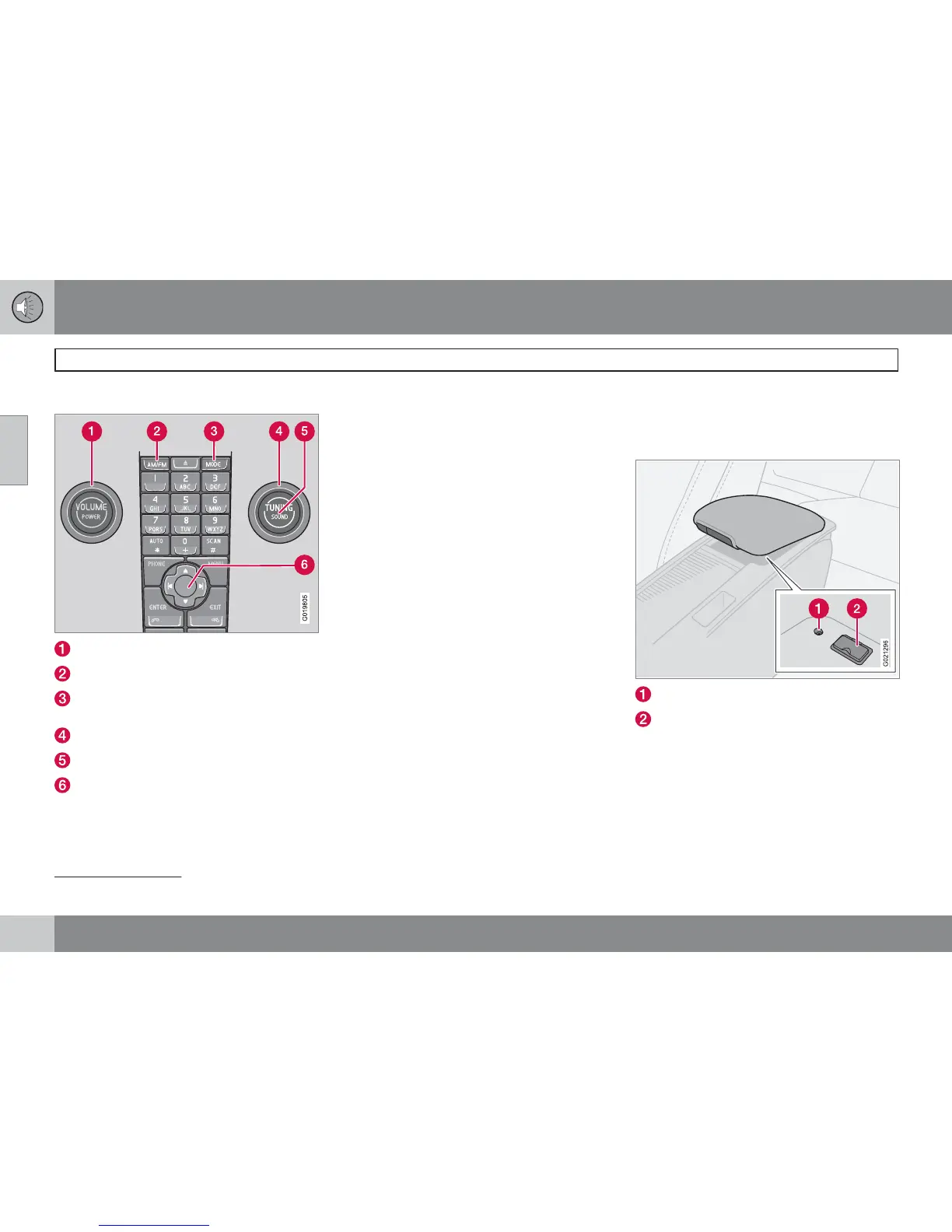
Audio controls
VOLUME - Knob
AM/FM – Audio source selection
MODE - Audio source selection, CD, AUX,
USB (e.g. iPod
)
1
and BT*
TUNING - Knob
SOUND - Button
Navigation button - Menus
Volume
Use VOLUME (1) or the steering wheel keypad
to regulate the volume, see page 71. Audio vol-
ume adjusts automatically depending on vehi-
cle speed, see page 255.
Audio source selection
Repeatedly pressing AM/FM switches
between FM1, FM2 and AM.
Repeatedly pressing MODE changes between
CD, USB, AUX and BT.
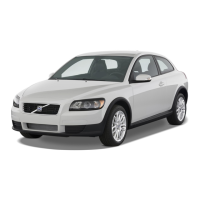
External audio sources
AUX, USB*
General
AUX input
USB input*
The AUX and USB inputs enable the connec-
tion of an external audio source, e.g. an
iPod
1
or MP3 player.
If you choose to connect an iPod
, MP3 player
or a USB memory stick to the USB connection
then you can control the media via the car's
audio controls.
1
USB only applies for High Performance and Premium Sound. The iPod trademark belongs to Apple Computer Inc.



 To Next Page