6S
e
t
u
p
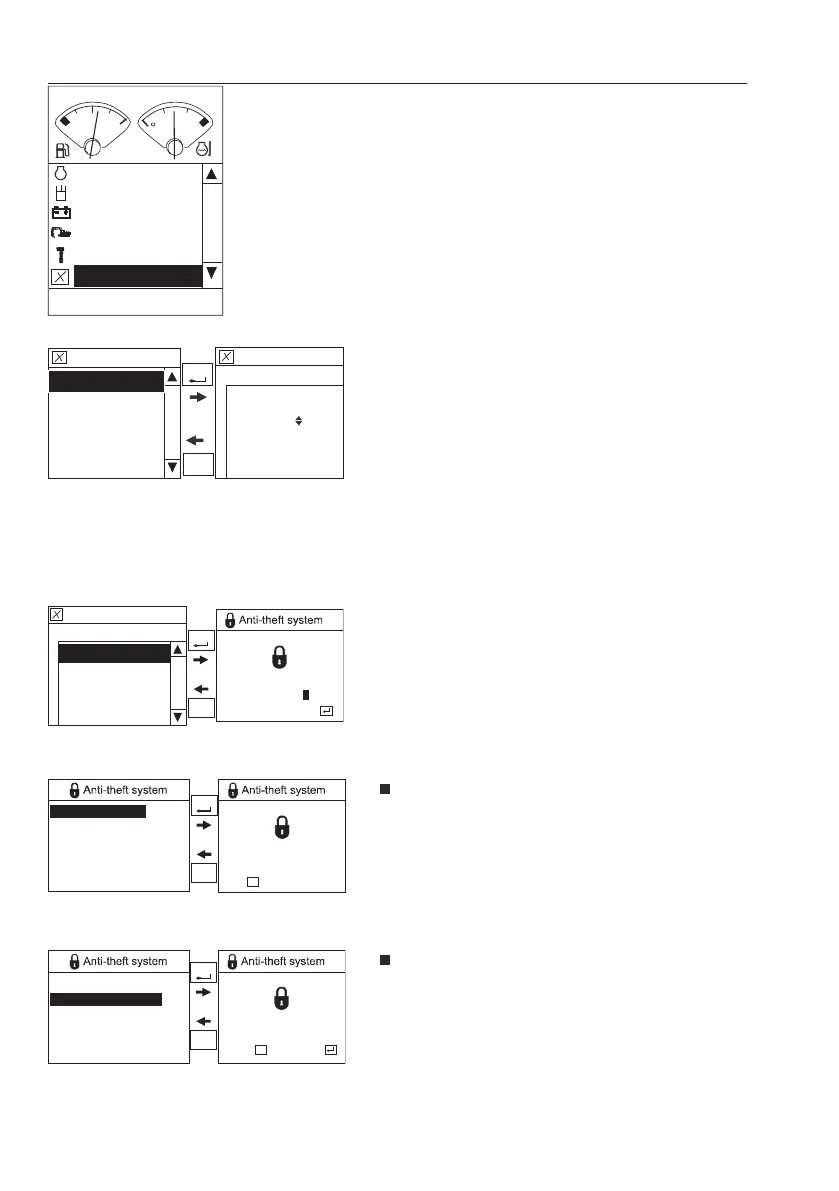
There are sub items, "Auto idle time”, “Anti-theft
system”, “Language", "Units", "Time/Date",
"Display light" and "Keypad backlight".
-A
u
t
o
i
d
l
e
t
i
m
e
The basic concept of “Auto idle” is to reduce fuel
consumption. The engine speed will be lowered
automatically to idle mode, if Auto idle button
ON and any of control levers (pedals) or engine
speed control switch are not operated for a
certain second.
Operator can set Auto idle time from 3 second
to 20 second.
-A
n
t
i
-
t
h
e
f
t
s
y
s
t
e
m
This menu is used for setting up the anti-theft
system.
O
w
n
e
r
m
e
n
u
: The machine owner's
authorization code is required to access this
menu. (6 digits)
R
e
a
d
o
p
e
r
a
t
o
r
c
o
d
e
: This sub-menu allows
the machine owner to read the current
operator code. (4 digits)
G
e
n
e
r
a
t
e
o
p
e
r
a
t
o
r
c
o
d
e
: This sub-menu
allows the machine owner to generate a
random operator code. (4 digits)
F
C
Hydraulics
Electrical system
Vehicle information
Service
Setup
Engine
V1065527
V1185315
Auto idle time
Setup
5sec
SELEC T
ESC
Setup
Anti-theft system
Units
Language
Auto idle time
Time/Date
V1185314
Anti-theft system
Setup
Owner menu
Enter owner code
*****
confirm :
2
SELECT
ESC
Enter owner code
V1123167
Read operator code
Generate operator code
Set operator code
Service action
Operator code:
4321
SELECT
ESC
Close:
ESC
Operator code
confirm :reject :
Read operator code
Generate operator code
Set operator code
Service action
New operator code:
4321
ESC
SELECT
ESC
V1123168
New operator code
4
2
I
n
s
t
r
u
m
e
n
t
p
a
n
e
l
s
D
i
s
p
l
a
y
u
n
i
t



 To Next Page