P
o
p
u
p
m
e
s
s
a
g
e
s
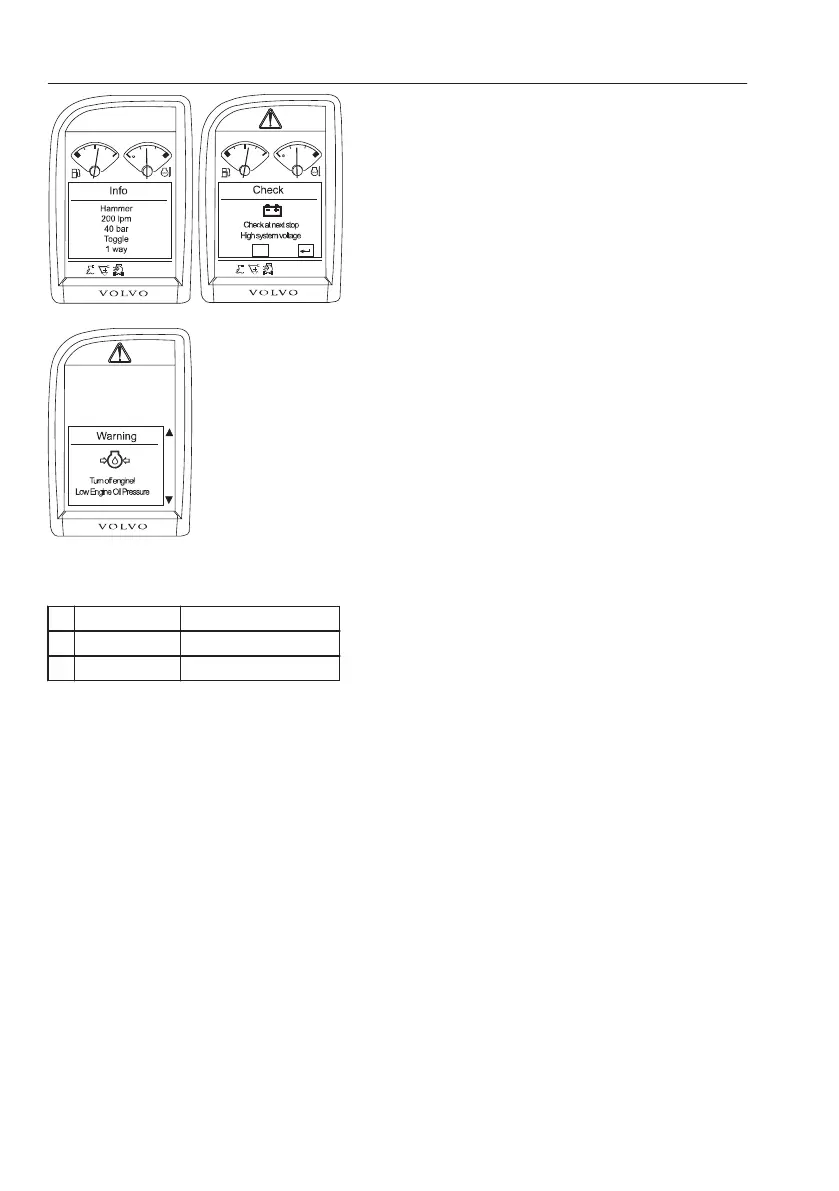
The popup messages are divided into three groups:
1I
n
f
o
s
c
r
e
e
n
- This screen is to give useful information about
the machine.
- The main screen is replaced by a green-
outlined box with title of "Info". The buzzer
alarm sounds on only 1 time.
- The "Info screen" disappears automatically in 2
seconds.
2C
h
e
c
k
s
c
r
e
e
n
- This screen is to inform the operator when a
partial failure of the machine is detected.
- The main screen is replaced by a yellow-
outlined box with title of "Check". The buzzer
alarm sounds 4 times.
- To get more information about the message on
the screen, press the SELECT button. To go
back to the user's screen, press the ESC
button.
3W
a
r
n
i
n
g
s
c
r
e
e
n
- This screen is to warn the operator when the
electronic system senses a machine
malfunction or a safety related failure. Stop the
machine immediately and investigate the
cause.
- The whole I-ECU screen is replaced by a red-
outlined box with title of "Warning".
- A warning alarm sounds when the "Warning
screen" pops up.
- When the ESC button is pressed, the warning
sound will stop and the central warning lamp
will be turned off. To dismiss the "Warning
screen", ESC button should be pressed again.
The message will not appear again as long as
the power is switched on even though the error
signal is still valid.
- To get more information about the message,
refer to the "Vehicle messages" in the main
menu.
N
O
T
E
!
When error messages related with common rail
pressure problem happen, buzzer and central
warning will keep going on regardless of any key
operations. Contact your Volvo Construction
Equipment dealer.
V1065550
AB
C
F
C
Close : info :
ESC
F
C
P
o
p
u
p
s
c
r
e
e
n
s
A
I
n
f
o
I
n
f
o
s
c
r
e
e
n
B
C
h
e
c
k
C
h
e
c
k
s
c
r
e
e
n
C
W
a
r
n
i
n
g
W
a
r
n
i
n
g
s
c
r
e
e
n
4
8
I
n
s
t
r
u
m
e
n
t
p
a
n
e
l
s
D
i
s
p
l
a
y
u
n
i
t



 To Next Page