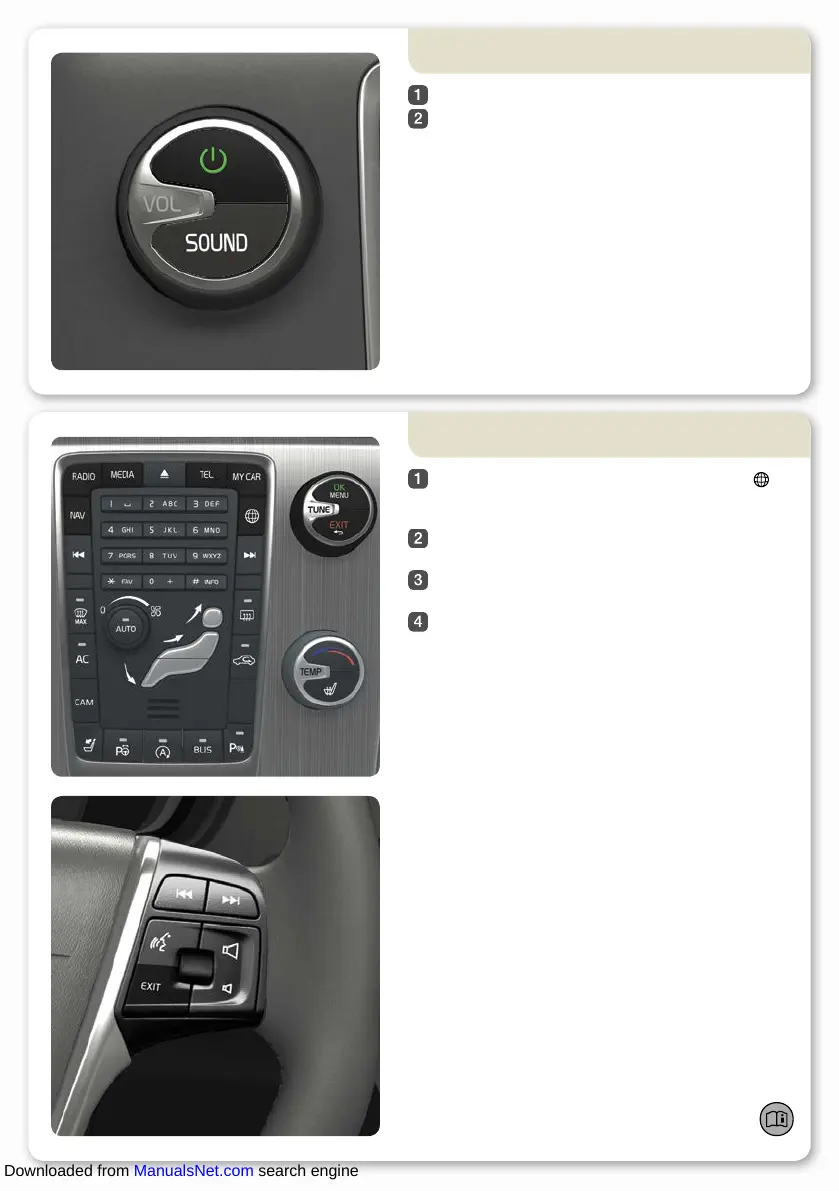
How do I switch on and off the Infotainment
system?
A short press activates the system.
A long press (until the screen switches off)
deactivates.
To switch off the sound: Give a short press - the next
press reactivates.
04
Note that the whole of the Sensus system (including
navigation* and phone functions*) is started/switched off
at the same time.
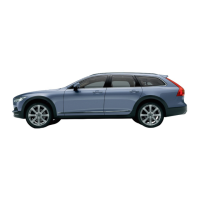
How do I navigate in the infotainment system?
Press RADIO, MEDIA, MY CAR, NAV*, TEL* or *
to select the main source. The normal view for the last
active source is shown in this position.
Press OK/MENU or the thumbwheel* in the steering
wheel to access the selected source's main menu.
Turn TUNE or the thumbwheel to navigate in the
menus.
Press OK/MENU or the thumbwheel to make a
selection in the menus.
Briefly press EXIT to go back in the menu system,
cancel a function or delete entered characters.
Give a long press on EXIT to go back to normal view,
or to go from normal view to the main source view.
Tips:
To go to the shortcut menu from normal view, press once
on the main source button. Press again to go back to
normal view.
04
For more information about operating the system –
see owner's manual.
Downloaded from ManualsNet.com search engine



 To Next Page