04 Driver support
Collision Warning with Auto Brake & Pedestrian Protection*
04
``
* Option/accessory, for more information, see Introduction.
179
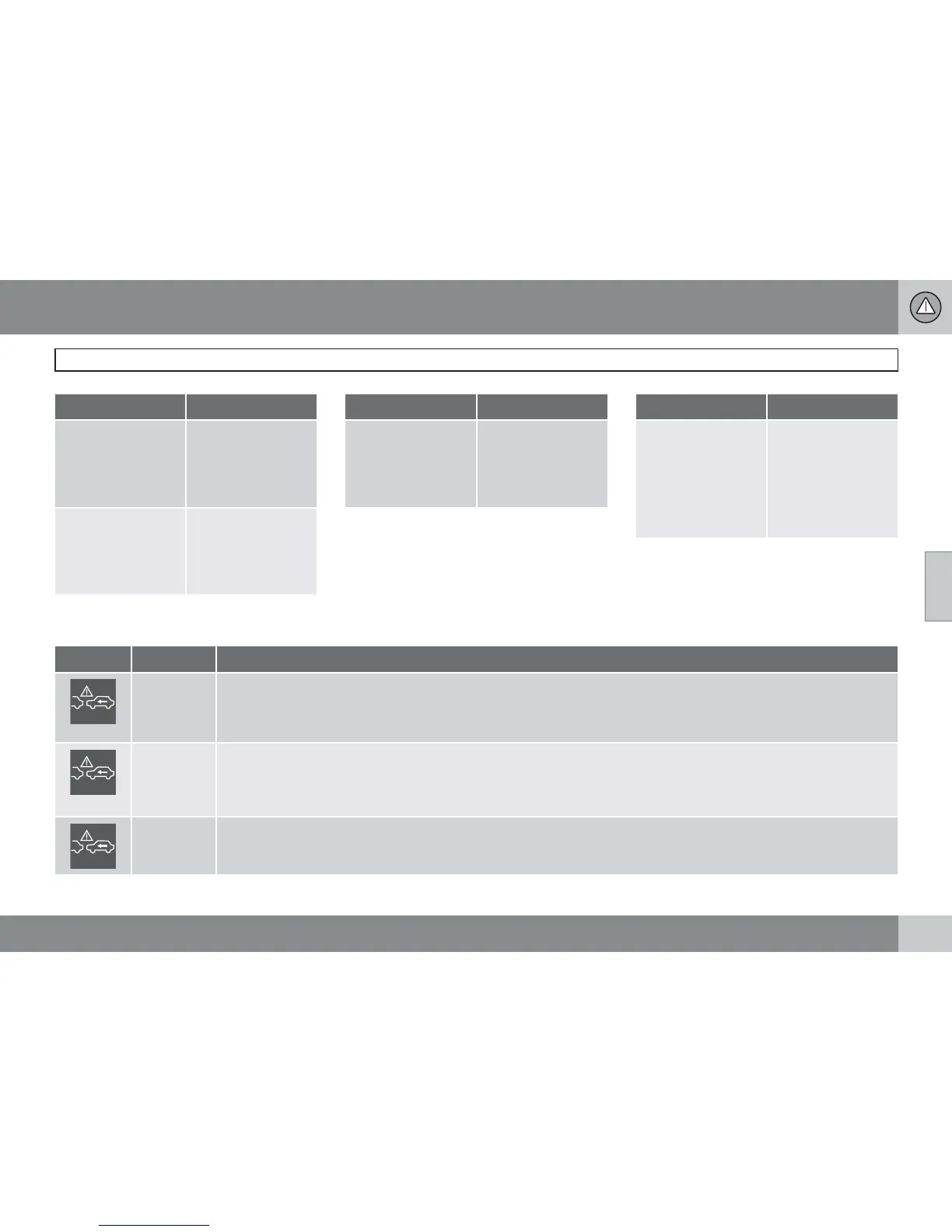
Cause Action
The windscreen sur-
face in front of the
camera is dirty or
covered with ice or
snow.
Clean the wind-
screen surface in
front of the camera
from dirt, ice and
snow.
Thick fog, heavy rain
or snow means that
the camera does not
work sufficiently
well.
No action. At times
the camera does not
work during heavy
rain or snowfall.
Cause Action
The windscreen sur-
face in front of the
camera has been
cleaned but the
message remains.
Wait. It may take
several minutes for
the camera to meas-
ure the visibility.
Cause Action
Dirt has appeared
between the inside
of the windscreen
and the camera.
Visit a workshop to
have the windscreen
inside the camera
cover cleaned - an
authorised Volvo
workshop is recom-
mended.
Symbols and messages in the display
Symbol Message Specification
Collis'n
warning
OFF
Collision warning system switched off.
Shown when the engine is started.
The message clears after about 5 seconds or after one press of the OK button.
Collision
warn.
Unavaila-
ble
The collision warning system cannot be activated.
Shown when the driver attempts to activate the function.
The message clears after about 5 seconds or after one press of the OK button.
Auto brak-
ing was
activated
Auto Brake has been active.
The message clears after one press of the OK button.









 To Next Page