06 Infotainment system
Radio
06
* Option/accessory, for more information, see Introduction.
245
General
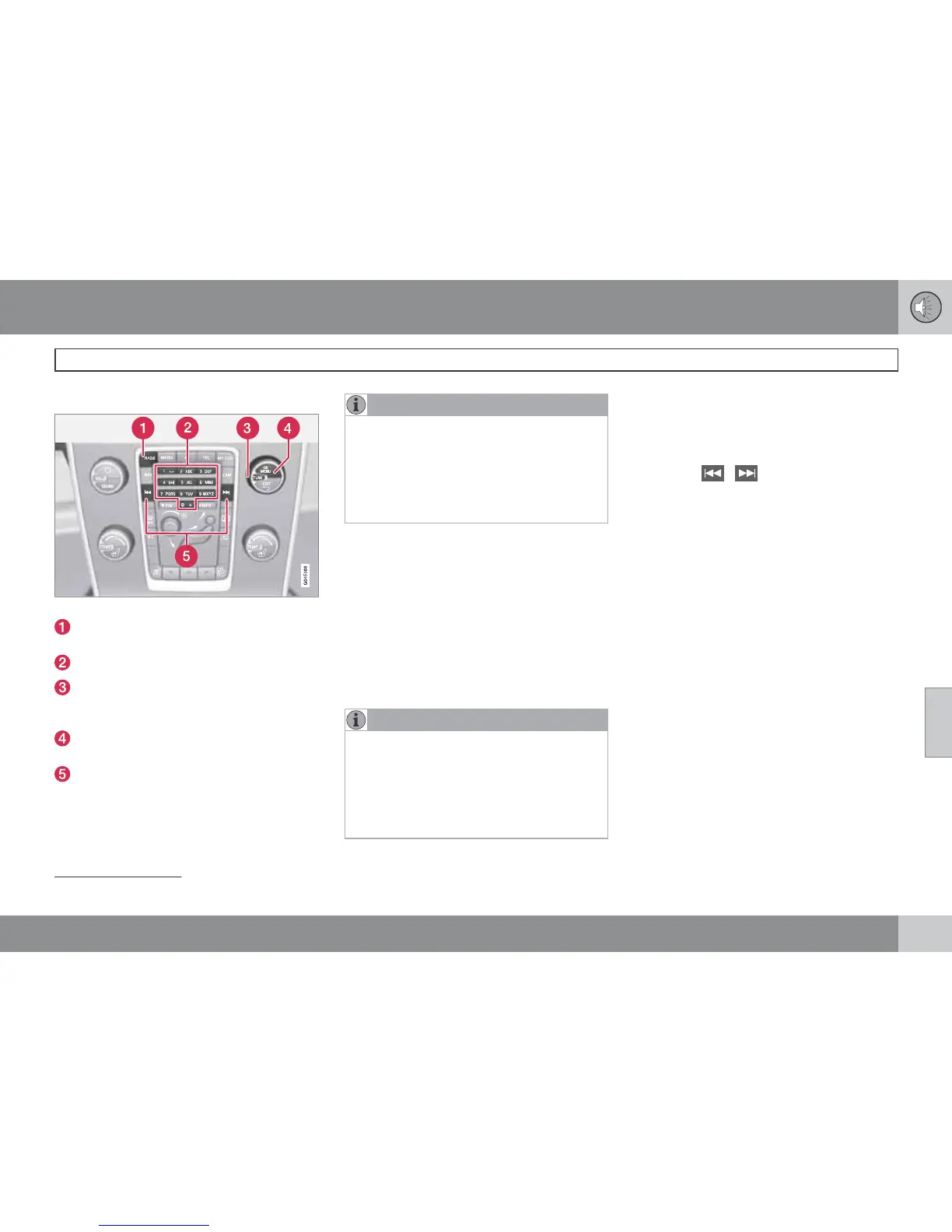
Centre console, controls for radio functions.
RADIO button for selecting the wavelength
(AM, FM1, FM2, DAB1*, DAB2*).
Station presets (0-9)
Select the desired frequency/station or
navigate in the radio menu by turning
TUNE.
Confirm your selection or go to the radio
menu by pressing OK/MENU.
Hold in the button for next/previous avail-
able station. Short press for preset.
NOTE
If the car is equipped with a steering wheel
keypad* and/or remote control* then in
many cases these can be used instead of
the buttons in the centre console. For a
description of the steering wheel keypad,
see page 236. For a description of the
remote control, see page 279.
Menus
The menus inRADIO are controlled from the
centre console and the steering wheel key-
pad*. For general information on menu naviga-
tion, see page 238 and menu overview, see
page 241.
Radio AM/FM
Tuning
NOTE
The reception is dependent both on how
good the signal strength and signal quality
are. The transmission may be disturbed by
various factors such as tall buildings or the
transmitter being far away. Coverage level
can also vary depending on where in the
country you are located.
Automatic tuning
1.
Press RADIO, turn TUNE until the desired
wavelength (
AM, FM1 etc.) is shown, press
OK/MENU.
2.
Hold in
/ in the centre console (or
in the steering wheel keypad*). The radio
searches for the next/previous available
station.
Station list
1
The radio automatically compiles a list of the
strongest FM stations whose signals it is cur-
rently receiving. This enables you to find a sta-
tion when you drive into an area where you do
not know the radio stations and their frequen-
cies.
To go to the list and select a station:
1.
Select the desired wavelength (
FM1 or
FM2).
2.
Turn TUNE one step in either direction.
This displays the list of all stations in the
area. The currently tuned station is indi-
cated with enlarged text in the list.
3.
Turn TUNE again in either direction to
select a station from the list.
4.
Confirm your selection with OK/MENU.
1
Does not apply to Performance.












 To Next Page