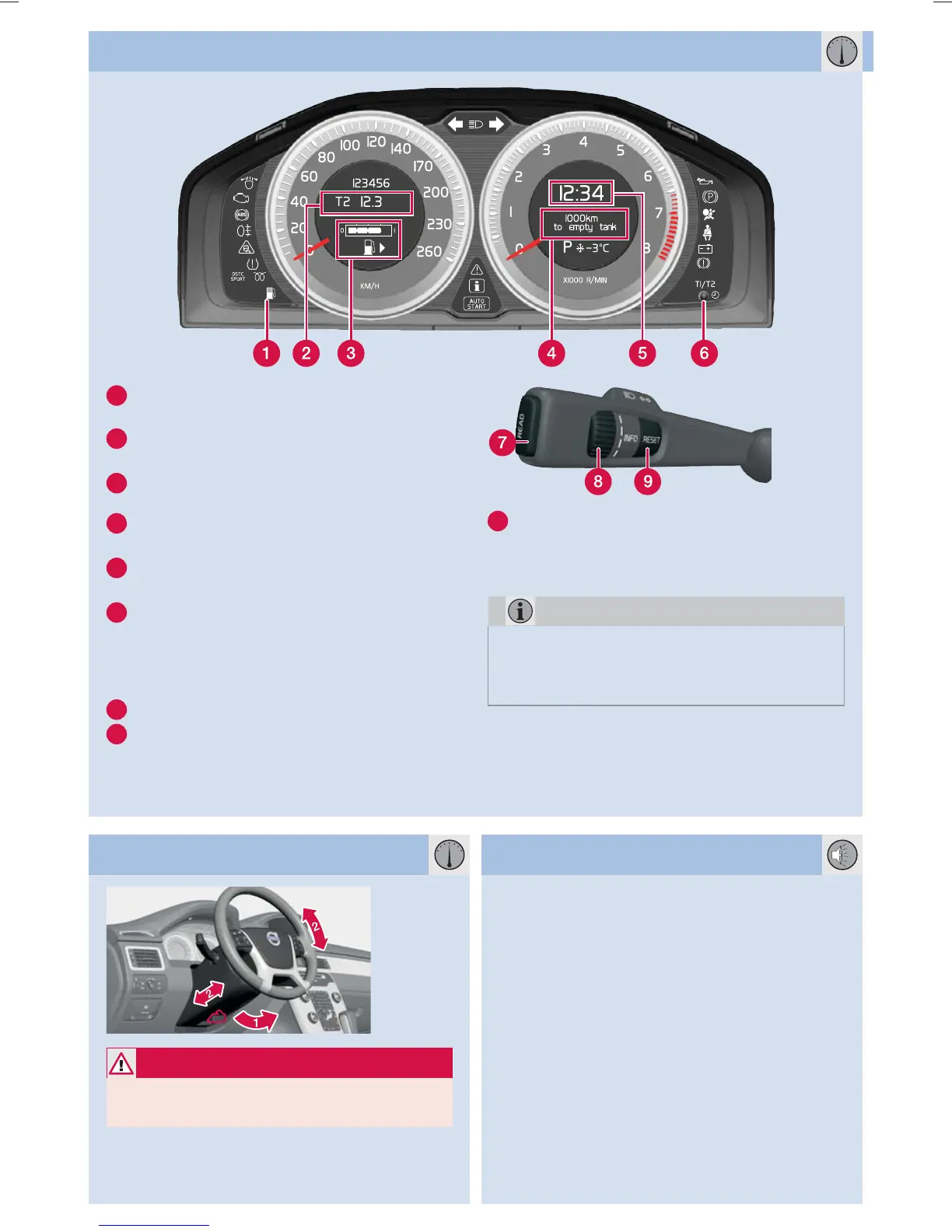
1
Low fuel level. When the lamp is illumina-
ted, fill with fuel as soon as possible.
2
T1 & T2 – independent trip meters, which
are always active.
3
Fuel gauge. The symbol's arrow points out
the side on which the fuel cap is located.
4
Display, trip computer. Select function with
(8).
5
Clock. Adjusted in the MY CAR menu
system or with (6).
6
One short press switches between T1 & T2.
One long press resets the current meter.
Setting the clock: turn to the end position
and then turn past the end position with a
"click".
7
Press to show/clear message.
8
Turn to see the trip computer's options.
TRIP COMPUTER AND TRIP METERS
9
One short press resets the trip computer's
current function.
One long press resets all trip computer
functions.
NOTE
Display text _ _ _ km to empty tank is an
estimate of the possible distance left to drive,
based on earlier driving conditions.
ADJUSTING THE STEERING WHEEL BLUETOOTH*
WARNING
Adjust the steering wheel before starting to
drive – never do this while driving.
1. Release the catch.
2. Adjust.
1. Makes mobile phone searchable/visible.
2. Hold in the audio system's TEL key.
3. Select
Add phone from the audio system
display.
4. Select the phone to be connected.
5. Input the digits shown in the audio system
display using the mobile phone's keypad.


 To Next Page