VONETS——VAP11N 300M WiFi Repeater WiFi Bridge
6
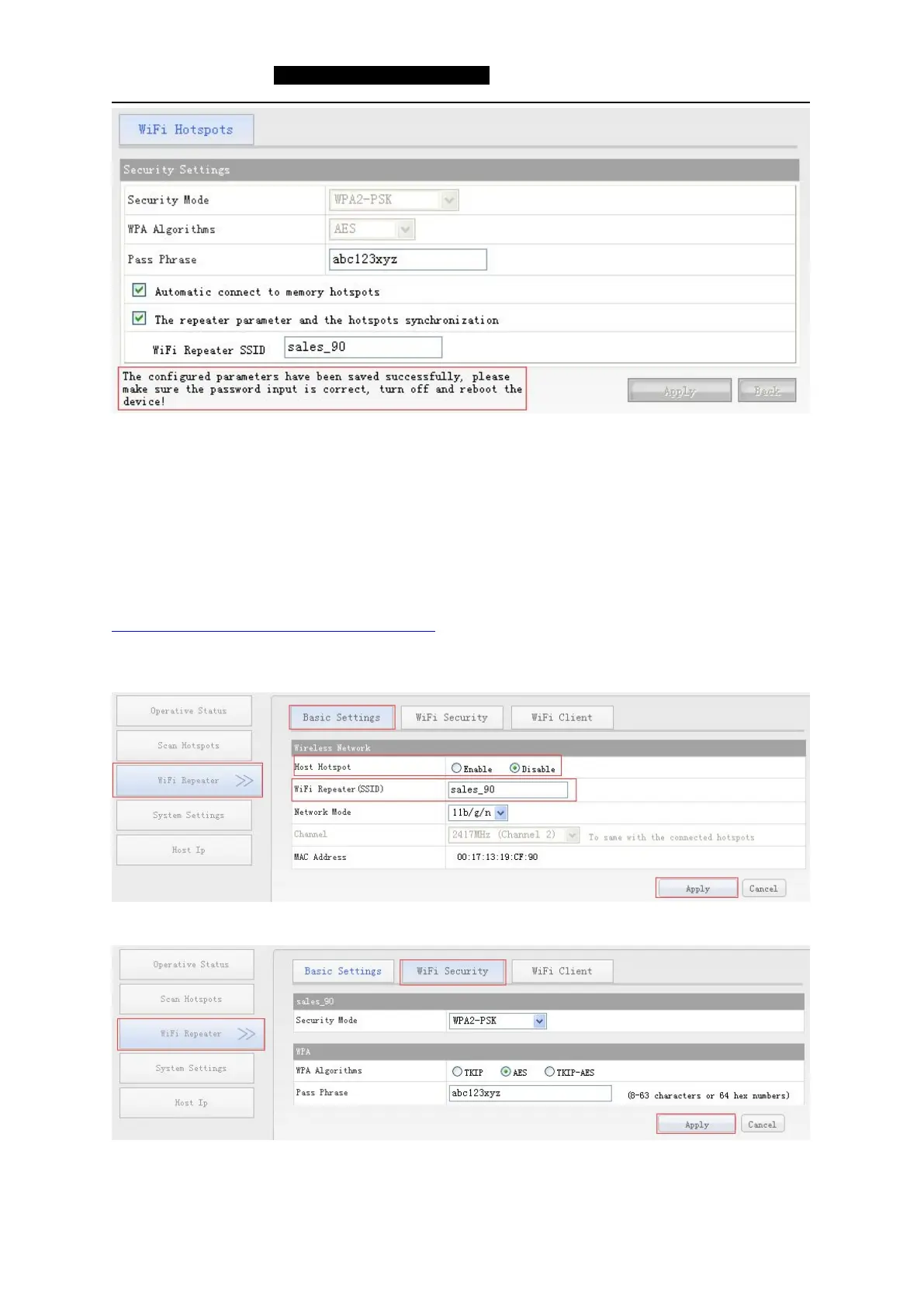
6. After click Apply button, the above prompt will appear, after saved the configuration parameters
successfully, in ensuring the correct password, please restart the device.
Remark: 1) After configured successfully, the WiFi name of the device is source WiFi name_the last two
character of Mac address, the password, encryption method and channel and some other parameters are the
same as source hotspot, user can change SSID (hotspot name) and password in WiFi repeater option.
2) In local area network, there is more than one WiFi repeater, it is recommended users to use a static IP
configuration. The method of how to set static IP, please click to refer to the documents:
http://www.vonets.com/serviceView.asp?D_ID=215
4.WiFi Repeater
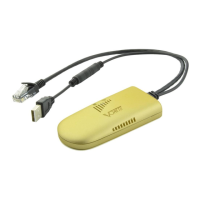
In “Basic Settings”, user can choose to disable WiFi network, revise WiFi Repeater (SSID).
In “WiFi Security”, user can change Security mode and WiFi pass phrase.
Shenzhen Houtian Network Communication Technology Co.,Ltd
http://www.vonets.com


 To Previous Page