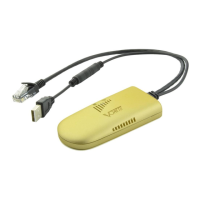
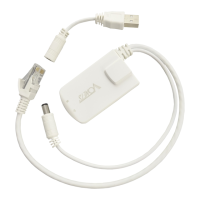
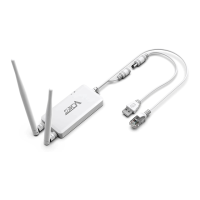
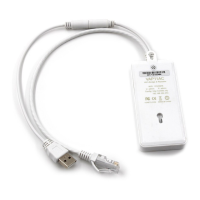
This document describes the VONETS Wireless Module/WiFi product, encompassing models VM300, VM5G, VBG1200, and VAP11AC. It serves as a quick setting guide, outlining the device's functionalities, technical specifications, and configuration procedures for various application modes.
Function Description:
The VONETS Wireless Module/WiFi product is a versatile device designed for wireless networking applications. It supports three primary application modes: WiFi Repeater, WiFi Bridge, and WiFi AP, as well as a Router mode.
- WiFi Repeater: In this mode, the device extends the wireless signal coverage of existing Access Points (APs) or WiFi routers. It requires configuration with the source WiFi hotspot parameters.
- WiFi Bridge: As a WiFi bridge, the device enables devices with only Ethernet ports to access wireless networks. Similar to the repeater mode, it needs to be configured with the source WiFi hotspot parameters.
- WiFi AP (Access Point): When configured as a WiFi AP, the device provides wireless access to a wired Local Area Network (LAN). This mode is designed for plug-and-play operation, requiring no initial configuration.
- Router Mode: In router mode, the device functions as a wireless router, dividing its Ethernet port into a WAN (Wide Area Network) port and a LAN port. The WAN and LAN ports are interchangeable, offering flexibility in network setup. The WAN port can be configured to connect to a WiFi hotspot, allowing the device to act as a secondary router.
Important Technical Specifications:
The document provides a "Transmission Distance Parameters Form" and a "Power Supply Parameters List" detailing key technical specifications for the different models:
- Transmission Distance (No-barrier point to point):
- VM300: 80m–100m
- VM5G/VBG1200/VAP11AC: 600m–700m
- Transmission Rate (Mbps):
- VM300: 300
- VM5G/VBG1200/VAP11AC: 300+900
- Band:
- VM300: Not specified, but likely 2.4G based on other models.
- VM5G/VBG1200/VAP11AC: 5G
- Power Supply Voltage:
- VM300: DC5V–15V
- VM5G/VBG1200: DC5V–15V
- VAP11AC: DC5V–24V
- Input Power:
- VM300: ≥5W
- VM5G/VBG1200: ≥10W
- VAP11AC: Not specified, but likely similar to VM5G/VBG1200 given the higher voltage range.
- Typical Power Supply:
- VM300: 5V/1A
- VM5G/VBG1200: 5V/2A
- VAP11AC: Not specified, but likely similar to VM5G/VBG1200.
Usage Features:
The device offers several features to enhance its usability and adaptability in various network environments:
- Flexible Application Modes: Supports WiFi Repeater, WiFi Bridge, WiFi AP, and Router modes, catering to diverse networking needs.
- WAN/LAN Interchangeability: In router mode, the Ethernet ports can be configured as either WAN or LAN, providing flexibility in network setup. For VM300/VAP11AC, the Ethernet port defaults to WAN, and the cable to LAN. For VM5G/VBG1200, the Ethernet cable defaults to LAN, requiring explicit "WAN/LAN interchange" setting for broadband dialing.
- Multiple WAN Port Connection Methods (Router Mode):
- DHCP (Auto Config): Automatically obtains an IP address from the source network. This is the default mode.
- PPPoE (ADSL): Requires an Internet account and password from an ISP for ADSL virtual dialing.
- WiFi: Uses the device's built-in WiFi network card to connect to a source hotspot as a WAN port, while all Ethernet ports function as LAN ports and the device provides WiFi hotspot functions.
- Transparent Transmission Options:
- IP layer transparent transmission (factory default): Transmits IP layer data, suitable for most WiFi bridge applications.
- MAC layer transparent transmission: Transmits all data above the MAC layer (link layer) and MAC layer, including IP layer data. This is useful for special applications requiring MAC layer encryption, such as GoPro cameras, Cisco APs, and Hikvision monitoring systems.
- Hotspot Synchronization: The "The configuration parameters of WiFi repeater security is synchronized with source hotspot" option, when ticked, associates the VONETS repeater's SSID with the source hotspot's SSID and uses the same WiFi password.
- Disable Hotspot Feature: Allows disabling the device's own hotspot transmission, making it function solely as a bridge.
- Adjustable WiFi Tx Power: Users can adjust the WiFi transmit power via "System Settings" -> "Advance Settings" to optimize signal strength.
- Web-based Configuration: The device is configured via a web interface accessible through
http://vonets.cfg or a default IP address (192.168.254.254).
- LED Indicators: The device features LED lights (Blue, Green, Yellow) to indicate various connection statuses:
- Blue Light (WiFi Connection Status Light):
- Flashes quickly: Not connected to any hotspot.
- Quick flash: Connected to hotspot successfully.
- Pause flash and flash: Connected to hotspot successfully, but signal strength is between 10% and 50%.
- Flashes slowly: Failed to connect to hotspot.
- Green Light (Ethernet Cable Connection Status Light): Indicates Ethernet connection status.
- Yellow Light (5G WiFi Connection Status Light for VM5G/VBG1200/VAP11AC): Indicates 5G WiFi connection status.
Maintenance Features:
- Firmware Upgrade Support: The device supports firmware upgrades, including online upgrades. Users are directed to
www.vonets.com for related documents.
- Factory Default Reset: The device can be restored to factory default parameters. For VM300 and VM5G, specific URLs are provided. For VBG1200, a physical reset button can be pressed and held for 5 seconds after power-on. It's crucial not to power down the device during the reset process to prevent damage.
- Troubleshooting Guidance: The manual includes a "Frequently Asked Questions" section to assist users with common issues, such as:
- Inability to connect to the device's WiFi hotspot.
- Connected to the device's WiFi hotspot but no internet access.
- Inability to log in to the device's WEB page.
- Recommendations include checking status lights, resetting to factory defaults, changing WiFi channels, reducing interference, verifying hotspot parameters, and checking browser/firewall settings.
- Copyright and Disclaimer: The document includes a copyright notice (© 2023 Shenzhen HouTian Network Communication Technology Co.,Ltd) and a disclaimer regarding unauthorized reproduction, distribution, and the informational nature of the specifications.
FCC Compliance:
The device complies with Part 15 of the FCC Rules, ensuring it does not cause harmful interference and accepts any received interference. Users are warned against unauthorized modifications. The equipment is tested to comply with Class B digital device limits. It is recommended to reorient/relocate the receiving antenna, increase separation from the receiver, and connect to a different circuit if interference occurs.
FCC Radiation Exposure Statement:
The device complies with FCC radiation exposure limits for an uncontrolled environment. It must be installed and operated with a minimum distance of 20cm between the radiator and the user's body. Operation in the 5150-5250 MHz band is restricted to indoor use only.

 Need help?
 General

 To Next Page