EasyManua.ls Logo

Vonyx ST010 - User Manual

Vonyx ST010
12 pages
Print Icon
To Next Page IconTo Next Page
Loading...
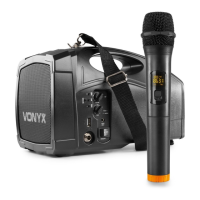
ST010 Personal PA Wireless System
Ref. nr.: 178.869
INSTRUCTION MANUAL
GEBRUIKSAANWIJZING
GEBRAUCHSANLEITUNG
MANUEL D'INSTRUCTIONS
V1.0

Questions and Answers

  • H
    Heather OsbornAug 1, 2025
    How to stop hash howl in Vonyx Microphone system?
    • K
      Krystal BuchananAug 2, 2025
      To stop the Vonyx Microphone system from producing a hash howl, you can try the following: * Turn down the volume of the amplifier. * Adjust the tone control to bass. * Increase the distance between the amplifier and the microphone, and avoid pointing the microphone towards the amplifier's speaker during use.
  • S
    Sergio AnthonyAug 11, 2025
    Why does my Vonyx Microphone system produce noise?
    • M
      michelle32Aug 11, 2025
      Noise in the Vonyx Microphone system can stem from a few potential sources: * A low battery in the amplifier or transmitter. * A damaged microphone cord. * Interference from the same frequency (201.400MHz).
  • K
    Kyle PittmanAug 22, 2025
    What to do if the power indicator is dim on Vonyx Microphone system?
    • R
      Robert BakerAug 22, 2025
      If the power indicator on your Vonyx Microphone system is dim, it means the battery is low. Please switch to AC power and charge the device immediately.

Summary

Safety Precautions and Warnings

Electrical Safety and Unit Handling

Covers avoiding shock, not opening housing, proper mains lead handling, and avoiding wet hands.

Usage Environment and Maintenance

Includes avoiding heat, vibration, moisture, ensuring ventilation, and cleaning with dry cloth.

Important Notes and Markings

Explains high voltage warnings, important instructions, CE certification, operating temperature, and disposal.

Amplifier Operation

Operating the Amplifier

Instructions for using AC and DC power supplies, including power indicator and low battery alerts.

Wireless Transmitter Operation

Guides on battery installation, power activation, and setting volume for the wireless transmitter.

BT-Technology Connection

Explains how to enable and connect to the device using Bluetooth technology.

Troubleshooting Guide

Common Issues and Resolutions

Addresses power indicator dimness, hash howl, and noise with their respective causes and solutions.

Technical Specifications

Product Specifications

Details output power, speaker unit, sensitivity, frequency, and size of the PA system.

VHF Microphone Usage Regulations

Outlines EU license-free use conditions and restrictions for VHF microphone frequency bands.

Declaration of Conformity

Manufacturer and Product Details

Lists manufacturer, product number, description, trade name, and regulatory requirements.

Compliance Statement

Confirms the product meets requirements of Directives 2006/95 and 2004/108/EC.

Vonyx ST010 Specifications

General IconGeneral
BrandVonyx
ModelST010
CategoryMicrophone system
LanguageEnglish

Related product manuals