22
45016 - 11.2022 - V7
INSTRUCTION MANUAL VOSS.SONIC 1000
8.3 FUNCTIONS
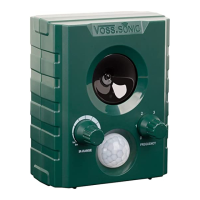
Rotary knob range (IR range)
The "IR Range" button (2) controls the setting of sensitivity and distance.
Turning the knob clockwise increases the range and protection zone.
To scare small animals, turn the "IR Range" knob all the way to the right.
Rotary knob Frequency
The "Frequency" button (4) controls the frequency. Turn the knob clockwise
to increase/change the emitted frequency. You have the choice between
5 different frequencies:
Level Frequency Use
0 OFF
1 13–19 kHz Mice, rats, martens, foxes, dogs
2 17–23 kHz Hares, rabbits, raccoons, cats
3 22–29 kHz Dogs, cats
4 8 kHz
Red deer, wild boar
Burglar alarm function/alarm mode
audible tones for approx. 30 seconds (4 s tone
/ 2 s pause / 5 s tone / 2 s pause / 6 s tone / 3 s
pause / 8 s tone)
5
Mix from
level 1-3
A frequency mix from all levels. This is the best
setting as all the functions of the device are
used.
8.4 SWITCHING ON THE DEVICE
To switch on the device, turn the knobs (2 & 4) to the desired setting.
When the device is switched on, a red control LED in the upper half of
the motion detector (3) lights up briey.
After triggering, a short click is audible and the control LED in the upper
half of the motion detector (3) lights up red. The device then emits the
set sound frequency for approx. 30 seconds.
Info
To change a setting, you must always start from the OFF position
(0) and directly select the desired function. For example, if you
change directly from position 5 to 3 without rst having turned
back to the OFF position (0), the setting will remain at position 5.


 To Next Page
 Loading...