- 2 -
Operation
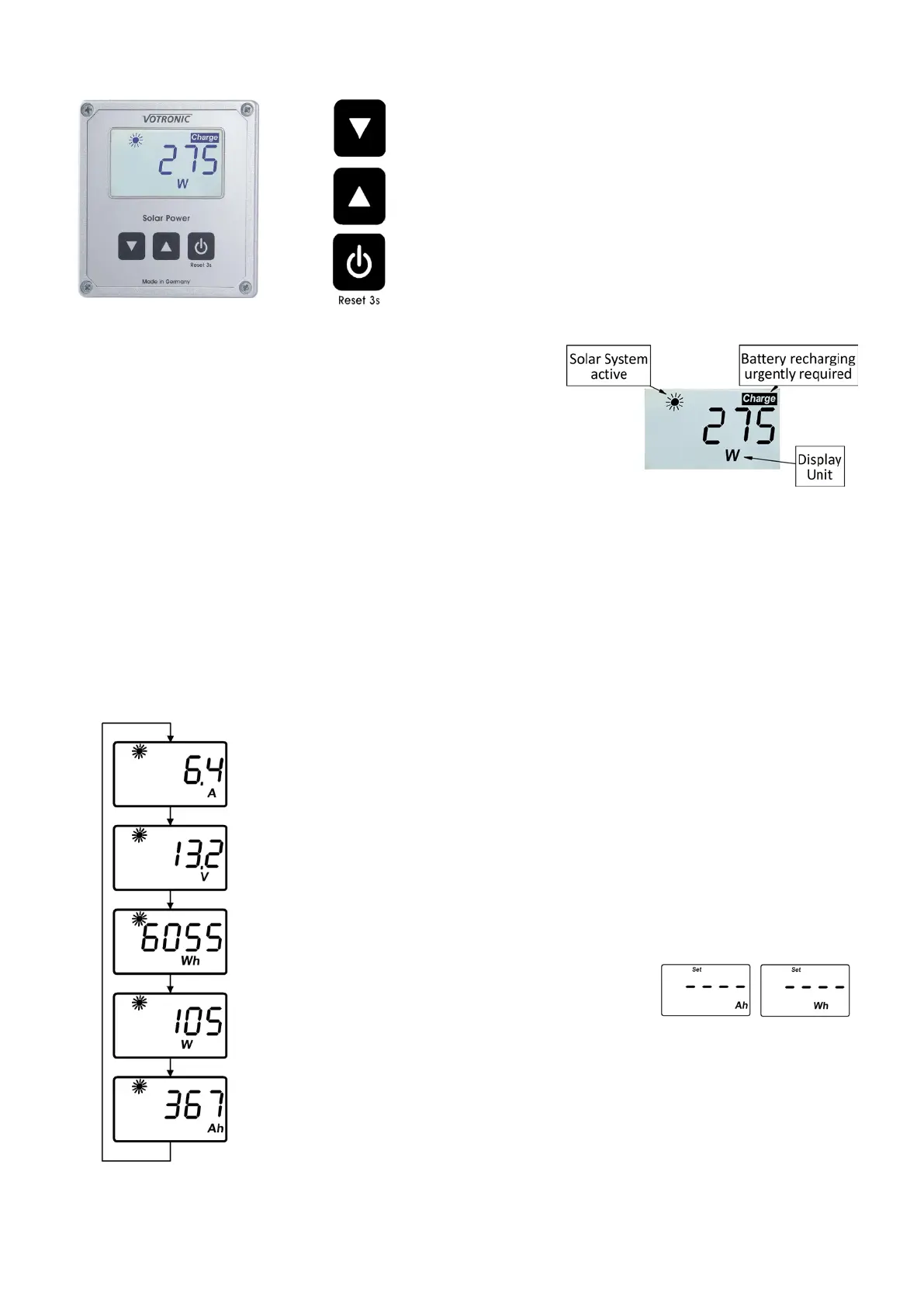
Button 1: Next page of Display.
Adjustment of illumination (3 s)
Button 2: Previous page of Display.
Adjustment of illumination (3 s)
Button 3: Display on/off.
Reset (3 s)
Display Contrast
The background illumination can be adapted in steps of 10 % according to
the requirements. For this the Display has to show the battery voltage.
Pressing the right button for 3 seconds activates the adjustment of the
backlight. Each further brief press of the right button changes the
brightness. The setting is automatically saved after a short time and the
display will return to normal operation.
Activation, Deactivation
The solar controller supplies current to the solar computer. The unit is optimized for extremely current saving operation
and offers three operation modes.
Stand-by: During stand-by mode the display is empty. Only the "Charge" symbol will be displayed in case of discharged
battery and the sun symbol in case of activated solar controller.
Display with and without illumination: As soon as the solar computer is operated, the display illumination will be switched-
on and will remain activated for 3 minutes. If there is no operation during this time, the illumination will be switched-off
automatically. The display continues showing the same data. The display illumination is reactivated by pressing any button.
The proper function of the button will be effected by pressing the button a second time.
Solar Displays
Use the button 1 to change to the next page of the measured and displayed values of the
solar system. The buttons 1 or 2 are used to change to the next or previous page of the
display.
Current: The instantaneous current rate (Amperes "A") of the solar system is displayed.
Voltage: The voltage rate (Volts "V") of the solar battery is displayed.
Solar Power Counter: The power being generated by the solar system is counted continuously
and will be displayed as ampere-hours (Ah), as well as watt-hours (Wh). If the value 9999 Wh
is exceeded, the display changes to kWh.
The counter readings can be separately reset to zero at any
time. If the corresponding counter value is displayed, the
reset can be effected by pressing the button 3 for more
than 3 seconds until (Set ----) is displayed.
Power: The instantaneous Power (Watts "W") of the solar system is displayed.


 To Next Page
 Loading...