- 2 -
Start-up:
Switch ON: a.) Through external switch “ON”
(Voltage at sensor cable > 10 V)
b.) By hand with switch lever on the product – EMERGENCY towards “ON”
Switch OFF: a.) By hand every time through external (remote-controlled) switch to „OFF“
b.) Automatically through reaching the minimal point of operating voltage
(Undervoltage at sensor cable < 8.5 V)
c.) By hand with switch lever on the product – EMERGENCY towards “OFF”
If the „EMERGENCY“ lever is blocked due to dust, dirt or hand-blocking the electronic cannot work
properly!
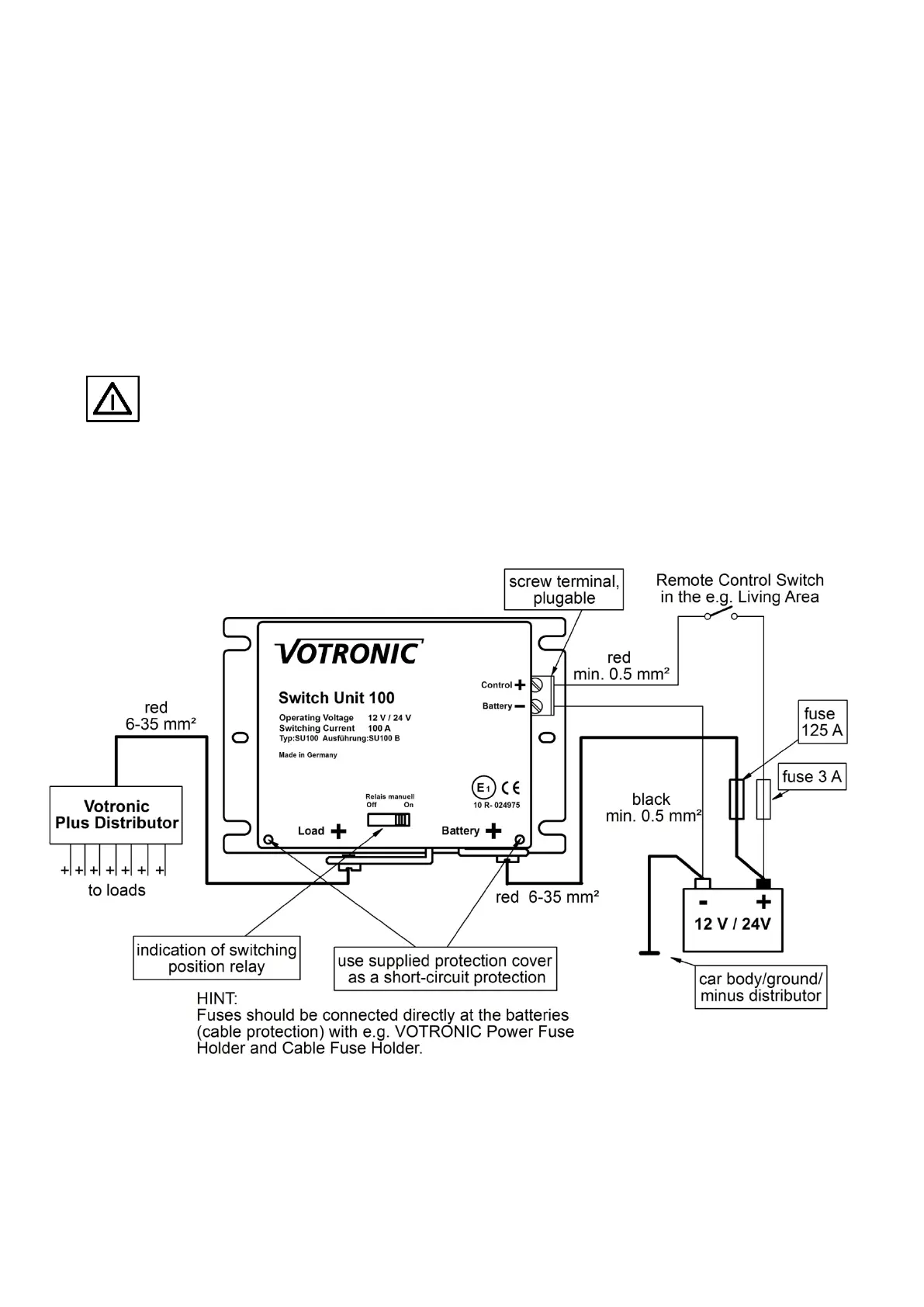
Application example: Using as main switch -
Remote control through ON / OFF switch in living room
This application example enables through a switch in the living room the remote-control of the product. Current
consumption of the unit is only 0.003 A, therefore a miniature switch is sufficient.
By switching off the switch the electronic is turned off, therefore the low own electricity consumption of the Switch Unit
100 is turned off completely.


 To Next Page